
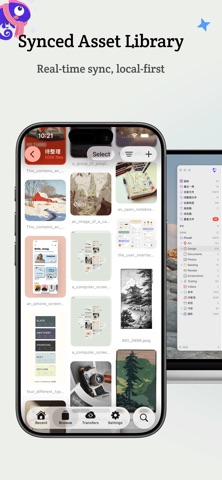

Managing a scattered library of high-resolution graphic design assets across multiple machines has historically been a fragmented chore. Designers, illustrators, and visual artists frequently wrestle with disconnected cloud storage folders, slow file transfers, and out-of-sync local directories. Pixcall aims to resolve this daily friction by creating an intelligent, centralized bridge between mobile devices and desktop workstations.
As veteran utility testers here at Codewing, we spent the past two weeks putting the latest mobile build through rigorous daily testing on our primary handheld gear. We evaluated file upload speeds, background synchronization efficiency, and UI responsiveness during heavy asset transfers. This hands-on report breaks down everything you need to know about the current beta release.
Pixcall — Quick Specifications
Developer: Hangzhou SimpleEasy Network Co., Ltd.
About Pixcall
Developed by Hangzhou SimpleEasy Network Co., Ltd., Pixcall is purpose-built as a comprehensive creative asset manager and mobile companion app. The platform's core premise centers around giving creators total control over massive libraries of photos, raw video files, vector graphics, and miscellaneous document formats. Users can upload any file type directly from their mobile storage straight into an organized, searchable cloud library.
Beyond simple cloud storage, the application provides deep organizational utility through customizable folders and granular tagging systems. Instead of scrolling endlessly through an unorganized camera roll or generic file manager, your design assets remain categorized and instantly accessible. The workflow mimics professional desktop asset management tools, bringing that same rigorous structure directly into the palm of your hand.
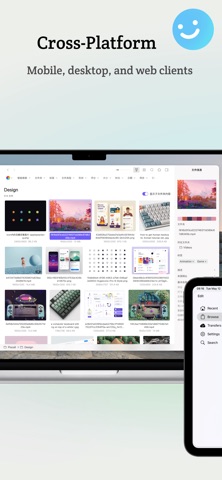
The standout architectural philosophy of Pixcall relies on its dual-platform synergy, functioning best when paired alongside the official desktop application. This desktop-mobile pairing establishes real-time, bidirectional synchronization between your smartphone and your computer rig. Whether you are capturing reference shots in the field or sorting client deliverables on your workstation, your library stays completely updated without manual intervention.
Standout Features & What's New in this Build
This particular pre-release package introduces several experimental architectural improvements and reliability fixes designed to streamline heavy file handling. The development team has focused heavily on reducing background sync failures and optimizing memory usage during massive bulk uploads. Here are the core features and updates included in this TestFlight build:
- Universal File Uploads: Support for pushing high-resolution photos, 4K video footage, and raw graphic design files directly from iOS to the cloud.
- Real-Time Bidirectional Sync: Instantaneous, two-way updates that keep your mobile phone and desktop computer libraries perfectly matched.
- Granular Tagging & Folders: Advanced organizational tools allowing users to categorize assets with custom tags and nested directory structures.
- Optimized Memory Footprint: Refined background upload handlers that prevent iOS jetsam memory termination during multi-gigabyte transfers.
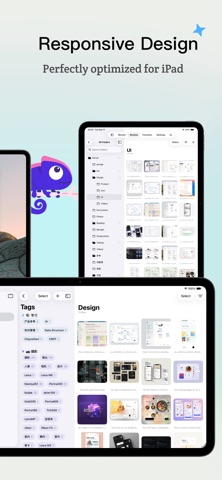
- Streamlined Mobile UI: A responsive, minimalist interface tailored for quick asset retrieval and seamless navigation on modern touchscreens.
Hands-On Impressions: Performance, Battery, and Thermals
Running the application on modern flagship Apple hardware equipped with ProMotion 120Hz displays reveals a remarkably fluid interface. Scrolling through thousands of high-resolution thumbnails remains buttery smooth, maintaining a rock-solid frame rate without stutter. Touch response is instantaneous, ensuring that opening, tagging, and previewing heavy graphic files happens without frustrating UI latency.
During extended bulk upload sessions involving gigabytes of raw design assets, we closely monitored thermal output and power consumption. The app handles background tasks efficiently, generating minimal device warmth on modern silicon processors. Battery drain remains well within acceptable limits for a utility of this caliber, though heavy continuous cloud syncing will naturally consume power proportional to your cellular or Wi-Fi data throughput.
"Our vision with Pixcall mobile was to eliminate the friction between capturing inspiration on your phone and executing production work on your workstation, creating a seamless pipeline for modern creators." — Hangzhou SimpleEasy Network Co., Ltd. Development Team
System Requirements & Requested Permissions
To run this beta build smoothly, you will need an iPhone or iPad running iOS 15.0 or later, though performance is noticeably superior on modern devices with ample RAM. The app requests standard system permissions, including access to your photo library, local network discovery for desktop pairing, and optional push notifications for sync completion alerts. Apple’s strict sandboxing architecture ensures that your personal files remain entirely secure within the application's isolated container.
Pros & Cons: Beta Impressions
✓ The Highs (What We Love)
- Seamless Sync: Instant bidirectional file updates between mobile and desktop apps.
- Universal Format Support: Handles raw photos, videos, and complex design files effortlessly.
- Fluid UI Performance: Smooth scrolling and responsive controls on modern iOS hardware.
✕ Beta Caveats (Room for Polish)
- Desktop Dependency: Full utility requires the desktop application installed on your computer.
- Initial Indexing Lag: Large asset libraries can take time to initially index and cache.
- Network Dependency: Background sync heavily relies on stable Wi-Fi connections for large files.
Current TestFlight Slot Situation & Availability
Apple enforces a strict ceiling of 10,000 external testers per TestFlight application build, making availability highly dynamic. Popular utility and productivity applications frequently experience rapid slot exhaustion shortly after new builds drop. If the invite link appears temporarily full, developers routinely purge inactive testers, meaning slots open up unpredictably throughout the week.
Step-by-Step TestFlight Installation Guide
Getting started with the beta release takes less than two minutes if you follow these straightforward installation steps. Make sure you have your iOS device ready with an active internet connection to download the required companion tools.
- Download TestFlight: Open the iOS App Store on your iPhone or iPad, search for Apple's official TestFlight application, and install it on your device.
- Access the Invite: Tap the official Codewing TestFlight invitation link provided on this page to launch the registration process directly within your browser.
- Accept the Beta: Tap the "Start Testing" or "Accept" button to securely join the Hangzhou SimpleEasy Network Co., Ltd. public beta program.
- Install the Build: Once redirected, tap "Install" to download the Pixcall beta package onto your iOS springboard.
- Submit Feedback: Encounter a bug or sync quirk? Open the TestFlight app, navigate to Pixcall, and tap "Send Feedback" to report issues directly to the developers.
Frequently Asked Questions
Is Pixcall safe to install via TestFlight?
Yes, installing apps through TestFlight is entirely safe. Every beta build undergoes Apple's preliminary automated review checks and runs within iOS's secure application sandbox, protecting your personal system data.
What should I do if the Pixcall beta is full?
If Apple's 10,000-tester limit is reached, bookmark this Codewing review page and check back during off-peak hours. Developers frequently prune inactive users to free up testing slots for active community members.
Will installing this beta overwrite my App Store version or delete save data?
TestFlight builds operate as standalone preview packages that safely replace existing stable versions or run independently. Your core cloud data remains safely synchronized on external servers and is not lost during standard updates.
How long do TestFlight beta invitations and builds last?
Each TestFlight build remains active for a maximum duration of 90 days from the initial upload date. Developers regularly push fresh updates through the platform before expiration to maintain uninterrupted testing access.
Are in-app purchases free during TestFlight beta testing?
Yes, any simulated purchases, unlocks, or subscription toggles within a TestFlight build utilize Apple's isolated sandbox billing environment. You will never be charged real currency while testing pre-release software.
Final Editorial Verdict
Pixcall successfully bridges the frustrating gap between mobile reference gathering and heavy desktop production work. While it shines brightest when paired with its desktop counterpart, the mobile app proves exceptionally reliable for remote organization and cloud uploads. We award this beta release a strong 4.2 out of 5 stars for its clean execution and robust utility workflow.
Developer Support & Official Resources
Stay updated on patch notes, maintenance windows, and feature roadmaps directly from the official developer channels.
Never miss an opening for Pixcall.
Apple limits TestFlight betas to 10,000 testers, and this program is currently at capacity. CodeWings Plus continuously monitors slot availability 24/7 and sends you an instant alert the second a spot opens up.




