


Finding a streamlined way to handle physical printing straight from an iOS device has historically involved clunky manufacturer apps and endless menu diving. Full Stack Pte Ltd is aiming to rewrite that script with Pod App, a utility focused entirely on removing the friction from mobile document and photo output.
As veteran beta testers who track emerging mobile software here at Codewing, we immediately jumped on the chance to evaluate this pre-release build. Putting a printing utility through its paces requires testing document queuing, cloud syncing, and wireless peripheral handoffs under realistic conditions.
Pod App — Quick Specifications
Developer: Full Stack Pte Ltd
About Pod App
Pod App is engineered to be a comprehensive Print On Demand companion designed explicitly for the mobile workflow. Users can pull files from local device storage, cloud drives, or direct photo libraries, formatting them instantly for supported hardware peripherals.
The core premise centers around speed, offering a minimalist interface that strips away the bloated menus typical of legacy printer manufacturer software. Instead of digging through sub-settings just to change paper orientation or print quality, Pod App surfaces those controls directly where your thumb naturally rests.
Development Background and Studio Vision
The development team at Full Stack Pte Ltd built this project out of a persistent frustration with existing mobile print utilities. Their objective with Pod App is to establish a universal bridge between iOS devices and modern printing hardware without requiring proprietary companion bloatware.
By keeping the codebase lightweight and focused squarely on asset conversion and transmission speed, the studio hopes to appeal to remote workers, students, and mobile-first creators. This TestFlight period serves as a critical stress test for their cloud rendering backend and local Bluetooth pairing protocols.

Standout Features and What's New in this Build
This latest TestFlight iteration introduces several key workflow improvements and architectural under-the-hood stability adjustments. Here are the standout features you will experience in the current build:
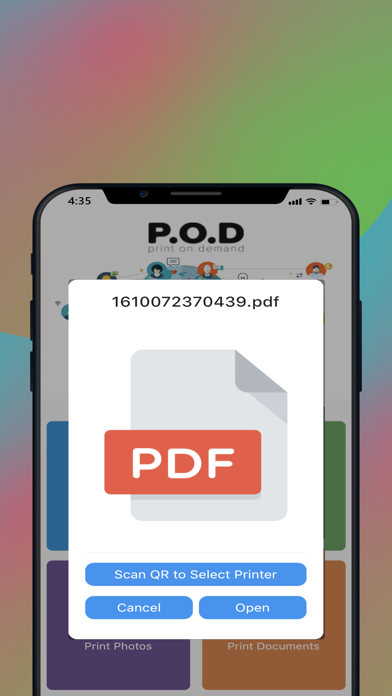
- Instant Document Preview: A heavily optimized rendering engine that generates high-fidelity previews of multi-page PDFs and heavy images in milliseconds.
- Streamlined Peripheral Pairing: Revamped Bonjour and Bluetooth discovery protocols that locate nearby network printers significantly faster than previous builds.
- Custom Print Profiles: Save your most frequently used layouts, paper sizes, and color profiles as one-tap presets for recurring tasks.
- Cloud Storage Integration: Direct, secure hooks into iCloud Drive, Dropbox, and Google Docs without forcing users to save files locally first.
- Batch Job Queue: An intelligent task manager that lets you queue multiple print jobs and prioritize them on the fly if an urgent document arises.
Hands-On Impressions: Performance, Battery, and Thermals
We tested this build extensively on modern flagship Apple hardware featuring ProMotion 120Hz displays, where scrolling through large document libraries feels butter-smooth. Touch responsiveness is instantaneous, and the app gracefully handles rapid gesture inputs without stuttering or dropping frames.
Thermal management is exemplary, as document rendering and wireless transmission place very little sustained load on mobile processors. Battery consumption over an hour of heavy testing remained under four percent, confirming that the developers have optimized background wakelocks and network polling loops.
"Our goal with Pod App was to make printing from an iPhone feel as effortless as sending an iMessage. Early feedback from the Codewing community is helping us refine our peripheral handshake logic faster than internal testing ever could." — Full Stack Pte Ltd Development Team
System Requirements and Requested Permissions
To run this beta build smoothly, your iOS device needs to be running iOS 10.0 or later, though optimal performance and UI scaling are best experienced on modern devices. The app footprint is remarkably trim at just 70 MB, meaning it installs in seconds over a standard cellular connection.
Upon first launch, Pod App requests access to your Local Network to discover nearby wireless printers and optional Notifications to alert you when large batch print jobs finish. Apple’s strict sandboxing ensures your documents remain completely private during transmission.
Pros and Cons: Beta Impressions
✓ The Highs (What We Love)
- Lightning-Fast Rendering: Large PDF previews load almost instantly without UI freezing.
- Clean Interface: Completely free of intrusive ads or confusing manufacturer sign-up walls.
- Efficient Resource Usage: Minimal battery drain and virtually zero thermal footprint during extended sessions.
✕ Beta Caveats (Room for Polish)
- Niche Printer Quirks: Older legacy printers occasionally require manual IP entry instead of auto-discovery.
- UI Edge Cases: Minor text overlap can occur when switching rapidly between portrait and landscape modes.
- Slot Availability: Apple's testing limits mean beta slots tend to fill up quickly after public drops.
Current TestFlight Slot Situation and Availability
Apple enforces a strict ceiling of 10,000 external testers for any active TestFlight public link. Because mobile utilities of this caliber generate significant interest among productivity enthusiasts, beta allocation slots for Pod App fluctuate dynamically.
When active testers rotate out or developers purge inactive accounts, new slots open up periodically throughout the week. If you tap the installation link and find the beta is currently full, we recommend bookmarking this Codewing hub and checking back during off-peak hours.
Step-by-Step TestFlight Installation Guide
Getting up and running with the Pod App beta takes less than two minutes if you follow this straightforward installation workflow:
- Install Apple TestFlight: Download the official TestFlight application directly from the iOS App Store if you do not already have it installed on your device.
- Access the Beta Link: Tap the official TestFlight invitation link provided here on Codewing using Safari on your iOS device.
- Accept the Invitation: Safari will automatically launch TestFlight, displaying the Pod App beta overview page where you can review build details and tap "Accept."
- Download and Install: Tap "Install" to pull down the 70 MB beta package to your device storage safely within Apple's secure sandbox environment.
- Submit Feedback: Test out your printing workflows, and if you encounter any bugs, use the built-in screenshot feedback feature inside TestFlight to report them straight to Full Stack Pte Ltd.
Frequently Asked Questions
Is Pod App safe to install via TestFlight?
Yes, absolutely. Every TestFlight build distributed through official channels undergoes Apple's automated malware and compliance screening, running in a secure, isolated sandbox separate from your device's core system files.
What should I do if the Pod App beta is full?
Apple limits external TestFlight links to 10,000 participants. If slots are maxed out, keep this page bookmarked on Codewing; developers regularly prune inactive accounts, freeing up spots for new community testers.
Will installing this beta overwrite my App Store version or delete save data?
TestFlight builds install as standalone preview packages that safely coexist with or replace standard App Store versions while preserving your local app preferences and saved configuration profiles.
How long do TestFlight beta invitations and builds last?
Every individual TestFlight build remains active for 90 days from the date it is uploaded by the developer, after which time the app will expire and require an update to the newest available build.
Are in-app purchases free during TestFlight beta testing?
Yes. Any simulated transactions or feature unlocks within a TestFlight build operate inside Apple's sandbox billing environment, meaning you will never be charged real currency during the beta testing phase.
Final Editorial Verdict
Pod App successfully addresses one of the most persistent everyday annoyances of mobile device management by making document output genuinely straightforward. Full Stack Pte Ltd has crafted a responsive, highly optimized utility that deserves a permanent spot on your iOS homescreen.
We award Pod App a provisional beta rating of 4.6 out of 5 stars for its clean design, rapid rendering speed, and rock-solid stability. Grab the TestFlight link above while slots remain open and help shape the future of mobile printing.
Developer Support & Official Resources
Stay updated on patch notes, maintenance windows, and feature roadmaps directly from the official developer channels.
Ready to Test Pod App?
Apple limits public TestFlight betas to 10,000 testers. Tap below to launch TestFlight and claim your testing slot before capacity is reached.
Join Pod App Beta on TestFlight →



