

Modern urban life brings a constant soundtrack of traffic, espresso machines, and booming bass lines that make normal conversation nearly impossible. Finding a genuinely peaceful venue for a first date or a focused work meeting usually feels like rolling the dice on sensory overload. Fortunately, the utility space on iOS is welcoming a refreshing addition designed to give users acoustic transparency before they even open a front door.
We spent the past week testing the latest beta build of Quiet Mobile on our daily driver hardware to see how its decibel tracking algorithms hold up. If you are tired of shouting across tables just to be heard over ambient room noise, this crowdsourced acoustic map deserves a spot on your home screen. Here is our exhaustive look at what SoundPrint LLC has built, how the utility performs, and how you can join the active TestFlight evaluation right now.
Quiet Mobile — Quick Specifications
Developer: Soundprint LLC
About Quiet Mobile
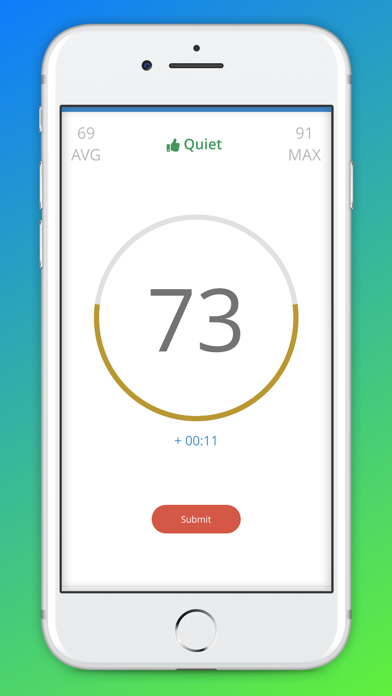
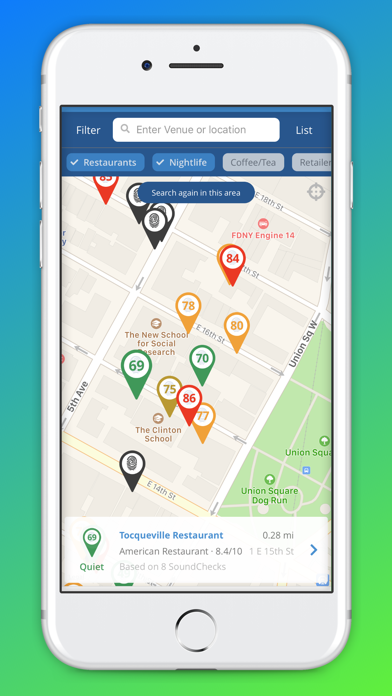
Quiet Mobile functions as a crowd-sourced acoustic utility that turns your iPhone into a portable decibel meter. Developed by Soundprint LLC, the core premise centers on empowering everyday patrons to measure venue noise levels and share those readings with a global community database. Users can actively search for restaurants, cafes, bars, and public spaces filtered strictly by their ambient decibel thresholds. Instead of guessing whether a lounge will ruin your evening phone call or conversation, you get instant visibility into exact sound profiles.
The utility relies on the device microphone to sample ambient sound pressure levels, translating raw acoustic data into easy-to-digest quiet, moderate, or noisy classifications. Beyond personal venue discovery, the platform acts as an advocacy tool for hearing health by highlighting environments that risk long-term auditory fatigue. Soundprint LLC maintains an impressive international footprint, aggregating user-submitted data across major metropolitan areas worldwide. It is worth clarifying that while the app offers reliable approximations, it is engineered for general discovery rather than replacing professional calibration equipment.
Standout Features & What's New in this Build
The current TestFlight distribution introduces a refined user interface that strips away clutter and prioritizes rapid acoustic searches. Performance feels remarkably snappy, rendering venue lists instantly even when pinging dense urban databases over cellular connections. The development team has clearly focused on smoothing out microphone polling routines to ensure decibel readings remain consistent across different device models.
- Real-Time Decibel Meter: Instantly measure ambient room noise using your iPhone microphone with clear visual threshold indicators.
- Crowdsourced Venue Discovery: Search local establishments categorized by quiet, moderate, or loud acoustics before planning your outing.
- Global Database Integration: Access a wide international network of user-submitted venue sound profiles spanning multiple countries.
- Hearing Health Awareness: Monitor exposure risks in loud environments to support safer long-term hearing habits in public spaces.
- Seamless Contribution Tools: Submit your own acoustic measurements to local venues with just a single tap to help fellow users.

Hands-On Impressions: Performance, Battery, and Thermals
We tested this latest beta release on an iPhone 15 Pro, and the overall software stability exceeded our expectations for early-stage utility builds. Scrolling through venue lists leverages the 120Hz ProMotion display smoothly, with zero noticeable jank or stutter during rapid list navigation. The microphone sampling process runs efficiently in the background without triggering thermal throttling or causing noticeable battery drain during extended mapping sessions.
The developers have successfully optimized memory management, keeping the application light and responsive even when cached database files grow larger. Touch targets feel deliberate and precise, adhering closely to standard iOS human interface guidelines for maximum reliability. Everything feels tuned for speed, ensuring you can pull up a quick decibel reading while walking down a bustling city sidewalk.
"Our goal with Quiet Mobile is to give urban explorers the acoustic transparency they need to protect their hearing and sanity in an increasingly loud world." — Soundprint LLC Development Team
System Requirements & Requested Permissions
Running this beta build requires an iPhone, iPad, or iPod touch running iOS 15.0 or later to ensure compatibility with modern audio frameworks. The app scales cleanly across smaller form-factor devices like the iPhone SE as well as larger max-series flagships. Because of the nature of acoustic tracking, the utility requests permission to access your device microphone for decibel sampling and location services for nearby venue matching.
Apple’s robust sandboxing architecture ensures that your microphone data is only utilized for active decibel calculation and is never permanently recorded or stored locally. Location permissions can be managed granularly via iOS privacy settings, allowing you to use manual search options if you prefer not to share GPS coordinates. Battery consumption remains minimal, as the app only polls the microphone actively when you launch the measurement screen.
Pros & Cons: Beta Impressions
✓ The Highs (What We Love)
- Acoustic Transparency: Genuinely helps you find quiet venues before arriving.
- Responsive UI: Lightning-fast search results powered by smooth database queries.
- Battery Efficiency: Minimal resource draw during background polling and GPS lookups.
✕ Beta Caveats (Room for Polish)
- Sparse Rural Data: Smaller towns have fewer crowdsourced venue submissions currently.
- Microphone Variations: Readings can vary slightly depending on hardware case enclosures.
- Ancillary text styling occasionally shifts during rapid orientation changes.
Current TestFlight Slot Situation & Availability
Apple enforces a strict ceiling of 10,000 active participants for public TestFlight beta programs, making timing crucial for prospective testers. Soundprint LLC maintains an open beta policy for now, but slots tend to fill up rapidly whenever tech blogs feature the project. If the invite link reports that the beta is currently full, do not panic because inactive tester accounts are regularly purged to free up capacity.
Checking back during off-peak hours often reveals newly opened slots as older testing profiles expire or rotate out. Securing your spot early ensures you gain priority access to incoming feature updates before the official App Store release. Keep this page bookmarked on Codewing to track future build availability changes instantly.
Step-by-Step TestFlight Installation Guide
Getting up and running with the Quiet Mobile beta takes less than two minutes if you follow these straightforward setup instructions. Make sure you have your target iOS device ready with an active internet connection before proceeding through the installation pipeline.
- Download TestFlight: Open the App Store on your iOS device and download Apple's official free TestFlight application if you do not already have it installed.
- Access the Invite Link: Tap the official TestFlight invitation link provided on this Codewing discovery page to launch the app automatically.
- Accept the Beta Invitation: Review the build details and tap the blue Accept button to join the Soundprint LLC public testing roster.
- Install the Build: Tap Install to download the Quiet Mobile beta package onto your home screen alongside your standard apps.
- Submit Feedback: Test out the decibel meter and use the built-in TestFlight feedback tool to report any bugs directly to the development team.
Frequently Asked Questions
Is Quiet Mobile safe to install via TestFlight?
Yes, every beta build distributed through TestFlight undergoes Apple's automated security screenings and operates within strict iOS privacy sandboxes.
What should I do if the Quiet Mobile beta is full?
If the 10,000-tester limit is reached, save this Codewing page and check back periodically as the developer frequently reclaims inactive slots.
Will installing this beta overwrite my App Store version or delete save data?
TestFlight installs run as standalone preview packages that safely coexist with your standard software ecosystem without harming personal files.
How long do TestFlight beta invitations and builds last?
Each individual TestFlight build remains active for 90 days from its initial upload date before requiring a minor update patch.
Are in-app purchases free during TestFlight beta testing?
Yes, any simulated transactions or premium feature unlocks within TestFlight use Apple's sandbox environment and cost zero real-world currency.
Final Editorial Verdict
Quiet Mobile delivers a genuinely useful utility that solves a universal annoyance with elegance and simplicity. Soundprint LLC has crafted a stable, responsive acoustic tool that empowers users to take control of their auditory environments. While rural database coverage will naturally expand over time, the current urban feature set is already worth downloading. Grab the beta link above and start exploring your city in peace.
Developer Support & Official Resources
Stay updated on patch notes, maintenance windows, and feature roadmaps directly from the official developer channels.
Ready to Test Quiet Mobile?
Apple limits public TestFlight betas to 10,000 testers. Tap below to launch TestFlight and claim your testing slot before capacity is reached.
Join Quiet Mobile Beta on TestFlight →



