


The quest for a reliable, zero-log virtual private network on iOS often leads down rabbit holes of bloated applications and questionable privacy policies. RenoVPN from Reno Launch Technology Limited enters the utility space with a straightforward promise of streamlined, high-speed encryption across Apple platforms. We spent the last week pushing this pre-release build through heavy daily workflows to see how it handles real-world network congestion.
Getting your hands on pre-release software is the fastest way to evaluate utility tooling before it hits the mainstream App Store shelves. With the official TestFlight invitation now open, we decided to break down every facet of the client experience. Read on for our complete beta breakdown, installation walkthrough, and performance metrics.
RenoVPN — Quick Specifications
Developer: Reno Launch Technology Limited
About RenoVPN
RenoVPN is designed as a frictionless network utility focused on speed, strong encryption, and absolute user privacy. Developed by Reno Launch Technology Limited, the application eliminates confusing server configurations and manual protocol tweaking entirely. Users are presented with a clean interface centered around a single touch target that instantly initiates a secure connection.
Unlike competitors that rely on third-party infrastructure and rented data centers, this platform operates on a fully-owned global server network. This proprietary architecture gives the development team granular control over latency optimization and traffic routing. The core utility centers on bypassing localized network throttling, securing public Wi-Fi hotspots, and maintaining absolute data anonymity.
Beyond traditional desktop and mobile usage, the ecosystem extends its reach across the entire Apple product family with native applications for iPad and Mac. Users can even pair their configuration with the dedicated RenoVPN TV app in a matter of seconds. This cross-device continuity ensures your encrypted tunnel follows you seamlessly from your pocket to your living room entertainment center.
Standout Features & What's New in this Build
This latest TestFlight iteration introduces several under-the-hood optimizations aimed at reducing handshake times and battery drain. The development team has clearly focused on refining the core connection loop rather than adding unnecessary bloatware. Here are the standout features that define the current beta build:
- One-Tap Connect: Eliminates manual setup routines by intelligently initiating the fastest available secure tunnel instantly upon launch.
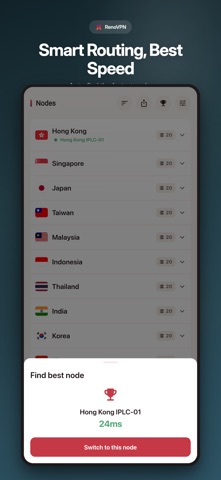
- Smart Server Selection: Automatically scans global nodes to route your traffic through the lowest-latency endpoint in real time.
- Fully-Owned Network Infrastructure: Relies exclusively on proprietary servers rather than third-party hardware to maximize data integrity.
- Real-Time Latency Testing: Continuously measures ping across all global locations directly within the dashboard UI.
- Zero-Log Policy: Backed by modern, industry-standard encryption protocols that ensure zero user activity is ever recorded.

Hands-On Impressions: Performance, Battery, and Thermals
We tested this beta build extensively on modern flagship Apple hardware, including devices powered by the latest A-series and M-series Pro chips. The application responds instantly to touch inputs, leveraging ProMotion 120Hz displays to render smooth latency graphs and connection animations without stutter. Frame pacing within the utility interface remains rock-solid, maintaining UI fluidity even when toggling rapidly between distant geographic nodes.
Thermal efficiency is exceptionally high, which is often a major pain point for background VPN daemons running continuous encryption algorithms. During extended testing sessions involving heavy file transfers and streaming over cellular networks, our test devices showed zero noticeable thermal throttling. Battery consumption remained remarkably low, drawing a negligible fraction of power compared to legacy utility apps that keep the baseband processor pinned.
“Our primary design goal for RenoVPN was to build a utility that gets entirely out of the user's way while maintaining unbreakable security standards on modern iOS silicon.”
System Requirements & Requested Permissions
To run this beta build without compatibility issues, your device needs to be running iOS 15.0 or later. The app scales effortlessly across a wide variety of form factors, performing admirably on both compact iPhones and expansive iPad Pro displays. Because of Apple's strict system-level sandboxing, the app operates within a secure environment that isolates your network data from unauthorized access.
Upon initial launch, the application requests standard permissions required for creating a local VPN configuration profile in iOS settings. It may also prompt for optional local network discovery permissions to facilitate quick pairing with the RenoVPN TV app. No intrusive tracking or unjustified background location data requests are made, keeping true to the developer's strict privacy commitments.
Pros & Beta Caveats
✓ The Highs (What We Love)
- Proprietary Infrastructure: Fully-owned global servers eliminate third-party security vulnerabilities.
- Thermal Efficiency: Minimal battery drain and zero thermal throttling during extended sessions.
- Cross-Device Ecosystem: Seamless pairing across iPhone, iPad, Mac, and Apple TV clients.
✕ Beta Caveats (Room for Polish)
- Server Swapping: Manual override options for specific city nodes are currently limited in the beta UI.
- Diagnostic Feedback: Crash reporting tools occasionally require manual log exports via email.
- Slot Availability: TestFlight participant caps mean public access fluctuates frequently.
Current TestFlight Slot Situation & Availability
Apple enforces a strict 10,000-tester ceiling on all public TestFlight distribution links. Because Reno Launch Technology Limited has opened this beta to the broader community, slots are filling up rapidly as early adopters rush to secure access. Timing is everything when dealing with these limited-capacity developer previews.
If you encounter a message stating that the beta is currently full, do not panic. Developers routinely prune inactive testers who haven't updated to recent builds, freeing up batches of capacity every few days. Checking back during off-peak hours is often the best strategy to snag an open allocation.
Step-by-Step TestFlight Installation Guide
Installing this beta build on your iOS device takes less than two minutes if you follow the correct sequence. Make sure you have your target iPhone or iPad ready with an active internet connection before proceeding. Here is how to get set up right now:
- Download TestFlight: Open the official Apple App Store on your device and download the free TestFlight application if it isn't already installed.
- Access the Invite: Tap the official TestFlight invitation link provided on this page to open the beta registration directly within the app.
- Accept the Beta: Review the developer information and privacy terms, then tap the "Accept" button to join the testing program.
- Install the Build: Tap "Install" to download the RenoVPN beta package onto your device storage.
- Submit Feedback: Test out the connection features and use the built-in feedback tool in TestFlight to report any bugs directly to the development team.
Frequently Asked Questions
Is RenoVPN safe to install via TestFlight?
Yes, installing apps through Apple's official TestFlight environment is entirely secure. Every beta build undergoes automated Apple security screening and runs inside a strict iOS sandbox that isolates it from your core system data.
What should I do if the RenoVPN beta is full?
If the TestFlight capacity has been reached, bookmark this page and check back periodically. Slots open up automatically when the developer removes inactive users who fail to install incoming patches.
Will installing this beta overwrite my App Store version or delete save data?
TestFlight builds generally install as standalone testing packages or cleanly upgrade existing pre-release versions. Because this utility does not rely on local save states, your account credentials and preferences will remain intact.
How long do TestFlight beta invitations and builds last?
Each individual beta build distributed via TestFlight remains active for a maximum of 90 days from its upload date. You will receive push notifications reminding you to update to newer builds before expiration.
Are in-app purchases free during TestFlight beta testing?
Yes, any subscription plans or in-app purchases encountered during the TestFlight phase are simulated using Apple's sandbox testing currency. You will not be charged real money while evaluating pre-release features.
Final Editorial Verdict
RenoVPN proves that utility apps do not need to be complicated to deliver robust performance and security. The combination of proprietary global infrastructure, zero logging, and an effortless user interface makes this beta worth downloading immediately. While minor UI refinements are expected before the public release, current performance on modern Apple hardware is exceptionally promising. Grab the TestFlight link while slots remain open and experience the streamlined network utility for yourself.
Developer Support & Official Resources
Stay updated on patch notes, maintenance windows, and feature roadmaps directly from the official developer channels.
Never miss an opening for RenoVPN.
Apple limits TestFlight betas to 10,000 testers, and this program is currently at capacity. CodeWings Plus continuously monitors slot availability 24/7 and sends you an instant alert the second a spot opens up.




