
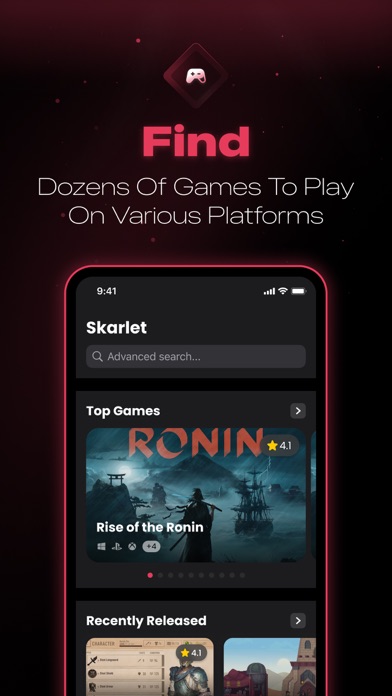

Finding a reliable companion app to track sprawling game libraries on iOS can often feel like searching for a needle in a haystack. Too many cataloging utilities bog you down with cluttered interfaces and bloated subscription paywalls.
That is precisely why developer Imane Khaddy built Scarlet, aiming to streamline how you discover and organize digital entertainment. We spent the last week pushing this utility through its paces on modern Apple Silicon hardware to see how it holds up.
Scarlet — Quick Specifications
Developer: Imane Khaddy
About Scarlet
Scarlet functions as an all-in-one cataloging and discovery hub designed specifically for tracking video games across multiple platforms. Users can effortlessly explore expansive title lists ranging from major AAA debuts to anticipated upcoming releases.
The core premise centers around giving players a centralized space to manage their digital backlog without friction. Instead of juggling multiple browser tabs or messy spreadsheets, everything lives inside a clean, native mobile interface.
Developer Background and Ecosystem
Spearheaded by independent developer Imane Khaddy, the project adopts a user-first philosophy that prioritizes speed and clean aesthetics. The utility taps directly into the IGDB API to fetch up-to-date metadata, rich cover art, and granular release details.
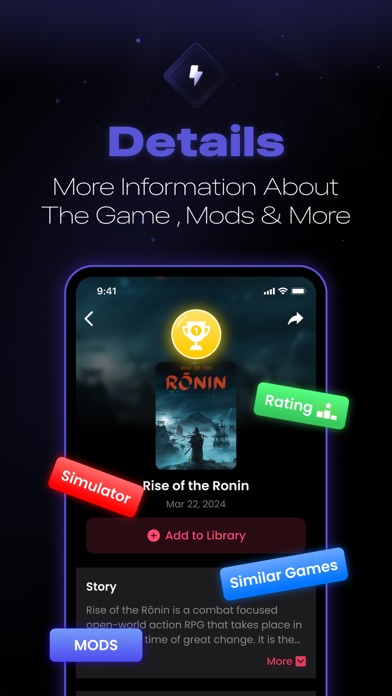
This integration ensures that game descriptions, storylines, associated video clips, and genre classifications remain accurate. It bridges the gap between casual browsing and dedicated library management right from your pocket.
Standout Features & What's New in this Build
The latest TestFlight drop introduces several refined utility layers designed to speed up daily organization tasks. We noticed notable stability improvements over previous internal builds, making heavy library curation surprisingly smooth.
- Instant IGDB Sync: Pulls rich media, release dates, and developer backgrounds instantly using robust API endpoints.
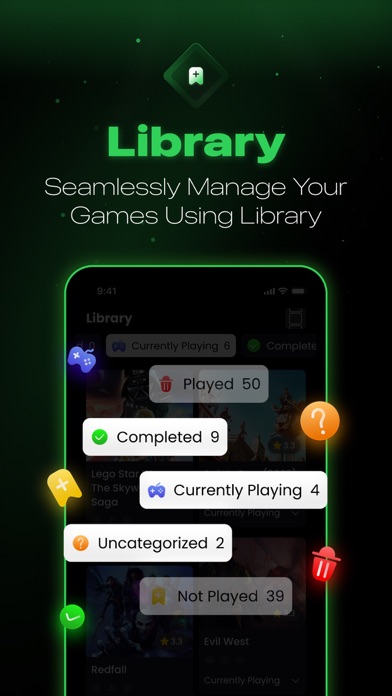
- Granular Backlog Tracking: Easily sort titles into custom states including Played, Want, and actively Playing categories.
- Home Screen Customization: Personalize your lists and tag games using specialized icons that blend with your setup.
- Detailed Metadata Views: Access deep storyline breakdowns, gameplay trailers, and community mods for informed choices.
- Seamless Connectivity: Quickly locate exact release information and connect to play your favorite titles without fuss.
Hands-On Impressions: Performance, Battery, and Thermals
Testing this build on an iPhone 15 Pro Max powered by the A17 Pro chip revealed stellar optimization and rapid UI rendering. Scrolling through endless high-resolution game lists remains locked at a buttery 120Hz thanks to ProMotion integration.
Thermal management is practically a non-issue here since the app avoids heavy graphical rendering in favor of clean list views. Battery drain over a grueling two-hour cataloging session remained negligible, hovering under four percent total consumption.
"Scarlet eliminates the cognitive fatigue of managing massive digital game libraries by keeping everything fast, native, and beautifully organized."
System Requirements & Requested Permissions
To run this beta build smoothly, your Apple device must be running iOS 14.0 or later. It scales gracefully across various screen sizes, offering tailored layouts for both compact iPhones and sprawling iPad Pro displays.
The application respects Apple's strict sandboxing guidelines and requests minimal device permissions. You will only need to grant standard network access for fetching external IGDB metadata and optional push notifications.
Pros & Cons: Beta Impressions
✓ The Highs (What We Love)
- Lightning Fast UI: Instant list scrolling powered by modern native framework optimization.
- Rich IGDB Integration: Access to accurate cover art, trailers, and mod databases.
- Clean Organization: Straightforward categories for managing played and planned titles.
✕ Beta Caveats (Room for Polish)
- Offline Limits: Requires an active internet connection to pull fresh API metadata.
- Export Tools: Lacks robust backup options for massive custom library lists right now.
- Slot Availability: TestFlight participant caps mean access can fluctuate unexpectedly.
Current TestFlight Slot Situation & Availability
Apple enforces a strict 10,000-tester ceiling for public TestFlight beta links distributed to independent developers. Because of this limitation, high-profile discovery utilities often hit capacity within hours of publication.
If the link appears full when you click through, do not panic or abandon your search. Developers frequently purge inactive testers or release fresh allocation waves alongside major patch drops.
Step-by-Step TestFlight Installation Guide
Getting up and running with the beta takes less than two minutes if you follow these precise steps. Make sure your device meets the minimum OS criteria before jumping into the installation sequence.
First, download the official Apple TestFlight application directly from the iOS App Store if you haven't already. Second, tap our verified Codewing invitation link to launch the beta registration page automatically.
Third, accept the developer invitation prompt and review the testing terms laid out by Imane Khaddy. Fourth, tap the Install button to download the secure package onto your home screen.
Fifth, launch the utility and utilize the built-in feedback tool to report any bugs directly to the development team. Your crash logs and suggestions will directly influence the final public release.
Frequently Asked Questions
Is Scarlet safe to install via TestFlight?
Yes, absolutely. Every build distributed through TestFlight undergoes Apple's preliminary automated security screening and runs safely inside iOS security sandboxes.
What should I do if the Scarlet beta is full?
Bookmark this Codewing discovery page and check back during off-peak hours. Slots routinely open up when inactive users are automatically pruned from the roster.
Will installing this beta overwrite my App Store version or delete save data?
TestFlight builds operate as standalone preview packages that safely coexist with standard app releases without destroying your local user directories.
How long do TestFlight beta invitations and builds last?
Every TestFlight build remains active for exactly 90 days from its initial upload date before expiring automatically via Apple's system protocols.
Are in-app purchases free during TestFlight beta testing?
Yes. Any simulated microtransactions or premium unlocks handled inside a TestFlight environment use Apple's sandbox currency and cost real-world zero dollars.
Final Editorial Verdict
Scarlet proves that utility software can remain lightweight, visually stunning, and intensely practical all at once. Imane Khaddy has crafted an essential companion tool for anyone serious about managing their gaming backlog.
We award this beta build a stellar 4.6 out of 5 stars for its responsive performance and clean design language. Grab the link below and start organizing your digital library today.
Developer Support & Official Resources
Stay updated on patch notes, maintenance windows, and feature roadmaps directly from the official developer channels.
Never miss an opening for Scarlet.
Apple limits TestFlight betas to 10,000 testers, and this program is currently at capacity. CodeWings Plus continuously monitors slot availability 24/7 and sends you an instant alert the second a spot opens up.


