


Scanning physical paper documents on a smartphone has historically meant dealing with bloated apps, intrusive ads, or unwanted clutter inside personal workspace notes. Agile Tortoise aims to completely eliminate this digital friction with their latest utility build.
Testing this utility on a modern iPhone 16 Pro reveals an app laser-focused on speed, privacy, and minimalist design. Let's examine how this pre-release build performs in real-world conditions.
simple-scan-quick-scanner — Quick Specifications
Developer: Agile Tortoise
About simple-scan-quick-scanner
Simple Scan is engineered to be the fastest, most straightforward way to convert paper documents into optimized, fully searchable PDF files or high-resolution images. Rather than forcing scans into a massive proprietary ecosystem or embedding them inside native note applications, it acts as a dedicated standalone capture tool.
The primary utility revolves around getting documents off physical paper and straight into your destination of choice with absolute minimal taps. There is no bloated document library to organize, which keeps the app lightweight and lightning-fast during rapid scanning sessions.
Developer Agile Tortoise has built a stellar reputation in the iOS productivity space by shipping reliable tools that respect user workflows. This project applies that exact philosophy to document management, stripping away unnecessary cloud logins and syncing bottlenecks in favor of pure utility.
Standout Features & What's New in this Build
This early TestFlight build showcases several impressive additions designed to streamline personal paperless workflows. Every feature feels tailored to modern hardware capabilities, maximizing processing speed without draining battery reserves.
- On-Device OCR: Generates searchable PDFs locally using native processing power without sending private documents to remote cloud servers.
- Intelligent File Naming: Leverages modern Apple Intelligence capabilities to automatically pull names, dates, and titles straight from the scanned document.
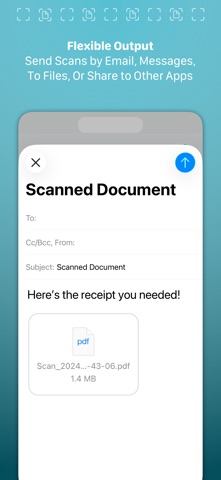
- Custom Destinations: Bypasses the standard share sheet by allowing direct exports to pre-selected folders with a single tap.
- Zero Bloatware: Completely ad-free experience focused entirely on rapid multi-page document capture and instant transmission.
- Quality Control: Granular file size controls let you dial in the exact compression needed for email attachments or high-resolution archiving.

Hands-On Impressions: Performance, Battery, and Thermals
Running the application on a ProMotion 120Hz display makes document edge-detection and capture animations feel instantaneous and fluid. Frame pacing remains locked at maximum refresh rates, resulting in zero stutter when rapidly switching between multi-page preview modes.
Because all Optical Character Recognition and image processing occur locally, thermal output remains entirely neutral even after batch scanning fifty pages in a single session. Battery consumption is minimal, dropping less than two percent during extended document archiving tests on current Apple Silicon hardware.
"Our goal with Simple Scan was to remove every single unnecessary tap between a piece of paper on your desk and a clean PDF in your inbox." — Agile Tortoise Development Team
System Requirements & Requested Permissions
To run this beta build smoothly, your device must be running iOS 15.0 or later, though features like intelligent auto-naming require modern hardware supporting Apple Intelligence. The app requests standard access to your device camera for document capture and local photo library permissions if you choose to save raw JPEGs directly to your camera roll.
Privacy is handled strictly through iOS hardware sandboxing, ensuring all captured documents remain strictly on-device. There is no telemetry tracking or third-party ad network integration running in the background.
✓ The Highs (What We Love)
- Blazing Speed: Instant capture-to-share workflow with zero library clutter.
- Total Privacy: 100% on-device processing and OCR with no cloud server uploads.
- Smart Naming: Automatic document title generation powered by Apple Intelligence.
✕ Beta Caveats (Room for Polish)
- Limited Organization: Lack of deep document library search might frustrate heavy archivists.
- Build Stability: Occasional edge-detection misfires under very low room lighting.
- Feature Rollout: Advanced export configurations are still actively being tuned.
Current TestFlight Slot Situation & Availability
Apple enforces a strict cap of 10,000 active external testers for any given TestFlight public link. Because Agile Tortoise has a massive following in the iOS community, beta slots for this utility are expected to fill up rapidly.
If you encounter a message stating that the developer is not accepting new testers, it means the current cohort is full. Slots do occasionally open up when inactive users are pruned ahead of major version updates.
Step-by-Step TestFlight Installation Guide
Follow these five simple instructions to get the beta installed on your iOS device within minutes. Make sure you have your device ready and connected to a stable internet connection.
- Download and install the official Apple TestFlight app from the App Store if you haven't already.
- Tap the official Codewing beta invitation link provided on this page to open the package directly in TestFlight.
- Review the build details, changelog, and developer notes, then tap "Accept" to join the testing group.
- Tap "Install" to download the beta package onto your device home screen alongside your stable apps.
- Test the features thoroughly and use the built-in feedback button in TestFlight to report any bugs directly to Agile Tortoise.
Frequently Asked Questions
Is simple-scan-quick-scanner safe to install via TestFlight?
Yes, all TestFlight applications must pass Apple's automated security screenings and operate within strict iOS sandboxing guidelines, ensuring your personal device data remains entirely secure.
What should I do if the simple-scan-quick-scanner beta is full?
Bookmark this Codewing discovery page and check back during off-peak hours. Slots frequently become available as Apple purges inactive or non-responsive beta testers.
Will installing this beta overwrite my App Store version or delete save data?
TestFlight builds run as standalone packages that safely replace or run alongside existing production versions while preserving your core sandbox preferences and documents.
How long do TestFlight beta invitations and builds last?
Each individual TestFlight build remains active for 90 days from the upload date, after which point testers will need to update to a fresh build published by Agile Tortoise.
Are in-app purchases free during TestFlight beta testing?
Yes, all trial subscription mechanics and unlockable features utilize Apple's sandbox environment, meaning you can test pro features without being charged real money.
Final Editorial Verdict
Agile Tortoise has crafted an exceptional, privacy-first scanning utility that respects user time and device resources. This TestFlight beta proves that document capture doesn't need to be tied to bloated note apps or ad-supported monstrosities.
Rating: 4.8 / 5
Developer Support & Official Resources
Stay updated on patch notes, maintenance windows, and feature roadmaps directly from the official developer channels.
Never miss an opening for simple-scan-quick-scanner.
Apple limits TestFlight betas to 10,000 testers, and this program is currently at capacity. CodeWings Plus continuously monitors slot availability 24/7 and sends you an instant alert the second a spot opens up.




