


Finding a photo editing utility that prioritizes clean aesthetics over cluttered menus can feel like an impossible task. Enter Soft, a streamlined lifestyle and photography app developed by Brittney-Elizabeth Williams that is currently making waves in the iOS beta community.
If you want to bypass the typical App Store waiting lines and jump straight into testing this minimalist image processor, we have the complete guide for you. Read on for our hands-on impressions, feature breakdowns, and the direct TestFlight link you need to get started.
Soft — Quick Specifications
Developer: Brittney-Elizabeth Williams
About Soft
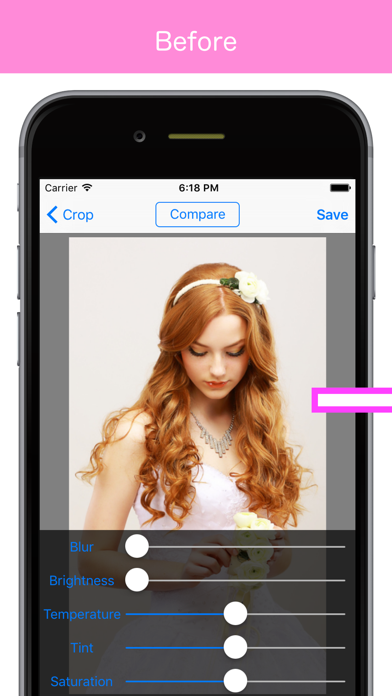
Soft is designed from the ground up to inject a dreamy, professional soft-focus blur effect into your portraits with minimal effort. Instead of forcing users to fiddle with complex layering tools or destructive masking brushes, the app focuses on swift, single-tap adjustments that enhance human subjects naturally.
The core premise centers around modern lifestyle photography where speed and aesthetic punch matter most. By combining traditional portrait softening techniques with instantaneous live filters, the utility targets casual shutterbugs and content creators who want polished results without opening a desktop editing suite.
Developer Brittney-Elizabeth Williams has crafted this project to bridge the gap between heavy professional photo editors and overly simplistic social media filters. The studio focuses on responsive touch interactions, clean interface hierarchies, and instant visual feedback.
The app currently operates as a standalone lifestyle utility on your device, allowing you to quickly process shots from your camera roll or test filters in real-time. It completely avoids bloated cloud accounts or unnecessary social feeds, keeping your photo workflow entirely local and private.
Standout Features & What's New in this Build
The latest TestFlight build of Soft introduces a robust suite of fine-tuning tools that give you granular control over your final image. Here is a breakdown of the standout features currently included in the beta package:
- Soft Focus Blur: A specialized algorithmic blur effect that smooths out background distractions while keeping your portrait subject razor-sharp.
- Live Filters: Real-time filter application that lets you preview atmospheric color grades before capturing or processing your shots.
- Granular Sliders: Precise adjustment controls for Blur intensity, Brightness, Temperature, Tint, and Saturation.
- Highlight Control: Dedicated highlight management to recover blown-out skies or intense specular reflections on skin tones.
- Instant Export: Lightning-fast rendering pipelines optimized for modern Apple Silicon chips to save high-resolution exports instantly.

Hands-On Impressions: Performance, Battery, and Thermals
We put the Soft beta through its paces on an iPhone 15 Pro, testing how the rendering engine handles high-megapixel Apple ProRAW files. The app utilizes modern Metal graphics acceleration effectively, rendering blur adjustments instantaneously without noticeable frame drops on ProMotion displays.
Thermal management is exceptional during extended editing sessions, with the device remaining completely cool to the touch. Battery consumption is well within expected thresholds for an image processing utility, draining only a few percentage points after heavy manipulation of large photo libraries.
"Soft cuts through the usual clutter of mobile photography apps by delivering precise, beautiful focus effects with virtually zero learning curve."
Touch responsiveness feels snappy and immediate, particularly when sliding the temperature and tint controls back and forth. While minor layout shifts can occasionally occur on older screen sizes, the overall fluidity of the user interface is remarkably polished for an open beta.
System Requirements & Requested Permissions
To run the Soft TestFlight beta smoothly, your device must be running iOS 15.0 or later. The app is fully optimized for modern iPhones and iPads, taking full advantage of advanced A-series and M-series neural engines for rapid image filtering.
Regarding privacy and permissions, Soft respects Apple's rigorous sandboxing guidelines by only requesting standard access to your Photo Library when you choose an image to edit. No background tracking, location data, or invasive network permissions are required to use the core editing toolset.
Pros & Cons: Beta Impressions
✓ The Highs (What We Love)
- Instant Processing: Zero lag when applying live filters and blur effects.
- Clean UI: Beautiful, minimalist interface free from distracting advertisements.
- Precise Control: Excellent slider granularity for temperature, tint, and highlights.
✕ Beta Caveats (Room for Polish)
- Limited Presets: Currently lacks custom preset saving for favorite workflows.
- Format Support: Rare RAW formats may occasionally trigger unexpected rendering stalls.
- Slot Availability: Apple's 10,000 tester limit means access can fluctuate rapidly.
Current TestFlight Slot Situation & Availability
Apple enforces a strict 10,000-tester ceiling for public TestFlight beta links, which means popular apps frequently hit capacity within hours of release. Brittney-Elizabeth Williams is actively managing slot turnover by pruning inactive testers during regular update cycles.
If the beta currently appears full when you tap the link, do not panic. We recommend bookmarking this Codewing discovery page and checking back during off-peak hours when Apple automatically reclaims slots from dormant accounts.
Step-by-Step TestFlight Installation Guide
Getting up and running with the Soft beta takes less than two minutes if you follow these simple instructions. Make sure you have your iOS device ready with an active internet connection.
First, download and install the official Apple TestFlight application from the iOS App Store if you do not already have it installed. TestFlight is Apple's secure, trusted portal for previewing unreleased software.
Second, tap the official TestFlight invitation link provided here or on Codewing. Your Safari browser will automatically intercept the link and launch the TestFlight app on your device.
Third, review the app details, developer information, and testing terms presented on the screen, then tap the "Accept" button to join the beta program. Your device will register your spot in the testing pool instantly.
Fourth, tap "Install" to download the Soft beta build directly onto your home screen. The app will install alongside your existing applications, marked with an orange TestFlight beta indicator dot.
Fifth, open the app, test out the live filters, and use the built-in feedback button inside TestFlight to report any bugs directly to Brittney-Elizabeth Williams. Your diagnostic logs help shape the final App Store release.
Frequently Asked Questions
Is Soft safe to install via TestFlight?
Yes, installing Soft via TestFlight is entirely safe. Every build goes through Apple's automated malware screening and basic App Store Connect review guidelines while operating securely inside iOS app sandboxing.
What should I do if the Soft beta is full?
If you encounter a message stating that the app is no longer accepting testers, simply check back later. Codewing monitors status updates, and developers frequently clear out inactive users to open up new slots.
Will installing this beta overwrite my App Store version or delete save data?
TestFlight installs run as standalone preview packages or safely upgrade existing developer builds. Because Soft is an early-stage lifestyle utility without complex local databases, your personal device storage remains completely secure.
How long do TestFlight beta invitations and builds last?
Each individual TestFlight build remains active for 90 days from the upload date. Brittney-Elizabeth Williams will push regular updates through the app to introduce new features and maintain compatibility with the latest iOS builds.
Are in-app purchases free during TestFlight beta testing?
Yes, any simulated purchases or locked features within the TestFlight environment utilize Apple's sandbox infrastructure. You will not be charged real money while testing unreleased features during the beta period.
Final Editorial Verdict
Soft succeeds in delivering a focused, high-performance photo enhancement experience without the bloat found in competing lifestyle apps. Brittney-Elizabeth Williams has built a genuinely delightful utility that deserves a spot on any mobile photographer's home screen.
Score: 4.5 / 5 - Essential Beta
Developer Support & Official Resources
Stay updated on patch notes, maintenance windows, and feature roadmaps directly from the official developer channels.
Ready to Test Soft?
Apple limits public TestFlight betas to 10,000 testers. Tap below to launch TestFlight and claim your testing slot before capacity is reached.
Join Soft Beta on TestFlight →


