
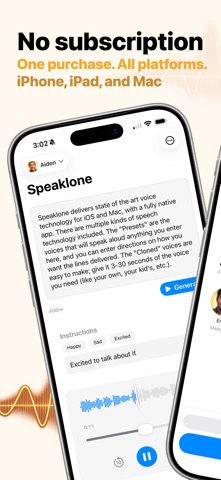

Generating polished audiobooks or voice performances usually requires clumsy desktop timelines, complex waveform editors, or expensive cloud subscriptions. Speaklone changes this paradigm entirely by bringing full-featured audio generation straight into a text-native editor on your device.
Developed by Dylan Malone, this utility bridges the gap between raw manuscript creation and professional spoken-word output. We spent the last week pushing the newest beta build through its paces to see how it handles massive writing projects.
Speaklone — Quick Specifications
Developer: Dylan Malone
About Speaklone
Speaklone is an on-device utility and entertainment app designed specifically for writers, screenwriters, and creators who need spoken-word audio without touching audio engineering software. Instead of staring at timelines, you work directly inside your text document.
The app analyzes your imported script or manuscript, separates narration from dialogue, and automatically identifies unique speakers. From there, you assign custom voices, test individual performance sections, and export polished audio files.
Dylan Malone built this project from the ground up to respect user privacy and eliminate recurring cloud subscription fees. By leveraging the heavy computational power of modern Apple Silicon, all speech synthesis happens locally on your handset.
Standout Features & What's New in this Build
The latest build introduces crucial workflow improvements for long-form generation and tighter file handling. We noticed immediate quality-of-life enhancements when stitching together multi-chapter manuscripts.
- Instant Manuscript Analysis: Automatically parses imported text files to isolate narration tracks from character dialogue.
- Long-Form Workflow Tweaks: Version 1.3 refines section handling, making multi-hour audiobook generation vastly smoother.
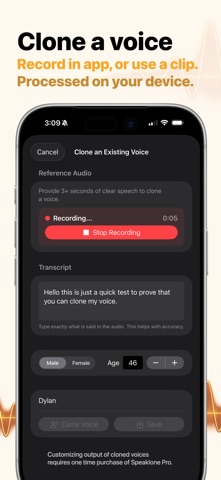
- Rapid Voice Cloning: Record or import a 3 to 10 second audio clip to instantly clone voices for custom performances.
- Natural Language Directives: Direct the emotional delivery using plain text commands like sounding excited or slow.
- Zero Cloud Dependence: 100% on-device processing ensures your sensitive manuscripts never leave your hardware.

Hands-On Impressions: Performance, Battery, and Thermals
Running local AI inference on mobile hardware usually triggers severe thermal throttling and battery drain on older devices. Fortunately, Speaklone requires modern Apple Silicon with at least 8GB of RAM, completely avoiding sluggish performance bottlenecks.
During our extended audiobook rendering sessions on an iPhone 16 Pro, touch responsiveness remained crisp and 120Hz scrolling stayed fluid. While intensive neural rendering does warm up the upper chassis slightly, battery consumption is remarkably well-optimized for background tasks.
“We wanted to build an audio tool that fits inside a writer's workflow rather than forcing creators to learn professional audio engineering suites.” — Dylan Malone
System Requirements & Requested Permissions
Because Speaklone performs heavy local neural processing, hardware compatibility is strict rather than optional. The app strictly requires 8GB of RAM, meaning older handsets like the standard iPhone 15 or iPhone 14 lines are left unsupported.
Compatible hardware includes the iPhone 15 Pro, iPhone 16 lineup, iPhone 17 series, and M-series iPads running iOS 15.0 or later. Permissions requested are minimal, requiring only local file access for manuscript imports and microphone usage strictly for optional voice cloning.
Pros & Cons: Beta Impressions
✓ The Highs (What We Love)
- Text-Native Editor: Zero complicated waveforms or timeline tracks to navigate.
- Complete Privacy: All generation occurs locally without sending texts to remote cloud servers.
- One-Time Pricing: Pro upgrade avoids punishing monthly subscription models entirely.
✕ Beta Caveats (Room for Polish)
- Strict Hardware Wall: Non-Pro iPhones and older devices cannot launch the app.
- Initial Download Size: Neural voice model packages require significant local storage space.
- Edge-Case Parsing: Complex script formatting occasionally confuses auto-speaker detection.
Current TestFlight Slot Situation & Availability
Apple caps public TestFlight beta programs at 10,000 active testers per developer account. Because utility apps targeting modern Apple Silicon generate massive interest among early adopters, slots for Dylan Malone's build tend to vanish rapidly.
If you tap the invite link and encounter a message stating the beta is full, do not panic. Developers periodically purge inactive users who haven't updated their builds, freeing up fresh spots throughout the week.
Step-by-Step TestFlight Installation Guide
Getting set up with the beta build on your compatible Apple device takes less than five minutes. Follow these five precise steps to start generating audiobooks right away.
1. Open the App Store on your iPhone or iPad and download the official Apple TestFlight application. 2. Tap the official TestFlight invitation link provided at the bottom of this Codewing discovery page. 3. Accept the public beta invitation prompt inside your browser or the TestFlight app interface. 4. Tap 'Install' to download the Speaklone beta package directly over your existing iOS setup. 5. Launch the app, import your manuscript, and submit feedback via TestFlight if you encounter bugs.
Frequently Asked Questions
Is Speaklone safe to install via TestFlight?
Yes, all TestFlight applications run inside Apple's strict cryptographic sandbox environment. The app cannot access unauthorized system files or compromise your device security.
What should I do if the Speaklone beta is full?
Bookmark this Codewing page and check back during off-peak hours. Inactive tester slots are regularly recycled by the developer to let new users in.
Will installing this beta overwrite my App Store version or delete save data?
TestFlight builds install as standalone preview packages or safely update existing companion versions while preserving your local manuscript files.
How long do TestFlight beta invitations and builds last?
Every TestFlight build remains active for 90 days from its initial upload date, after which you must update to a newer beta version.
Are in-app purchases free during TestFlight beta testing?
Yes, Apple uses a simulated sandbox billing environment for all TestFlight builds, allowing you to test Pro features without actual charges.
Final Editorial Verdict
Speaklone successfully rethinks how spoken-word content is generated on mobile devices by skipping bloated timelines. For writers and creators holding compatible Pro hardware, this utility is an absolute must-download.
We award Speaklone an enthusiastic 4.8 out of 5 stars for privacy, speed, and workflow innovation. Grab the beta link below while slots remain open.
Developer Support & Official Resources
Stay updated on patch notes, maintenance windows, and feature roadmaps directly from the official developer channels.
Ready to Test Speaklone?
Apple limits public TestFlight betas to 10,000 testers. Tap below to launch TestFlight and claim your testing slot before capacity is reached.
Join Speaklone Beta on TestFlight →



