


Finding a task manager that respects user data ownership instead of locking information behind proprietary cloud walls remains a persistent challenge for power users. TaskForge, developed by Azhar Dewji, steps into the productivity arena with a remarkably grounded philosophy: your tasks and notes live purely in local Markdown files. This hands-on review explores how this utility behaves during daily use on current Apple hardware.
Testing this build via the official Codewing distribution channel allows us to examine its architecture, speed, and real-world utility. For anyone tired of subscription-heavy productivity suites that hoard user analytics, this local-first approach presents an intriguing alternative. Let us examine how the beta performs under actual workloads.
TaskForge — Quick Specifications
Developer: Azhar Dewji
About TaskForge
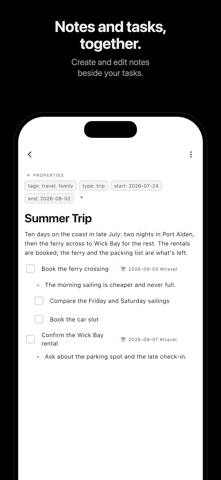
TaskForge acts as a native iOS, iPadOS, and macOS hub that brings tasks, notes, and device calendars together into a unified interface. Users create tasks, write notes, and check schedules without ever registering for a dedicated account or handing over telemetry. The software reads directly from a folder of local Markdown files, letting users open their workspace in any standard text editor.
The core utility centers around seamless integration with existing Markdown ecosystems, particularly supporting Obsidian vaults with zero importing or file conversion required. The engine parses Obsidian Tasks emoji fields, Dataview fields, and TaskNotes YAML frontmatter using personalized field mappings. Every edit executed on an iPhone or iPad instantly writes back to the original source file on disk.
Azhar Dewji engineered this project to bridge the gap between heavy desktop-class knowledge bases and fast, mobile task management. By relying on native system frameworks rather than web wrappers, the application maintains minimal resource footprints. Users can organize workflows into custom spaces, utilize kanban boards, and manage schedules alongside standard calendar events.
Standout Features & What's New in this Build
This TestFlight iteration introduces several refined capabilities designed to smooth out daily task capture and review. The developer continues to polish note editing workflows alongside robust local file synchronization routines.
- Local Markdown Core: Reads and writes directly to your local file directories and Obsidian vaults without proprietary databases or forced server uploads.
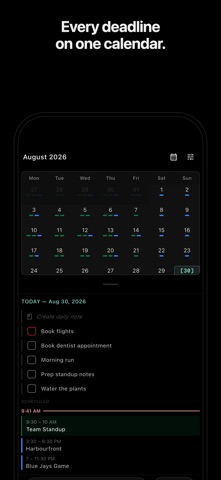
- Built-in Calendar Integration: Pulls device calendars from iCloud, Google, and Exchange directly into your month view, spaces, and widgets without duplicating event files.
- Quick Capture Intelligence: Type a task naturally the way you would say it, and the parser automatically populates correct dates, priorities, and tags.
- Advanced Parsing Support: Full compatibility with Obsidian Tasks emoji fields, Dataview fields, and TaskNotes YAML frontmatter with custom field mapping.
- Local AI Agent Tools: Optional desktop CLI and local MCP server integration allow compatible AI agents to read and edit tasks locally without cloud round-trips.
Hands-On Impressions: Performance, Battery, and Thermals
Running the application on modern Apple Silicon iPads and ProMotion iPhones yields instant touch responsiveness and buttery scrolling through extensive task lists. Frame pacing remains locked at 120Hz during rapid kanban board card dragging and deep workspace searches. Because the software processes local flat files rather than querying remote databases, thermal output stays completely flat even during heavy batch-editing sessions.
Battery consumption is negligible, matching the efficiency profile of native Apple productivity apps rather than electron-heavy alternatives. Memory footprint stays exceptionally low, ensuring background persistence without triggering aggressive iOS memory purges. The app switches between dark and light modes cleanly, adhering strictly to system-wide appearance changes without UI flashing.
"After trying many apps and workflows, this is the first one that actually stuck and made me productive!" — verified user review highlighting the software's streamlined efficiency.
While note editing is officially designated as a beta feature within the current build, stability has proven surprisingly dependable. Searching across thousands of lines of Markdown returns results instantly. The absence of mandatory cloud handshakes eliminates network latency entirely when working offline.
System Requirements & Requested Permissions
TaskForge requires a device running iOS 15.0 or later, making it compatible with a broad range of modern iPhones and iPads. The application scales gracefully across compact displays and expansive tablet screens alike. Hardware acceleration leverages modern A-series and M-series chips to render smooth workspace transitions.
Permissions requested are minimal by design, focusing purely on local storage access to read and write your selected workspace directories. Calendar permissions are optional if you choose to display native iCloud, Google, or Exchange events alongside your tasks. Push notification permissions are utilized strictly for due-date reminders and daily summaries.
Thanks to strict Apple sandboxing protocols, your Markdown files remain secure and inaccessible to outside applications unless explicitly granted folder access. The total absence of third-party analytics trackers guarantees complete privacy for personal and professional notes alike.
Pros & Cons: Beta Impressions
✓ The Highs (What We Love)
- Data Ownership: Zero accounts, zero analytics, and pure local Markdown files you completely control.
- Vault Compatibility: Flawless integration with existing Obsidian setups, emojis, and frontmatter tags.
- Native Performance: Blazing-fast touch response and minimal battery drain on modern Apple Silicon hardware.
✕ Beta Caveats (Room for Polish)
- Note Editing Status: Built-in note editing is actively labeled as beta and may experience minor formatting edge cases.
- Setup Complexity: Advanced features like AI agent local MCP servers require manual desktop configuration.
- TestFlight Limits: Apple's beta slot caps mean availability fluctuates depending on tester activity.
Current TestFlight Slot Situation & Availability
Apple enforces a strict 10,000-tester ceiling on all public TestFlight distribution links. Highly anticipated productivity tools like this routinely see heavy influxes of early adopters testing workflows across multiple devices. When beta slots reach maximum capacity, new users must wait for inactive accounts to be pruned by the developer.
Checking availability early and securing your build slot through the official Codewing distribution page ensures immediate access to upcoming patches. Azhar Dewji frequently pushes iterative updates addressing tester feedback and refining markdown parsing logic. Keeping notifications enabled within the TestFlight client guarantees prompt installation of newer builds.
Step-by-Step TestFlight Installation Guide
Getting started with the beta build requires only a few minutes and your iOS or iPadOS device. Follow these five straightforward steps to install the software safely:
- Install TestFlight: Download the official Apple TestFlight application from the App Store if it is not already present on your device.
- Access the Invite Link: Tap the official Codewing TestFlight distribution link provided on this page using your iOS device browser.
- Accept the Invitation: Accept the beta program invitation on the TestFlight landing screen to connect your Apple ID to the testing group.
- Download the Build: Tap the Install button to download the current TaskForge beta package directly onto your hardware.
- Submit Feedback: Test the app with your local folders and use TestFlight's built-in screenshot feedback tool to report any bugs directly to the developer.
Frequently Asked Questions
Is TaskForge safe to install via TestFlight?
Yes. The app is distributed through Apple's official TestFlight infrastructure, meaning every build undergoes Apple's automated security screening and runs securely inside standard iOS sandboxing constraints.
What should I do if the TaskForge beta is full?
If Apple's 10,000-tester cap is temporarily reached, check back periodically. Inactive tester accounts are routinely pruned, opening up new installation slots.
Will installing this beta overwrite my App Store version or delete save data?
TaskForge relies on local Markdown files that remain independent of the application package. Installing the beta update will not harm your external vault folders or existing file structures.
How long do TestFlight beta invitations and builds last?
Each individual TestFlight build remains active for 90 days from the date of upload. The developer will release updated builds before expiration to ensure uninterrupted usage.
Are in-app purchases free during TestFlight beta testing?
Yes. Apple's TestFlight environment simulates all transactions in a secure sandbox mode, allowing testers to evaluate premium features at no financial cost.
Final Editorial Verdict
TaskForge delivers an exceptionally refreshing alternative for users who value local data sovereignty above cloud-locked convenience. By keeping tasks and notes inside transparent Markdown files while offering polished mobile widgets and calendar integration, it bridges desktop power and mobile speed effortlessly. We award this beta build a solid 4.6 out of 5 stars for its ambitious scope and flawless execution.
Developer Support & Official Resources
Stay updated on patch notes, maintenance windows, and feature roadmaps directly from the official developer channels.
Never miss an opening for TaskForge.
Apple limits TestFlight betas to 10,000 testers, and this program is currently at capacity. CodeWings Plus continuously monitors slot availability 24/7 and sends you an instant alert the second a spot opens up.






