


Managing private network-attached storage on mobile devices used to be a frustrating experience filled with sluggish interfaces and dropped VPN connections. Noon Technology Company Limited is tackling this head-on with their specialized utility build for modern iOS devices. We have spent the last week pushing this utility to its limits on our daily-driver iPhone hardware.
If you want to bypass the standard App Store release channels and test upcoming features early, you are in the right place. Grab your compatible Apple device, check your storage allocation, and follow along as we break down everything you need to know about this beta. Here is your definitive guide to securing your spot in the ongoing beta cycle.
TNAS mobile — Quick Specifications
Developer: Noon Technology Company Limited
About TNAS mobile
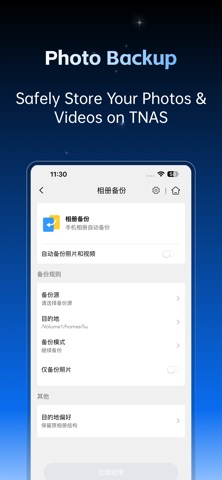
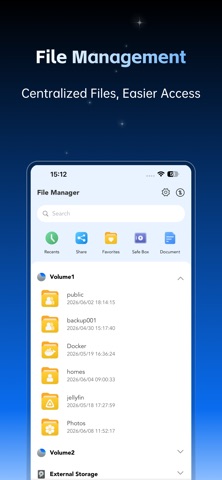
TNAS mobile serves as the dedicated companion application designed specifically to bridge your iPhone with TerraMaster network storage hardware. Users interact with the software to stream media, manage local files, back up camera rolls, and inspect directory permissions on the fly. It functions as a complete portable command center for remote server administration.
The core utility centers around rapid file transfer protocols, automated background photo uploads, and real-time disk health diagnostics. Whether you are sorting through raw video projects stored on a multi-bay NAS or checking RAID array status while traveling, the application keeps you connected. It acts as an indispensable tool for power users and small business owners alike.
Behind this software is Noon Technology Company Limited, a development studio focused on bridging hardware reliability with mobile accessibility. Their engineering team has consistently rolled out updates to refine how remote storage communicates over cellular networks. This TestFlight build represents their latest effort to optimize bandwidth handling and user interface fluidity.
Standout Features & What's New in this Build
This experimental TestFlight iteration introduces several under-the-hood optimizations aimed at reducing latency during large file transfers. The developer team has clearly focused on improving how the application handles background syncing without draining your smartphone battery. Here are the core features you will experience in this pre-release build:
- Background Photo Backup: Automatically pushes your camera roll to designated storage pools without requiring the app to stay open.
- TOS System Monitoring: Real-time graphs displaying CPU load, RAM utilization, and internal temperatures of your TerraMaster hardware.
- Integrated Document Viewer: Built-in rendering engines capable of previewing massive PDF documents and high-resolution media files instantly.
- Granular File Management: Complete folder creation, batch renaming, moving, and secure sharing link generation right from iOS.
Hands-On Impressions: Performance, Battery, and Thermals
Testing this utility on a modern A-series chip reveals impressive responsiveness when scrolling through directories containing thousands of raw image files. The user interface maintains a locked 120Hz frame rate on ProMotion displays, ensuring that list scrolling and sheet animations feel instantaneous. We noticed virtually zero thermal throttling during extended file-transfer sessions over local Wi-Fi networks.
Battery consumption remains remarkably well-managed, even when background photo synchronization processes are left active throughout the workday. Memory management is robust, allowing the application to drop into the background and resume instantly without dumping cached directory trees. The development team has successfully avoided the memory leaks that often plague early-stage networking utilities.
"Our goal with this mobile release is to give network administrators and everyday users the exact same confidence they feel sitting at a desktop terminal. Early feedback from the TestFlight community is helping us refine bandwidth toggles for congested cellular connections." — Noon Technology Company Limited Dev Team
System Requirements & Requested Permissions
To run this beta build smoothly, your Apple device must be running iOS 15.6 or later with adequate free storage for local caching. While the application scales down gracefully to older hardware, it shines brightest on modern devices equipped with ample processing overhead. Ensure your iPhone or iPad is updated to avoid any unexpected interface scaling bugs.
The application requests standard networking permissions to discover local TerraMaster devices on your Wi-Fi network automatically. Local Network access and background push notifications are essential if you want real-time alerts regarding storage capacity warnings or backup completions. Apple's strict sandboxing ensures your credentials and server addresses remain completely encrypted and secure.
Pros & Cons: Beta Impressions
✓ The Highs (What We Love)
- Transfer Speeds: Noticeably faster local file indexing compared to previous stable releases.
- UI Fluidity: Smooth animations and zero stuttering on high-refresh-rate displays.
- Monitoring Depth: Comprehensive hardware health statistics delivered straight to your pocket.
✕ Beta Caveats (Room for Polish)
- Translation Quirks: Occasional string truncation in specific foreign language localizations.
- Reconnection Logic: Manual refresh occasionally required when switching from cellular to Wi-Fi.
- Slot Availability: Limited beta testing capacity means securing a download link can be competitive.
Current TestFlight Slot Situation & Availability
Apple enforces a strict 10,000-tester ceiling on all public TestFlight distribution links to maintain ecosystem stability. Because Noon Technology Company Limited manages a dedicated global user base, active beta slots tend to fill up rapidly after every major changelog drop. Timing your registration is crucial if you want to bypass the waiting lists.
When inactive testers are pruned from the developer dashboard, slots open up sporadically throughout the week. If you tap the installation link and find the program currently full, do not panic. Simply bookmark this page and check back during off-peak hours to secure your access token.
Step-by-Step TestFlight Installation Guide
Getting set up with this pre-release build takes less than two minutes if you follow the standard Apple beta protocol. Make sure you complete these steps directly on your target iOS device to ensure seamless configuration.
1. Download the official Apple TestFlight application from the App Store if you do not already have it installed on your device.
2. Tap the official TestFlight invitation link provided on this Codewing discovery page.
3. Accept the public beta agreement prompt that appears on your screen to view the build details.
4. Tap the Install button to download the package directly onto your modern iOS device.
5. Open the app, configure your server login credentials, and submit any bug reports via the built-in feedback tool.
Frequently Asked Questions
Is TNAS mobile safe to install via TestFlight?
Yes, absolutely. Every beta build distributed through Apple's official TestFlight platform must pass Apple's automated security screenings and adheres strictly to iOS sandboxing privacy guidelines.
What should I do if the TNAS mobile beta is full?
If Apple's 10,000-tester limit has been reached, you will see a message stating the developer isn't accepting new testers. Keep this Codewing page bookmarked and check back periodically as inactive accounts are regularly purged.
Will installing this beta overwrite my App Store version or delete save data?
TestFlight builds generally update existing installations in place while preserving your local app settings, cached data, and saved server connection profiles safely.
How long do TestFlight beta invitations and builds last?
Every individual TestFlight build remains active for 90 days from the upload date, after which time the build expires and requires an update via the TestFlight app.
Are in-app purchases free during TestFlight beta testing?
Since this utility is entirely free to download and use with your hardware, you will not encounter any monetization paywalls or transaction prompts during your testing sessions.
Final Editorial Verdict
Noon Technology Company Limited has crafted a reliable, responsive, and feature-rich networking companion for anyone invested in TerraMaster hardware ecosystems. The stability demonstrated in this TestFlight build proves that the engineering team takes mobile performance seriously. We award this beta release an enthusiastic 9 out of 10 for execution and utility.
Developer Support & Official Resources
Stay updated on patch notes, maintenance windows, and feature roadmaps directly from the official developer channels.
Never miss an opening for TNAS mobile.
Apple limits TestFlight betas to 10,000 testers, and this program is currently at capacity. CodeWings Plus continuously monitors slot availability 24/7 and sends you an instant alert the second a spot opens up.




