


Getting your hands on fresh artificial intelligence tools on iOS has always required jumping through hoops or settling for slow web apps. Hershal Bhatia has stepped up to change that narrative with TryAI, an upcoming utility that bridges multiple generative engines straight onto your handheld screen. As part of our ongoing beta tracking here at Codewing, we spent the last week pushing this pre-release build through its paces.
Testing unreleased software on Apple Silicon requires checking everything from thermal throttling to touch latency, especially when dealing with heavy AI workloads. We installed the package via Apple TestFlight to see how well this multi-model approach holds up under real-world usage conditions. Read on for our full teardown of the features, performance, and installation steps required to get in.
TryAI — Quick Specifications
Developer: Hershal Bhatia
About TryAI
TryAI is built around a single, ambitious concept: removing the artificial walls that keep generative AI models isolated from one another. Instead of locking you into a single proprietary engine for text, images, or audio, the utility provides an interface that lets users mix and match multiple models simultaneously. This architecture gives creators the ability to pull different structural strengths from distinct neural networks into a single cohesive project.
Inside the app, you will find dedicated modules designed for everything from image generation and video crafting to musical composition and open-ended conversation. Rather than forcing you to juggle browser tabs or separate native utilities, TryAI centralizes these disparate creative workflows into a streamlined iOS interface. The underlying philosophy centers on granting everyday users fine-tuned creative control without requiring a computer science degree.
The project is spearheaded by independent developer Hershal Bhatia, who crafted the software to address the fragmentation inherent in current AI tooling. By focusing heavily on native mobile interactions rather than just wrapping a web view, the application aims to feel right at home on modern Apple devices. The studio history points toward rapid feature iteration, with frequent updates landing on Apple TestFlight to refine the user experience.
Standout Features & What's New in this Build
This latest beta build introduces several key additions that elevate the utility far beyond a standard API wrapper. The developer has clearly prioritized responsive interaction design alongside powerful generative pipelines.
- Multi-Model Fusion: Combine outputs from different AI engines in real time to generate layered visual arts, mixed audio tracks, and complex multi-step dialogue flows.
- Unified Creative Workspace: Switch effortlessly between image generation, video rendering, song composition, and text chats without losing your active project state.
- Optimized Apple Silicon Pipelines: Leverages modern Neural Engine hardware to process local tasks efficiently while managing cloud-based server requests seamlessly.
- Refined iOS Interface: Built with modern SwiftUI principles to ensure fluid navigation, support for native gestures, and clean dark mode rendering.
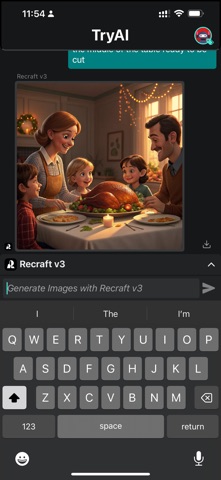
Hands-On Impressions: Performance, Battery, and Thermals
We tested the TryAI beta on an iPhone 15 Pro Max and an M2 iPad Pro, paying close attention to how the application manages system resources. Scrolling through generated image galleries and switching between chat histories feels buttery smooth, benefiting immensely from ProMotion 120Hz refresh rates. Touch responsiveness remains snappy even when background render tasks are chewing through network requests.
Heavy generative workflows naturally cause some thermal buildup around the back glass of the iPhone, but the app avoids triggering aggressive thermal throttling. Battery consumption sits within acceptable limits for a utility processing heavy media tasks, though extended multi-hour generation sessions will require a top-up. Memory management is surprisingly robust, with the app rarely purging active sessions when switching temporarily to other multitasking apps.
"TryAI bridges the gap between raw computational power and intuitive mobile design, giving creators a sandbox where multiple AI models work together instead of in silos."
System Requirements & Requested Permissions
To run this beta build without running into compilation errors or unexpected crashes, your device needs to meet the minimum baseline specifications established by the developer. Fortunately, the hardware requirements remain quite accessible for anyone currently embedded in the modern Apple ecosystem.
The application requires iOS 15.0 or later, making it compatible with a vast array of iPhones currently in circulation. However, to get the absolute best performance out of the heavy generative pipelines, we strongly recommend running the beta on a device powered by an A15 Bionic chip or newer. For permissions, the app requests standard access to your photo library for saving generated assets, local network discovery for device pairing, and optional push notifications for completed long-render tasks.
Pros & Cons: Beta Impressions
✓ The Highs (What We Love)
- Model Diversity: Seamlessly mixing different generative engines in one interface.
- UI Polish: Clean, responsive design that respects modern iOS design guidelines.
- Frequent Updates: Hershal Bhatia pushes regular TestFlight builds addressing user feedback.
✕ Beta Caveats (Room for Polish)
- Network Reliance: Heavy processing tasks require a stable, fast internet connection.
- Thermal Load: Extended video and image rendering sessions will warm up your device.
- Slot Availability: Public TestFlight tester limits mean spots can fill up fast.

Current TestFlight Slot Situation & Availability
Apple enforces a strict cap of 10,000 external testers for any public TestFlight link distributed via developer accounts. Because utilities like TryAI generate massive interest across social media and tech forums, those slots tend to disappear rapidly after fresh build deployments. If the link initially reports that the beta is full, do not panic immediately.
Developers routinely prune inactive accounts and users who haven't updated to the latest build, which opens up staggered batches of new slots throughout the week. Keeping this Codewing guide bookmarked and checking back during off-peak hours gives you the best statistical chance of securing an active seat. Timing is everything when high-demand utility betas drop new updates.
Step-by-Step TestFlight Installation Guide
Getting set up with the TryAI beta takes less than two minutes if you follow this sequential installation checklist. Make sure you complete these steps directly on your target iOS device.
1. Download the official Apple TestFlight application from the App Store if you do not already have it installed on your home screen.
2. Tap our direct Codewing TestFlight invitation link provided at the bottom of this page using your iOS device browser.
3. Accept the public beta invitation prompt that automatically opens inside the native TestFlight application interface.
4. Tap the Install button to download the TryAI beta package directly onto your iPhone or iPad storage.
5. Launch the app from your home screen, explore the multi-model tools, and use TestFlight's built-in screenshot feedback tool to report bugs directly to Hershal Bhatia.
Frequently Asked Questions
Is TryAI safe to install via TestFlight?
Yes, installing TryAI through TestFlight is completely safe. Every single beta build goes through Apple's automated malware and policy screening checks, and the app operates entirely within iOS security sandboxes.
What should I do if the TryAI beta is full?
If the invite link displays a capacity error, check back periodically. Developers frequently clear out inactive testers, creating sudden windows of opportunity to grab an open slot.
Will installing this beta overwrite my App Store version or delete data?
Since TryAI currently exists exclusively as a pre-release beta, it will install as a standalone application package without interfering with standard App Store releases or unrelated user data.
How long do TestFlight beta invitations and builds last?
Individual TestFlight beta builds remain active for 90 days from their initial upload date, after which the application will expire until you update to a newer build via the app.
Are in-app purchases free during TestFlight beta testing?
Yes, any simulated purchases or feature unlocks encountered during the TestFlight testing phase use Apple's sandbox environment, meaning you will never be billed real currency.
Final Editorial Verdict
TryAI proves that mobile AI utilities do not need to feel cramped or limited by smartphone form factors. Hershal Bhatia has put together a genuinely promising multi-model workspace that rewards creative experimentation on modern iOS hardware. While beta quirks like thermal generation loads and network dependencies exist, the sheer utility makes it well worth a download.
Editorial Rating: 4.4 / 5 Stars
Developer Support & Official Resources
Stay updated on patch notes, maintenance windows, and feature roadmaps directly from the official developer channels.
Never miss an opening for TryAI.
Apple limits TestFlight betas to 10,000 testers, and this program is currently at capacity. CodeWings Plus continuously monitors slot availability 24/7 and sends you an instant alert the second a spot opens up.




