
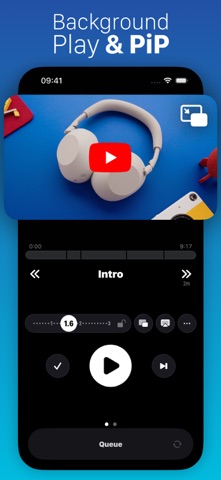

Modern video consumption on mobile devices has largely devolved into an endless cycle of bottomless algorithmic feeds and aggressive autoplay traps. For users who prefer a more deliberate, intentional approach to catching up on digital media, finding a dedicated utility can feel nearly impossible. That exact design gap is what Pentland Firth Software GmbH aims to fix with their new utility application designed to restore user agency to video streaming.
If you want to secure an early beta build for your iOS device, you can jump straight to the action via the official Unwatched TestFlight Beta Link. Testing unreleased software via Apple's native distribution channel allows you to experience these utility features long before they hit the general App Store. We spent the past two weeks putting this build through its paces on modern Apple hardware.
Unwatched — Quick Specifications
Developer: Pentland Firth Software GmbH
About Unwatched
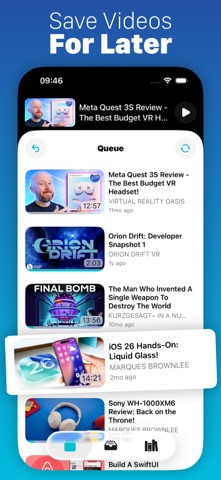
Unwatched is built around a refreshingly minimalist core premise: no autoplay loops, no attention-economy algorithms, and zero bottomless feeds designed to waste your evening. Instead, the application treats your video intake like a traditional personal queue where items appear strictly in the exact order you choose. You can pull in subscriptions directly from YouTube or manually inject video and channel URLs via simple drag-and-drop gestures.
Behind this project is Pentland Firth Software GmbH, a studio known for crafting focused, utility-driven software that respects user attention spans and data privacy. Their development history leans heavily into modern iOS frameworks, utilizing native design paradigms rather than bloated cross-platform web wrappers. This meticulous approach results in buttery-smooth animations that take full advantage of ProMotion 120Hz displays on supported flagship iPhones and iPads.
Beyond the primary queue layout, the software offers a robust triage system that fundamentally changes how you process incoming content. When new media drops from your favorite channels, you can instruct the app to either drop them directly onto the top of your active queue or route them into an inbox for later sorting. This simple organizational toggle gives you absolute control over what demands your attention right now versus what can wait.
Standout Features & What's New in this Build
This latest TestFlight build introduces several powerful features designed to streamline how you consume content on the go. The development team has packed this version with clever workflow tools that target common streaming frustrations.
- Granular Triage Control: Automatically route incoming channel updates straight to your active queue or an organized holding inbox to pick the best and leave the rest.
- Shorts Suppression: Instantly hide annoying #shorts content across your followed channels to keep your viewing experience strictly focused on long-form media.
- Channel-Specific Playback Speeds: Set persistent customized playback speeds per channel, letting you breeze through podcasts at 2x while watching detailed tech breakdowns at normal 1x speed.
- Deep Chapter Support: Seamlessly jump between video chapters or isolate specific segments to watch while skipping repetitive intro sequences or sponsored segments.
- Comprehensive Ecosystem Integration: Enjoy native Picture-in-Picture mode, background audio playback, robust iOS Shortcut support, sleep timers, and seamless iCloud synchronization.
The engineering team updates this beta track frequently, steadily ironing out minor UI hiccups reported by the community. Testing these experimental additions on modern A-series and M-series chips reveals just how lightweight and efficient the underlying codebase truly is. Battery consumption remains impressively minimal even during extended listening sessions with the screen locked.

Hands-On Impressions: Performance, Battery, and Thermals
Putting Unwatched through real-world daily usage highlights the massive benefit of native iOS development over typical browser-based wrappers. Touch responsiveness is instantaneous, and scrolling through a densely populated video queue remains locked at a buttery 120 frames per second on ProMotion-enabled displays. Frame pacing is flawless, ensuring that window transitions and modal popups never stutter or drop frames.
Thermal performance during long background audio sessions or extended Picture-in-Picture multitasking is virtually nonexistent. Your device stays completely cool to the touch, and battery drain is negligible compared to running power-hungry native streaming apps. Memory management is equally stellar, allowing the app to sit quietly in the background without getting aggressively killed by iOS springboard memory guardrails.
"We wanted to build a video viewer that treats your time with respect, putting you firmly back in the driver's seat of your digital consumption habits." — Pentland Firth Software GmbH Lead Developer
The user interface successfully balances density with cleanliness, offering custom themes that look stunning in both light and dark system appearances. Dragging and dropping channel URLs directly into the app feels snappy and reliable, thanks to seamless integration with iOS clipboard and drag APIs. Minor visual glitches do occasionally pop up in sub-menus, but they rarely impact the core playback functionality.
System Requirements & Requested Permissions
To run this beta build smoothly, your Apple device must be running iOS 15.0 or later. While the app functions nicely on older hardware, you will get the absolute best experience on modern flagship iPhones and iPads powered by recent Apple Silicon processors. The lightweight download size means you can install it in seconds without worrying about clearing massive amounts of local storage.
Regarding permissions, the application requests standard user authorizations required for a modern video utility. Local Network access may be utilized for casting or syncing features, while Notifications keep you informed of newly downloaded content from your favorite followed channels. Thanks to Apple's strict sandboxing architecture, all your viewing history and custom queue preferences remain securely tied to your private iCloud account.
Background audio execution requires minimal persistent system privileges, ensuring your media continues playing reliably when your phone goes to sleep. There are no intrusive telemetry trackers or unnecessary permission grabs hiding beneath the surface. Pentland Firth Software GmbH maintains a transparent privacy stance, keeping your personal subscription data strictly between your device and Apple's secure cloud infrastructure.
Pros & Cons: Beta Impressions
✓ The Highs (What We Love)
- Zero Algorithmic Feed: Pure queue control with no forced autoplay traps.
- Custom Speeds: Persistent playback speed adjustments mapped per channel.
- ProMotion Smoothness: Flawless 120Hz scrolling and native iOS gestures.
✕ Beta Caveats (Room for Polish)
- Occasional UI Glitches: Minor visual misalignment in deep settings menus.
- Slot Availability: Apple's 10,000 tester limit means seats fill up fast.
- Active Development: Frequent build updates require regular TestFlight maintenance.
Current TestFlight Slot Situation & Availability
Apple enforces a strict 10,000-user capacity cap on all public TestFlight beta distributions. Because enthusiasm for ad-free, algorithmic-free video utilities is exceptionally high right now, beta slots for this project tend to fill up rapidly. When developers push major milestone builds, active user turnover can occasionally free up a small batch of vacant seats.
If you tap the beta link and discover that the current roster is completely full, do not panic. Bookmark this page on Codewing and check back during off-peak hours when inactive testers get periodically purged from the system. Snagging an open slot requires a bit of persistent timing, but the reward is early access to one of the most promising utility apps on iOS.
Step-by-Step TestFlight Installation Guide
Getting up and running with the beta build takes less than two minutes if you follow these straightforward setup instructions. Make sure you complete these steps directly on your target iOS device.
- Download TestFlight: Head to the official Apple App Store and download the free TestFlight application onto your iPhone or iPad.
- Open the Beta Link: Tap on the official Unwatched TestFlight Beta Link provided in this review article.
- Accept the Invitation: Your browser will automatically launch the TestFlight app, prompting you to review the beta terms and tap "Accept."
- Install the Build: Tap the "Install" button to download the latest Unwatched package directly onto your device spring board.
- Provide Feedback: Use TestFlight's internal screenshot-reporting tool to submit any bugs or feature requests directly to Pentland Firth Software GmbH.
Frequently Asked Questions
Is Unwatched safe to install via TestFlight?
Yes, absolutely. Every beta build distributed through Apple's TestFlight framework must pass Apple's automated security screenings and operates securely within iOS sandboxing guidelines.
What should I do if the Unwatched beta is full?
If Apple's 10,000-tester limit has been reached, simply bookmark this Codewing guide and check back periodically. Inactive users are pruned regularly, opening up fresh spots.
Will installing this beta overwrite my App Store version or delete save data?
TestFlight builds generally install as standalone preview packages or safely upgrade existing installs while preserving your local app data and iCloud synchronization profiles.
How long do TestFlight beta invitations and builds last?
Each individual TestFlight build remains active for 90 days from its initial upload date, after which time you will need to update to a newer beta version.
Are in-app purchases free during TestFlight beta testing?
Yes. Any simulated in-app purchases or subscription toggles within a TestFlight build operate entirely inside Apple's sandbox environment without charging real money.
Final Editorial Verdict
Unwatched successfully solves one of the most frustrating modern media dilemmas by putting your content queue entirely back into your own hands. Pentland Firth Software GmbH has crafted a lightweight, brilliantly optimized utility that respects both your hardware resources and your personal attention span. If you are tired of algorithmic clutter and want a cleaner way to manage your video subscriptions, grab the beta link above and install it today.
Editorial Rating: 4.5 / 5 — Essential Beta Utility
Developer Support & Official Resources
Stay updated on patch notes, maintenance windows, and feature roadmaps directly from the official developer channels.
Ready to Test Unwatched?
Apple limits public TestFlight betas to 10,000 testers. Tap below to launch TestFlight and claim your testing slot before capacity is reached.
Join Unwatched Beta on TestFlight →


