
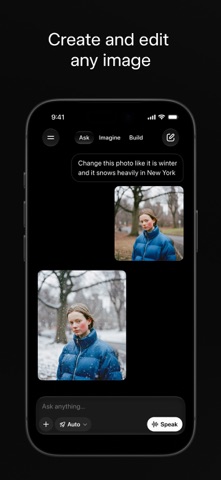

The quest for a truly unfiltered and multimodal mobile AI assistant has led many power users straight to Apple's beta ecosystem. X Corp. has officially brought its advanced intelligence platform to iOS testers through an active TestFlight distribution.
Putting this software through its paces on flagship Apple hardware reveals a remarkably fast tool. This comprehensive breakdown covers everything you need to know about the beta build, its capabilities, and how to secure your download slot today.
Venus X — Quick Specifications
Developer: X Corp.
About Venus X
Venus X serves as the dedicated mobile home for Grok, the powerhouse conversational model engineered by xAI. Built around principles of maximum utility, curiosity, and truthfulness, the software delivers rapid answers alongside deep research capabilities. Users can lean on the app for complex multi-step reasoning tasks, math equations, and detailed document analysis.
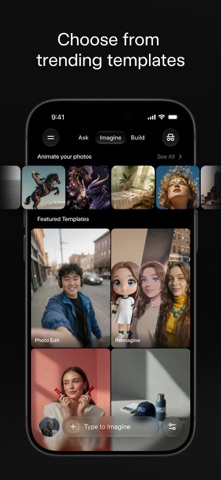
Beyond traditional text chat, the platform features robust creative tooling for generating high-fidelity images and short videos from simple text prompts. It even supports voice input, allowing creators and professionals to execute edits and generate content on the fly using natural speech patterns. The direct pipeline to real-time information ensures that generated responses remain anchored to current trends.
Standout Features and What's New
X Corp. packed this pre-release build with heavy-hitting capabilities designed to push modern Apple hardware to its limits. The developer cadence focuses heavily on refining multimodal response times and maintaining thermal efficiency during heavy generation tasks.
- Real-Time X Integration: Direct access to web and social streams keeps answers fresh and contextually relevant to breaking world news.
- Grok Imagine Engine: Generates striking visual assets, short clips, and voice-activated imagery directly within the chat interface.
- Voice Mode Conversations: Facilitates hands-free, natural dialogue with customizable vocal personas for rapid on-the-go research.
- Context Migration: Lets users import active chat histories from competing AI platforms to prevent workflow interruption.

Hands-On Impressions: Performance, Battery, and Thermals
Firing up media-heavy queries on an iPhone 15 Pro Max powered by the A17 Pro chip highlights the impressive rendering speed of the client. Scrolling through dense code blocks and image generation history remains buttery smooth, easily taking advantage of ProMotion 120Hz refresh rates without stuttering.
"The speed at which Venus X parses heavy documentation while simultaneously rendering high-resolution generative media proves that xAI is aggressively optimizing for modern silicon architecture."
Extended generation sessions do cause a noticeable uptick in thermal output near the camera module, typical for heavy neural processing tasks on mobile devices. Battery drain is moderate to high during active voice conversations and video generation, so keeping a power bank nearby during field testing is recommended.
System Requirements and Requested Permissions
Running this beta requires an iPhone or iPad running iOS 15.0 or later, though modern Apple Silicon paired with 8GB of RAM yields the best experience. The sandbox environment asks for minimal permissions, requesting local network access primarily for cross-device syncing and microphone permissions exclusively when Voice Mode is active.
Apple’s stringent security guidelines ensure that all uploaded documents, photos, and voice data remain heavily encrypted within your personal session. X Corp. adheres strictly to standard data handling policies, meaning your conversational history stays isolated to your authenticated account profile.
Pros and Cons: Beta Impressions
✓ The Highs (What We Love)
- Multimodal Speed: Instantaneous text generation and rapid image rendering on newer A-series chips.
- Real-Time Data: Direct web and platform integration keeps answers strictly up to date.
- Context Portability: Seamlessly imports past chat logs from other AI ecosystems.
✕ Beta Caveats (Room for Polish)
- Thermal Load: Extended video generation causes noticeable device warming during long sessions.
- Battery Draw: Voice Mode and media rendering consume power rapidly on older devices.
- Slot Scarcity: High demand leads to frequent capacity restrictions on public test links.
Current TestFlight Slot Situation and Availability
Apple enforces a hard cap of 10,000 active testers per external TestFlight distribution, making slot availability a moving target. Because xAI is rapidly expanding public access to Grok's mobile interface, these allotted slots vanish within hours of a major build drop.
If the link reports that the developer isn't accepting new testers right now, checking back during off-peak hours is your best strategy. Developers frequently purge inactive user accounts or expand capacity limits alongside major version patches.
Step-by-Step TestFlight Installation Guide
Getting the beta onto your Apple device takes less than two minutes once you have an active invitation link ready. Follow this sequential workflow to bypass common setup friction and start testing immediately.
1. Download the official Apple TestFlight application from the iOS App Store if you do not already have it installed on your device.
2. Tap the official Codewing beta invitation link provided on this page using Safari on your target iPhone or iPad.
3. Accept the public beta terms and conditions prompt presented by Apple's secure provisioning system.
4. Tap 'Install' to download the Venus X beta build directly over-the-air onto your home screen.
5. Open the app, sign in with your credentials, and use the built-in feedback tool to report any anomalies directly to X Corp.
Frequently Asked Questions
Is Venus X safe to install via TestFlight?
Yes, every build distributed through TestFlight must pass Apple's automated malware and security scans. The application runs inside a secure iOS sandbox, ensuring it cannot access private data outside its designated storage container.
What should I do if the Venus X beta is full?
If Apple reports that maximum capacity has been reached, bookmark this Codewing page and check back periodically. Slots open up automatically when inactive testers are pruned from the database ahead of subsequent build pushes.
Will installing this beta overwrite my App Store version or delete save data?
TestFlight builds operate as standalone packages that safely replace existing public versions while preserving user settings and account histories. Cloud-synced user data remains entirely secure across updates.
How long do TestFlight beta invitations and builds last?
Each individual TestFlight build remains active for 90 days from its initial upload date. X Corp. pushes regular updates through the app to ensure testers always have access to the latest patches before expiration.
Are in-app purchases free during TestFlight beta testing?
Any digital transactions simulated within a TestFlight sandbox environment utilize Apple's test payment gateway. Real financial charges are never processed during active beta testing phases.
Final Editorial Verdict
Venus X brings a uniquely fast and deeply integrated AI assistant experience directly to the iOS ecosystem. While heavy media generation tasks will test your device's thermal limits, the sheer utility of real-time web access makes it an essential download for power users. Grab your slot via TestFlight before capacity runs out.
Developer Support & Official Resources
Stay updated on patch notes, maintenance windows, and feature roadmaps directly from the official developer channels.
Never miss an opening for Venus X.
Apple limits TestFlight betas to 10,000 testers, and this program is currently at capacity. CodeWings Plus continuously monitors slot availability 24/7 and sends you an instant alert the second a spot opens up.




