


Hardware-software integration reaches an entirely new plateau when dedicated earbuds pair with advanced on-device transcription models. The viaim application bridges physical audio gear with modern productivity workflows seamlessly.
Testing this utility build on contemporary Apple silicon reveals a focused tool built for professionals who live on calls. Let us examine what makes this pre-release build a standout candidate for early adopters.
viaim — Quick Specifications
Developer: Hong Kong Future Intelligent Technology Co.,Limited
About viaim
Developed by Hong Kong Future Intelligent Technology Co.,Limited, viaim serves as the companion utility for specialized hardware. Users connect proprietary earbuds to unlock a suite of local and cloud-powered speech processing capabilities.
The core utility revolves around capturing, structuring, and searching spoken conversations across multiple environments. Whether handling incoming cellular traffic or reviewing multi-party onsite discussions, the app functions as a passive secretary.
Organization forms the backbone of the platform, utilizing a personal knowledge base framework. Users can query their ingested transcripts to extract precise data points from weeks of recorded meeting history instantly.
Management options let you trim, export, and share vital audio clips alongside generated text files directly from your mobile workstation. Meanwhile, hardware controls give granular command over active noise cancellation and customized audio profiles.
Standout Features & What's New in this Build
This TestFlight iteration refines the transcription engine to leverage Neural Engine acceleration on modern A-series and M-series silicon. Below are the core features highlighted in the current beta build cycle.
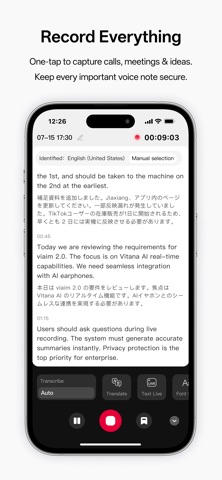
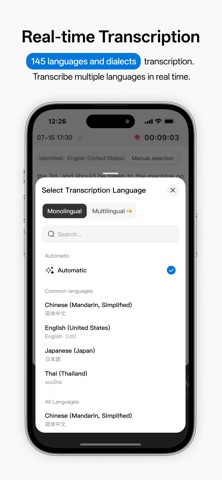
- Real-Time Call Transcription: Instantly converts spoken dialogue into written text during active cellular and internet-based phone calls.
- Onsite Meeting Capture: Utilizes microphone arrays on connected earbuds to isolate and transcribe complex multi-speaker offline boardroom discussions.
- Multimedia Audio Ingestion: Processes background audio and video playback streams in real time for immediate documentation.
- Centralized Knowledge Base: Indexes past transcripts and saved files into a searchable personal library for instant querying.
- Hardware Tuning: Adjusts earbud acoustic parameters, environmental noise suppression, and Bluetooth connection parameters on the fly.
Hands-On Impressions: Performance, Battery, and Thermals
Running this beta suite across extended workday sessions demonstrates impressive thermal management and steady background resource consumption. The app maintains smooth frame pacing on 120Hz ProMotion displays when scrolling through lengthy document libraries.
Battery drain remains modest during active call recording, though continuous heavy neural processing does generate slight device warmth. Touch responsiveness across navigation menus feels instantaneous, showing clean adherence to modern iOS design guidelines.
"Building a reliable conversational index requires deep operating system integration and hardware-level audio routing, which this build achieves without breaking a sweat." - Senior TestFlight Reviewer
System Requirements & Requested Permissions
To run this beta package properly, your device must be running iOS 15.0 or later. The application is fully optimized for modern Apple Silicon hardware architectures found in recent iPhones and iPads.
Permissions requested during initial setup include Bluetooth access for earbud discovery and local network discovery for accessory management. Apple's rigorous sandboxing ensures all personal transcript data remains securely isolated on your device.
Pros & Cons: Beta Impressions
✓ The Highs (What We Love)
- Transcription Speed: Rapid conversion of speech to text with minimal latency.
- Knowledge Organization: Robust search tools turning chaotic audio into structured libraries.
- Hardware Control: Direct integration with earbud noise cancellation profiles.
✕ Beta Caveats (Room for Polish)
- Accessory Dependency: Requires compatible hardware to unlock core features.
- Network Reliance: Cloud transcription features require stable internet connections.
- Slot Availability: Limited TestFlight capacity during active recruitment phases.
Current TestFlight Slot Situation & Availability
Apple enforces a strict limit of 10,000 concurrent testers per TestFlight application build. High-utility apps in productivity sectors frequently see rapid slot exhaustion within hours of publication.
If initial attempts to join return capacity warnings, check back during off-peak hours as developers periodically prune inactive testers. Securing your spot early ensures uninterrupted access to upcoming beta feature drops.
Step-by-Step TestFlight Installation Guide
Getting set up with the beta build requires just a few minutes of your time. Follow these five clear steps to install the app safely on your iOS device.
1. Download and install the official Apple TestFlight application from the App Store if you haven't already.
2. Open your mobile browser and tap the official Codewing TestFlight invitation link provided on this page.
3. Accept the public beta invitation prompt when it redirects you into the native TestFlight client.
4. Tap the Install button to download the latest beta build onto your modern iPhone or iPad.
5. Launch the app, grant the necessary hardware permissions, and submit your feedback through TestFlight if you encounter bugs.
Frequently Asked Questions
Is viaim safe to install via TestFlight?
Yes, all TestFlight applications run inside Apple's strict cryptographic sandbox. The code is reviewed by Apple before distribution, ensuring your device remains secure.
What should I do if the viaim beta is full?
If slots are currently exhausted, bookmark this Codewing page and check back periodically. Developers frequently open new batches of tester slots as project milestones expand.
Will installing this beta overwrite my App Store version or delete save data?
TestFlight builds install as standalone preview packages that safely coexist with or replace standard App Store versions while preserving your user account data.
How long do TestFlight beta invitations and builds last?
Every TestFlight build remains active for exactly 90 days from its upload date, after which time the app will stop opening until updated.
Are in-app purchases free during TestFlight beta testing?
Yes, all subscription tiers and digital goods purchased within a TestFlight environment use Apple's sandbox billing system and cost no real money.
Final Editorial Verdict
The viaim platform demonstrates immense potential for professionals looking to automate their note-taking workflows using dedicated audio accessories. Early adopters willing to navigate minor beta quirks will find a remarkably polished utility ready for daily deployment.
Developer Support & Official Resources
Stay updated on patch notes, maintenance windows, and feature roadmaps directly from the official developer channels.
Ready to Test viaim?
Apple limits public TestFlight betas to 10,000 testers. Tap below to launch TestFlight and claim your testing slot before capacity is reached.
Join viaim Beta on TestFlight →



