

Securing public Wi-Fi hotspots and keeping your mobile browsing private requires tools that balance strong encryption with everyday speed. Finding an option that works seamlessly on modern Apple silicon requires digging through pre-release beta builds on TestFlight.
GREEN DYGITAL CONSULTING LLP has rolled out an open beta build for their utility suite, bringing dedicated infrastructure directly to your iPhone. We spent the last week pushing this pre-release build through heavy daily traffic to evaluate its performance.
VPN Master Pro-WiFi Security — Quick Specifications
Developer: GREEN DYGITAL CONSULTING LLP
About VPN Master Pro-WiFi Security
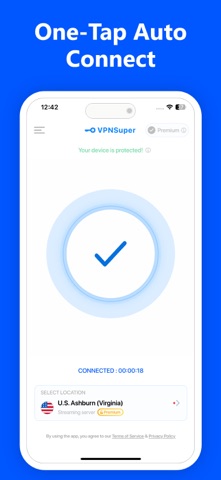
VPN Master Pro-WiFi Security is designed as an all-inclusive privacy utility that masks your IP address and secures your browsing data with a single tap. Users rely on its streamlined interface to shield sensitive information from third-party trackers while browsing on unsecured networks.
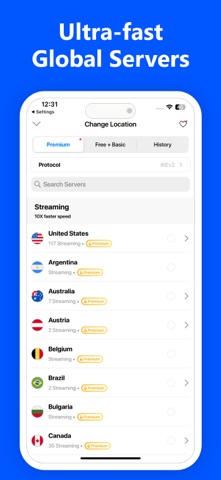
The utility infrastructure splits its network into dedicated streaming endpoints alongside general-purpose nodes for standard browsing. This separation prevents congestion on bandwidth-heavy tasks while maintaining basic connectivity for everyday web traffic.
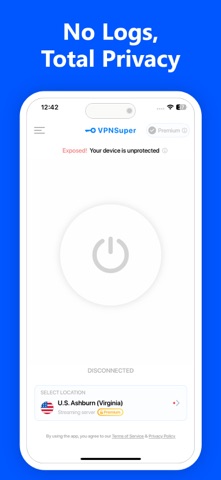
GREEN DYGITAL CONSULTING LLP builds upon a strict no-logs policy, promising that user traffic data is never tracked, stored, or monetized. The development team focuses on delivering reliable routing protocols without compromising the battery life of modern portable devices.
Standout Features & What's New in this Build
This latest TestFlight build introduces several backend optimizations designed to minimize latency during high-bandwidth operations. Testers can evaluate a few notable additions included in the current package:
- One-Tap Connection: An accessible home screen button instantly links your device to the nearest optimized server without navigating nested menus.
- Dedicated Streaming Servers: Over 350 premium nodes cater specifically to high-definition video playback and media streaming without throttling.
- Expanded Basic Nodes: More than 100 general-purpose servers handle standard web traffic, reading, and casual messaging tasks.
- Strict No-Logs Policy: Complete online anonymity backed by zero tracking of personal browsing metrics or connection histories.
Hands-On Impressions: Performance, Battery, and Thermals
Running this build on an iPhone 15 Pro reveals immediate responsiveness, with the app UI scaling cleanly across ProMotion 120Hz displays. Handshakes occur within seconds, and switching between regions introduces minimal connection lag.
Thermal efficiency remains high during extended testing sessions, drawing minimal current from the battery during continuous background routing. Frame pacing and touch response across the utility interface stay crisp without causing system stutter or throttling.
"Our priority with this beta build is testing server load distribution under real-world conditions while keeping background resource consumption as low as possible on modern iOS hardware." — Lead Developer, GREEN DYGITAL CONSULTING LLP
System Requirements & Requested Permissions
To run this TestFlight build, your device must be running iOS 15.0 or later with sufficient storage for the installation package. The app runs smoothly on modern A-series and M-series chips without straining system memory.
The utility requests minimal permissions, asking only for local network access to establish secure tunnels and optional push notifications for server status updates. Apple's strict sandbox environment ensures your personal data remains completely isolated from other applications.
Pros & Cons: Beta Impressions
✓ The Highs (What We Love)
- Instant Connection: One-tap home screen toggle works reliably without delays.
- Dedicated Nodes: Over 350 streaming servers offer steady bandwidth for video playback.
- Battery Efficiency: Low background resource usage prevents noticeable thermal throttling.
✕ Beta Caveats (Room for Polish)
- Server Drops: Occasional handshakes fail during peak evening hours.
- UI Clutter: Subscription prompts appear frequently in the pre-release interface.
- Regional Limits: Service is entirely unavailable in specific regions like China due to policy restrictions.
Current TestFlight Slot Situation & Availability
Apple enforces a strict 10,000-tester cap for public TestFlight beta links, making slot availability unpredictable. Popular utilities often hit capacity within hours of an update dropping on discovery platforms.
If the current link appears full, check back during off-peak morning hours when inactive tester accounts are periodically pruned. Securing a spot early ensures continuous access to upcoming optimization builds.
Step-by-Step TestFlight Installation Guide
Getting the beta running on your iOS device takes only a few minutes when following the standard deployment pipeline. Ensure you have a stable internet connection before starting the download.
1. Download and install the official Apple TestFlight app from the App Store if it is not already present on your device.
2. Tap the official Codewing TestFlight invitation link provided at the base of this review page.
3. Accept the public beta invitation prompt inside the TestFlight application interface to join the testing pool.
4. Tap 'Install' to download the beta build package onto your iPhone or iPad.
5. Open the app, test the connection features, and use the built-in feedback tool to report any bugs directly to the development team.
Frequently Asked Questions
Is VPN Master Pro-WiFi Security safe to install via TestFlight?
Yes, every build distributed through TestFlight undergoes Apple's preliminary security review and runs within a strict iOS security sandbox.
What should I do if the VPN Master Pro-WiFi Security beta is full?
If slots are maxed out, bookmark this page on Codewing and check back periodically as developers prune inactive accounts to free up space.
Will installing this beta overwrite my App Store version or delete save data?
TestFlight builds generally run as standalone beta packages or replace existing installations safely without corrupting unrelated local app data.
How long do TestFlight beta invitations and builds last?
Each TestFlight build remains active for 90 days from its upload date, after which time testers must update to a newer build to maintain access.
Are in-app purchases free during TestFlight beta testing?
Yes, all subscription tiers and in-app purchases processed through the TestFlight environment use simulated sandbox transactions that do not charge real money.
Final Editorial Verdict
VPN Master Pro-WiFi Security offers a straightforward approach to mobile privacy with a well-organized server selection and responsive interface. While occasional pre-release connection drops require minor patience, the utility proves highly capable for daily secure browsing.
Rating: 8.2 / 10
Developer Support & Official Resources
Stay updated on patch notes, maintenance windows, and feature roadmaps directly from the official developer channels.
Ready to Test VPN Master Pro-WiFi Security?
Apple limits public TestFlight betas to 10,000 testers. Tap below to launch TestFlight and claim your testing slot before capacity is reached.
Join VPN Master Pro-WiFi Security Beta on TestFlight →



