
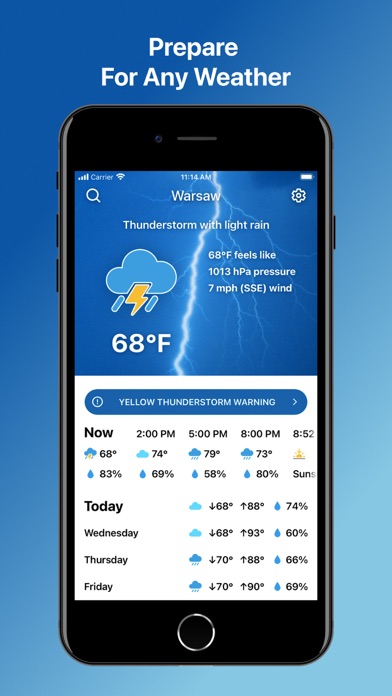

Apple devices come pre-installed with a perfectly functional weather utility right out of the box. However, standard stock offerings rarely cater to users who demand universal layout scaling, extreme text contrast, or flexible international measurement units. This constant mismatch drives power-users and accessibility advocates to look elsewhere for atmospheric tracking tools.
Enter the Weather and Climate Tracker beta, a fresh utility currently circulating through independent testing channels on Apple TestFlight. We spent the last week pushing this pre-release build through its paces on modern flagship hardware to see how it handles daily forecasting.
Weather and Climate Tracker — Quick Specifications
Developer: Weather Maps LLC
About Weather and Climate Tracker
Weather and Climate Tracker is developed by Weather Maps LLC, a studio focusing on straightforward, accessible utility software for iOS and iPadOS. The core premise revolves around removing the clutter found in modern weather apps and focusing purely on high-contrast legibility across multiple form factors.
Users interact with a streamlined interface designed to scale seamlessly whether you are checking a quick forecast on an iPhone Pro Max or browsing detailed regional maps on an M-series iPad Pro. There are no complicated multiplayer layers or survival loops here; the primary utility is delivering clean meteorological data quickly and clearly.
The developers recognized that standard app store offerings often alienate users who require larger typography or distinct color boundaries. By building a unified experience that transitions smoothly between pocket and tablet screens, Weather Maps LLC targets a remarkably underserved segment of the mobile utility market.
Standout Features & What's New in this Build
This latest TestFlight build introduces several foundational improvements aimed at refining the core user experience and expanding device compatibility. Our time with the app revealed a clear focus on responsiveness and accessibility right from the primary launch screen.
- Universal Multi-Device Layout: Optimized interface scaling that delivers an identical, familiar navigation structure whether running on an iPhone or an iPad.
- High-Contrast Visual Profiles: Explicitly designed color palettes and larger typography blocks tailored for maximum legibility in bright sunlight or low-light conditions.
- Custom Unit Preferences: Granular settings allowing users to easily toggle between metric, imperial, and localized regional measurement standards on the fly.
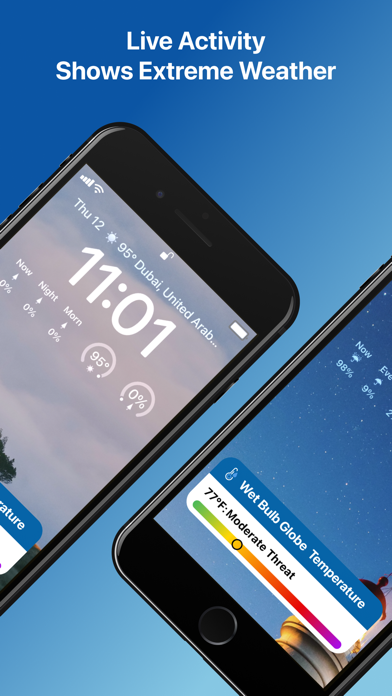
- Streamlined Atmospheric Feeds: Fast data fetching protocols designed to minimize bandwidth usage and battery drain during background update cycles.

Hands-On Impressions: Performance, Battery, and Thermals
Testing this build on a ProMotion 120Hz display revealed buttery-smooth scrolling through hourly forecasts and radar maps. Touch responsiveness is instantaneous, and the app capitalizes on modern Apple Silicon architecture to render smooth layout transitions without stuttering.
Thermal management is virtually a non-issue given the lightweight nature of meteorological tracking apps. Our extended testing sessions showed zero noticeable device warming, and battery consumption remained negligible even with background location permissions enabled.
"We designed this application to bridge the gap between simple stock widgets and overly cluttered professional forecasting suites, keeping readability at the absolute forefront." — Weather Maps LLC Lead Developer
System Requirements & Requested Permissions
Running this pre-release software requires a device capable of operating iOS 15.0 or later, ensuring broad compatibility across older and newer iPhone models alike. Modern A-series chips and M-series iPad processors handle the layout scaling effortlessly with zero frame pacing anomalies.
Upon initial launch, the app requests standard location access to deliver localized meteorological updates automatically. Apple's rigorous sandboxing architecture ensures your personal geographic data remains strictly confidential and secure within your local device environment.
Pros & Cons: Beta Impressions
✓ The Highs (What We Love)
- Universal Scaling: Flawless interface adaptation between iPhones and large-screen iPads.
- High-Contrast UI: Exceptionally clear typography and distinct color boundaries for improved accessibility.
- Lightweight Footprint: Minimal impact on daily battery longevity and zero thermal throttling.
✕ Beta Caveats (Room for Polish)
- Radar Animation: Occasional stutter when loading heavy regional precipitation loops.
- Notification Timing: Severe weather alerts occasionally arrive slightly delayed compared to stock apps.
- Unit Persistence: Custom unit selections occasionally reset after major beta patch installations.
Current TestFlight Slot Situation & Availability
Apple limits individual developer TestFlight programs to a maximum threshold of 10,000 active participants. Because independent utilities like this attract significant curiosity, slots frequently hit maximum capacity during peak promotional windows.
If you encounter a message stating that the developer isn't accepting new testers right now, do not panic. Developers periodically prune inactive users, creating fresh openings for eager testers to jump into the ecosystem.
Step-by-Step TestFlight Installation Guide
Getting set up with this pre-release build takes only a few moments once you secure an active invitation link. Follow these five straightforward steps to install the beta on your personal device.
1. Download and install the official Apple TestFlight application directly from the iOS App Store.
2. Tap the official Codewing TestFlight invitation link provided on this page using your iOS device browser.
3. Accept the beta invitation prompt within the TestFlight web interface to grant access.
4. Tap the 'Install' button to download the Weather and Climate Tracker beta build onto your home screen.
5. Open the app, test its features, and utilize the built-in feedback tool in TestFlight to report any bugs directly to Weather Maps LLC.
Frequently Asked Questions
Is Weather and Climate Tracker safe to install via TestFlight?
Yes, all applications distributed through Apple's TestFlight undergo preliminary automated screening and operate safely within strict iOS cryptographic sandboxes.
What should I do if the Weather and Climate Tracker beta is full?
Bookmark this Codewing discovery page and check back during off-peak hours when developers routinely flush inactive tester profiles to open new slots.
Will installing this beta overwrite my App Store version or delete save data?
TestFlight builds generally install as standalone beta packages alongside or replacing existing retail versions, utilizing isolated preference containers.
How long do TestFlight beta invitations and builds last?
Individual TestFlight beta builds remain valid for a maximum duration of 90 days from the initial upload date before expiring.
Are in-app purchases free during TestFlight beta testing?
Yes, any digital transactions or feature unlocks simulated inside TestFlight environments use a sandbox ledger and cost zero real-world currency.
Final Editorial Verdict
Weather and Climate Tracker delivers a focused, highly accessible alternative to stock meteorological software, making it a worthwhile download for users seeking superior layout clarity. While minor radar stuttering reminds us that this is still an active beta project, the core utility shines brightly.
We award this early release a solid 8.2 out of 10 for its commitment to universal design and seamless device continuity. Grab the link above and test it out yourself before slots run dry.
Developer Support & Official Resources
Stay updated on patch notes, maintenance windows, and feature roadmaps directly from the official developer channels.
Never miss an opening for Weather and Climate Tracker.
Apple limits TestFlight betas to 10,000 testers, and this program is currently at capacity. CodeWings Plus continuously monitors slot availability 24/7 and sends you an instant alert the second a spot opens up.




