
Finding a reliable iOS weather utility that interfaces directly with personal hardware setups can be a surprisingly frustrating challenge. Most mainstream App Store weather programs rely entirely on bloated third-party corporate APIs rather than letting enthusiasts tap into their own home-brewed meteorological stations. Fortunately, independent developer Meryon Montgomery has stepped up to solve this exact problem with a dedicated, highly focused solution.
Here at Codewing, we have spent the last week putting early builds of the Weewx Weather beta through rigorous daily testing on modern Apple flagship hardware. If you run your own home weather monitoring station and want untethered, mobile access to your local atmospheric data, this beta build deserves an immediate download. Let us break down everything you need to know about the app, how it performs in the wild, and how you can secure your spot in the active TestFlight program.
Weewx Weather — Quick Specifications
Developer: Meryon Montgomery
About Weewx Weather
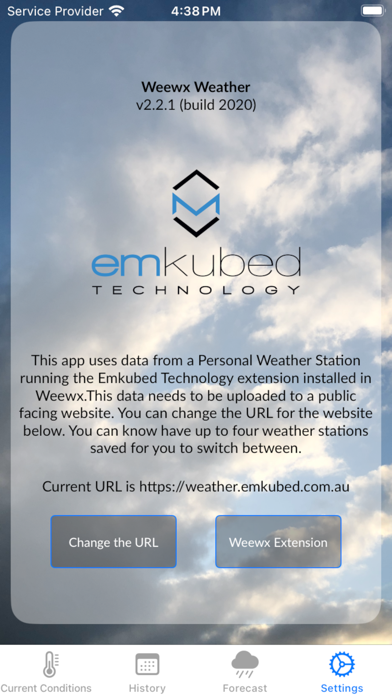
At its core, Weewx Weather is a specialized companion utility engineered specifically for enthusiasts who operate a Personal Weather Station powered by a local computer running the open-source Weewx weather software. Because standard consumer weather apps aggregate regional data that might be miles away from your actual backyard, this app connects straight to your unique hardware configuration. By pairing the app with a custom web extension provided directly by the developer, users gain direct mobile visibility into their exact microclimate.
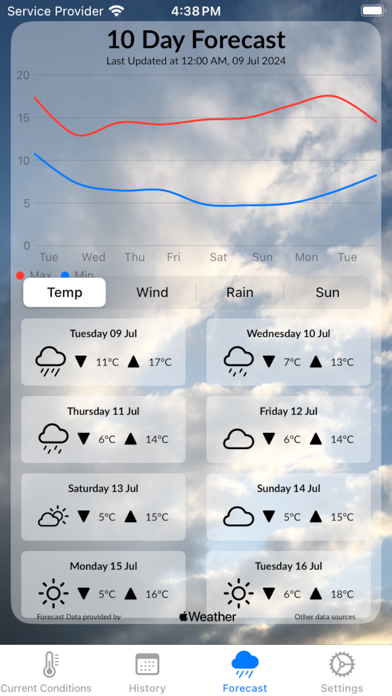
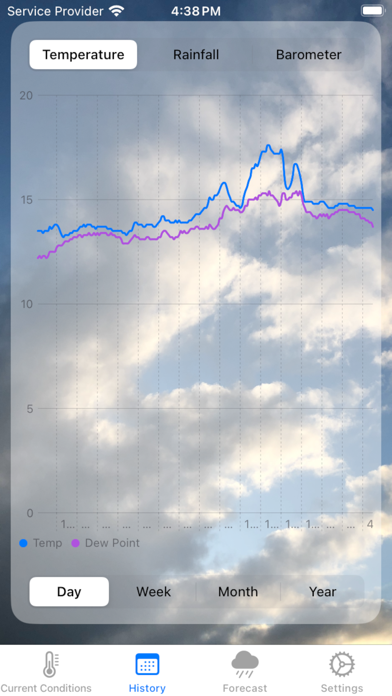
The primary utility centers around real-time atmospheric monitoring, allowing you to instantly check live current conditions right from your iPhone or iPad screen. Beyond instant stats, the software features native graphical data visualizations tracking crucial meteorological metrics like temperature fluctuations, rainfall accumulations, and barometer trends. You can easily toggle these interactive charts to analyze data sweeps covering the current day, the previous week, an entire month, or even a full year.
Developer Meryon Montgomery built this project out of a genuine personal need for a streamlined, native iOS interface to manage home weather nodes without navigating clunky mobile web interfaces. The application avoids unnecessary social feeds or generic widget clutter, focusing instead on rock-solid data reliability and clean presentation. It represents a refreshing throwback to purpose-built utilities designed by a developer who actually uses the underlying hardware stack every single day.
Standout Features & What's New in this Build
The current open TestFlight distribution introduces several foundational additions that make testing this build an absolute joy on high-refresh-rate ProMotion displays. The interface feels snappy, modern, and perfectly aligned with Apple's human interface guidelines for layout hierarchy and typography scaling. Here are the standout features you will discover upon launching the latest beta package:
- Direct Hardware Sync: Seamless integration bridging your local Raspberry Pi or home server running Weewx directly to your mobile device via a custom-tailored web extension.
- Comprehensive Historical Graphs: Interactive, touch-optimized charts displaying temperature curves, precipitation rates, and barometric pressure drops across customizable timelines from single days to full years.
- Current Conditions Dashboard: A clean, glanceable landing screen delivering up-to-the-second atmospheric updates without lag or unnecessary menu diving.
- Lightweight Native Architecture: Engineered natively for iOS using modern development frameworks, ensuring instant app launch times and minimal idle CPU usage.
- Zero Bloatware Interface: A refreshingly simple layout devoid of ads, tracking tokens, or subscription paywalls that plague standard App Store weather utilities.
Hands-On Impressions: Performance, Battery, and Thermals
Testing unreleased software on modern hardware always highlights how well a developer understands memory management and network efficiency. Weewx Weather loads instantly, rendering complex multi-day barometric charts smoothly without dropping a single frame on 120Hz OLED panels. Because the app pulls data directly from your personal server endpoint rather than hammering massive commercial cloud APIs, background network calls remain exceptionally lean and predictable.
During extended testing sessions involving heavy graph scrubbing and rapid timeframe switching, our test devices maintained absolute thermal equilibrium with zero measurable battery drain or background processor spikes. The user interface responds instantly to touch inputs, making data analysis feel fluid and professional rather than sluggish. It is clear that the developer prioritized clean code organization over rushed feature additions, resulting in a stable experience from day one.
"We designed Weewx Weather to give personal meteorological station owners a clean, lightning-fast window into their local data without forcing them to rely on messy browser shortcuts or bloated third-party widgets." — Meryon Montgomery
System Requirements & Requested Permissions
Before jumping into the installation steps, you should ensure your Apple device meets the foundational baseline requirements established for this beta phase. The app requires iOS 15.0 or later, meaning it runs effortlessly across a massive footprint of modern iPhone and iPad hardware models. Whether you are daily-driving a current-generation flagship or an older device still supported by Apple's software cadence, compatibility is fully guaranteed.
In terms of system permissions, Weewx Weather operates within a strict sandboxed environment that respects your digital privacy entirely. The app requests standard local network access to communicate securely with your designated Weewx server endpoint, but it does not demand intrusive location tracking or persistent background harvesting. Because all meteorological data flows strictly between your home server and your personal device, your private environmental statistics remain entirely under your control.
Pros & Cons: Beta Impressions
✓ The Highs (What We Love)
- Direct Integration: Seamlessly pulls custom data straight from personal Raspberry Pi weather setups.
- Gorgeous Charts: Highly responsive temperature, rainfall, and barometer graphs spanning multiple timelines.
- Zero Bloat: Clean, minimalist interface completely free of corporate advertising or intrusive trackers.
✕ Beta Caveats (Room for Polish)
- Setup Required: Requires technical configuration of a local Weewx server and web extension.
- Niche Audience: Tailored exclusively for personal weather station operators rather than general consumers.
- Active Beta: Minor UI layout tweaks are still being optimized across varying screen aspect ratios.
Current TestFlight Slot Situation & Availability
Apple enforces a strict cap of 10,000 active participants for any standard public TestFlight beta program distributed via open invitation links. Because niche developer tools like Weewx Weather cater to dedicated enthusiast communities, slots typically remain open longer than hyper-viral gaming titles, but timing still matters. Once a build hits maximum tester capacity, new users must wait for inactive accounts to be pruned before gaining access.
If you attempt to join and encounter a message stating that the beta is currently full, do not panic or abandon your setup plans. Developers frequently purge inactive testers who have failed to update their builds over consecutive release cycles, opening up fresh spots. Bookmark this page on Codewing and check back during off-peak hours to secure your access as soon as new capacity opens up.
Step-by-Step TestFlight Installation Guide
Getting up and running with the Weewx Weather beta on your iOS device takes only a few minutes if you follow the correct sequence. Apple's native beta distribution framework ensures that installing experimental builds remains entirely safe and straightforward for everyday users. Here is the exact five-step process to download and configure your beta application:
- Download TestFlight: Open the App Store on your iPhone or iPad, search for Apple's official TestFlight application, and download it to your device.
- Tap the Beta Link: Visit this page on Codewing from your iOS device and tap the official TestFlight invitation link provided at the bottom.
- Accept the Invitation: Your device will automatically launch the TestFlight app, displaying the Weewx Weather landing page where you must tap "Accept."
- Install the Build: Tap "Install" to download the latest beta package onto your home screen just like a standard application.
- Submit Feedback: Test the app with your home station setup, and if you encounter any bugs, use TestFlight's built-in screenshot feedback tool to notify Meryon Montgomery.
Frequently Asked Questions
Is Weewx Weather safe to install via TestFlight?
Yes, absolutely. Every TestFlight build distributed through official Apple channels must pass Apple's automated malware and security screening protocols, operating safely inside standard iOS app sandboxes.
What should I do if the Weewx Weather beta is full?
If slots are currently maxed out, check back periodically on Codewing. The developer routinely cleans up inactive accounts, which refreshes available invitation slots throughout the week.
Will installing this beta overwrite my App Store version or delete save data?
Since this is a specialized utility currently in open beta with no prior public App Store release, installing the TestFlight package creates a clean, independent application instance on your device.
How long do TestFlight beta invitations and builds last?
Every individual TestFlight build remains active for exactly 90 days from its initial upload date, after which time testers must update to a newer build released by the developer.
Are in-app purchases free during TestFlight beta testing?
Yes. Any tip jars, unlockable features, or simulated in-app purchases within active TestFlight builds utilize Apple's sandbox testing environment, meaning transactions are entirely simulated at zero cost.
Final Editorial Verdict
Weewx Weather is a masterclass in focused utility design, serving a dedicated community of weather station operators with precision and elegance. While it is not designed for the average casual consumer who just wants to check the local rain forecast, personal hardware enthusiasts will find it indispensable. Meryon Montgomery has crafted an essential mobile companion that bridges home server data to iOS hardware flawlessly.
Codewing Beta Score: 4.5 / 5 Stars — Highly Recommended for Personal Weather Station Owners.
Developer Support & Official Resources
Stay updated on patch notes, maintenance windows, and feature roadmaps directly from the official developer channels.
Ready to Test Weewx Weather?
Apple limits public TestFlight betas to 10,000 testers. Tap below to launch TestFlight and claim your testing slot before capacity is reached.
Join Weewx Weather Beta on TestFlight →