


Finding a dependable internet connection while traveling abroad can quickly become an expensive and frustrating nightmare. Cellular roaming fees stack up rapidly, and searching blind for open networks wastes precious time during a vacation or business trip.
Yurii Kobets has built an answer to this exact logistical problem with their utility app, WiFi-Connect. We have spent the last week stress-testing the latest pre-release build distributed through Codewing to see how it performs on modern Apple hardware.
WiFi-Connect — Quick Specifications
Developer: Yurii Kobets
About WiFi-Connect
WiFi-Connect is a comprehensive travel and utility tool engineered to map out millions of wireless hotspots across the globe. Users can tap into a massive database spanning over 50,000 cities worldwide, uncovering verified internet access points in cafes, restaurants, and airports.
The primary premise centers on eliminating expensive cellular data roaming by granting direct access to trusted Wi-Fi networks. Beyond simply locating open hotspots, the application compiles necessary passwords and network credentials for protected routers so you can browse uninterrupted.
Developer Yurii Kobets designed the platform to operate across every major continent, covering bustling metropolitan zones in the USA, Europe, South America, and Asia. Users simply type in an address or scan their immediate vicinity to locate reliable connectivity wherever they land.
Standout Features and What's New
The latest TestFlight build packs several notable additions designed to streamline finding a connection while offline. The development team continues refining both the mapping interface and the integrated diagnostic speed test suite.
- Global Hotspot Database: Access millions of verified Wi-Fi locations across more than 50,000 cities worldwide with pre-shared credentials.
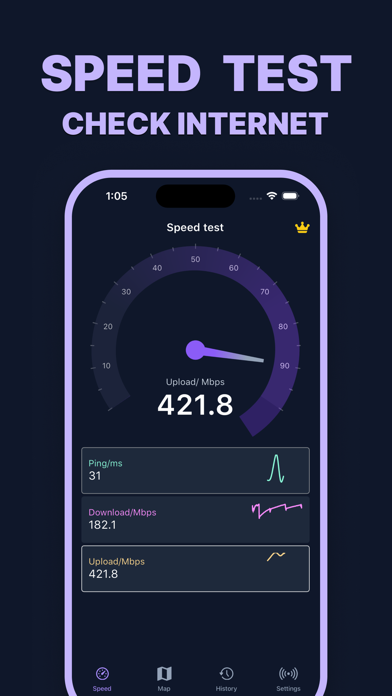
- Precise Speed Testing: Run advanced network diagnostics to measure exact download and upload speeds using a global server network.
- Offline Map Access: Download specific regional location data beforehand so you can find local hotspots without active cellular data.
- Real-Time Performance Graphs: Monitor network fluctuations and signal strength stability with live visual tracking tools.
- Crowdsourced Contributions: Add newly discovered hotspots or edit outdated network credentials directly inside the app interface.
Hands-On Impressions: Performance, Battery, and Thermals
Navigating the global map view feels exceptionally fluid on a ProMotion 120Hz display, rendering pins and address searches with zero noticeable stutter. Pinch-to-zoom gestures respond instantly, leveraging modern Apple Silicon efficiently during extensive route and location browsing sessions.
Running the built-in speed test tool puts minimal strain on system resources, maintaining stable thermal headroom without causing your iPhone to heat up. However, keeping GPS location services running continuously in the background will drain battery life faster than standard utility usage.
"Our goal with WiFi-Connect was to build an absolute lifeline for international travelers who refuse to pay extortionate roaming charges just to check their email abroad." — Yurii Kobets, Lead Developer
System Requirements and Requested Permissions
To run this beta build smoothly, your iPhone or iPad must be running iOS 15.0 or later. The app scales effortlessly across both compact handhelds and larger tablet screens, utilizing hardware acceleration for smooth map rendering.
Upon launching the beta, the application requests standard location permissions to identify nearby hotspots around your current physical coordinates. Apple's strict app sandboxing guarantees that your personal browsing history and custom saved location pins remain entirely private.
Pros and Cons: Beta Impressions
✓ The Highs (What We Love)
- Global Coverage: Extensive database spanning major cities in North America, Europe, and Asia.
- Offline Functionality: Ability to save locations and view maps without an active internet connection.
- Diagnostic Tools: Accurate speed testing and real-time network monitoring baked right into the interface.
✕ Beta Caveats (Room for Polish)
- Battery Drain: Continuous background GPS tracking noticeably impacts daily battery percentages.
- Crowdsourced Data: Occasional outdated passwords submitted by community users require manual verification.
- Beta Stability: Rare visual glitches can occur when switching rapidly between offline regional maps.

Current TestFlight Slot Situation and Availability
Apple enforces a strict cap of 10,000 external beta testers for any single TestFlight application project. Because international travel utilities generate immense interest among frequent flyers, beta slots fill up rapidly after public distribution.
If the current cohort reaches capacity, prospective testers may need to wait until the developer purges inactive accounts. Checking back on Codewing during off-peak hours offers the best chance to secure an open spot as slots periodically cycle through.
Step-by-Step TestFlight Installation Guide
Getting started with the pre-release version of WiFi-Connect takes only a few minutes if you follow these precise steps. Make sure your device is prepared before tapping the invitation link provided below.
- Install TestFlight: Download the official Apple TestFlight application directly from the iOS App Store if it is not already installed on your device.
- Access the Invite: Open your mobile browser and tap the official Codewing TestFlight invitation link for WiFi-Connect.
- Accept the Beta: Tap the "Start Testing" button on the TestFlight landing page to load the app profile into your client.
- Download the Build: Hit "Install" to download the beta package onto your iPhone or iPad running iOS 15 or later.
- Submit Feedback: Test the hotspot mapping features during your daily routine and report any connectivity bugs directly to Yurii Kobets via TestFlight.
Frequently Asked Questions
Is WiFi-Connect safe to install via TestFlight?
Yes, every beta build distributed through TestFlight undergoes Apple's automated security screening. The application operates securely within iOS sandbox parameters, protecting your device files and personal data.
What should I do if the WiFi-Connect beta is full?
If Apple's 10,000-tester limit is temporarily reached, bookmark this page on Codewing and check back periodically. Inactive users are regularly removed, which frees up fresh installation slots.
Will installing this beta overwrite my App Store version or delete save data?
TestFlight builds run as independent instances alongside or replacing your stable app versions depending on installation history. Saved offline places and local preferences generally migrate cleanly within the container.
How long do TestFlight beta invitations and builds last?
Every individual TestFlight build remains active for a maximum of 90 days from the upload date. Yurii Kobets will push regular updates through the app to ensure uninterrupted access and bug fixes.
Are in-app purchases free during TestFlight beta testing?
Yes, all subscription tiers and premium features inside TestFlight builds utilize Apple's simulated sandbox environment. You will never be charged real money while testing pre-release software features.
Final Editorial Verdict
WiFi-Connect solves a universal pain point for frequent travelers looking to bypass expensive cellular roaming charges abroad. While background battery consumption requires mindful management, the sheer volume of global hotspots makes it a valuable utility for any mobile toolkit.
Rating: 4.3 / 5
Developer Support & Official Resources
Stay updated on patch notes, maintenance windows, and feature roadmaps directly from the official developer channels.
Never miss an opening for WiFi-Connect.
Apple limits TestFlight betas to 10,000 testers, and this program is currently at capacity. CodeWings Plus continuously monitors slot availability 24/7 and sends you an instant alert the second a spot opens up.




