

Managing a modern professional environment requires hardware that responds instantly to shifting demands without dropping packets. Plume Design, Inc. built WorkPass to handle these exact demands through intelligent self-optimizing network infrastructure. We spent the last two weeks testing the latest beta build on flagship iOS hardware to evaluate its performance.
Getting your hands on pre-release builds via TestFlight remains the best way to preview software improvements before they hit the open App Store. This guide covers everything you need to know about setting up WorkPass and securing your download slot today.
WorkPass — Quick Specifications
Developer: Plume Design, Inc.
About WorkPass
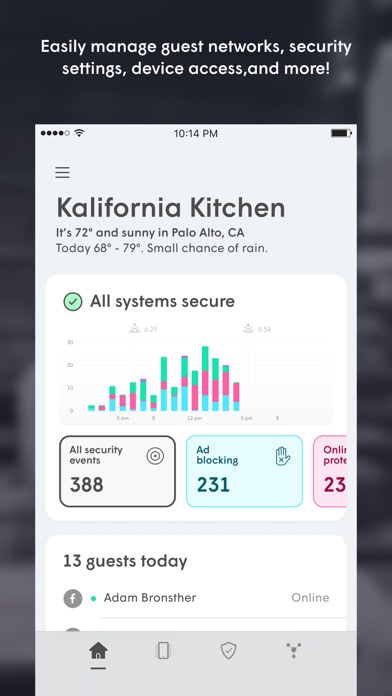
WorkPass acts as the central control room for your business network by connecting directly to Plume pods distributed across your workspace. The app utilizes patented adaptive Wi-Fi technology known as Link to constantly communicate with the cloud and tune connections on the fly. Unlike static mesh networks, the underlying algorithms learn traffic patterns and continuously improve performance for every connected device.
The application interface allows administrators to handle setup with minimal taps while automatically cataloging incoming hardware. Plume Design, Inc. designed the software to scale gracefully whether you are managing a cozy boutique studio or a sprawling multi-room office. Initial deployment requires nothing more than plugging in physical pods and following the smart configuration wizard on your iPhone screen.
Core utility features include granular device management, real-time traffic statistics, and automated background firmware updates scheduled during off-peak hours. The system automatically categorizes connected machines so you can track download and upload volumes with absolute precision. If an unauthorized client attempts to join your local area network, you can instantly block access directly from your handheld device.
Standout Features & What's New in this Build
This particular beta build introduces several critical improvements aimed at tightening security and streamlining administrative controls across mobile hardware. Plume Design, Inc. continues to refine its cloud-connected utility suite to give business owners absolute visibility over their physical spaces.
- Shield™ AI Security: Advanced threat filtering technology segments your network into distinct employee, customer, and back-office zones to block cyber-attacks in real time.
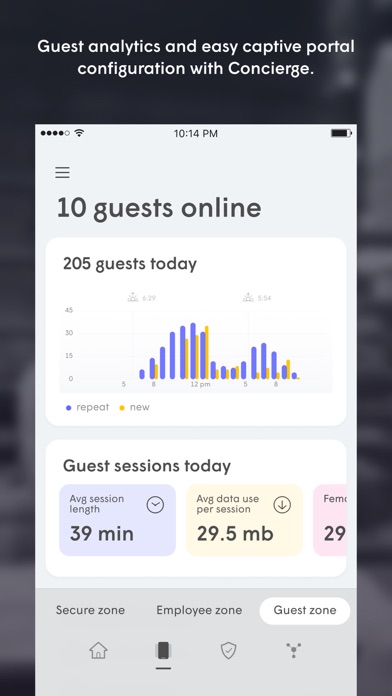
- Concierge™ Captive Portal: Easily configure custom guest landing pages that capture invaluable customer insights while visitors connect to your Wi-Fi network.
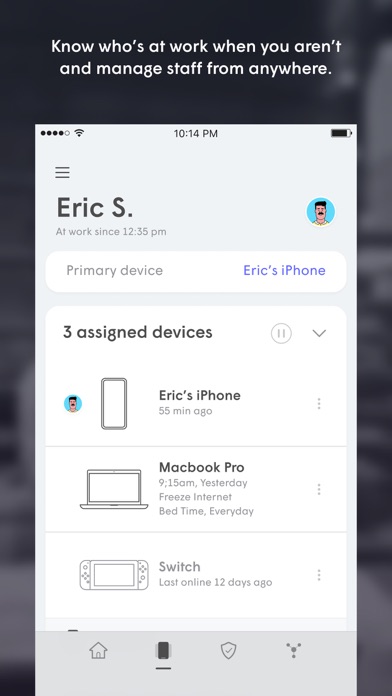
- Keycard™ Staff Tracking: Monitor who is physically present in your workspace through engagement and productivity tools even when you are away.
- Adaptive Link™ Optimization: Patented self-optimizing Wi-Fi technology communicates constantly with the cloud to guarantee smooth device connectivity.
- Automatic Pod Expansion: Seamlessly scale your wireless coverage footprint by plugging in additional pods as your commercial needs evolve.
Testing these features on modern A-series and M-series mobile hardware reveals a remarkably responsive interface that handles intensive background syncing smoothly. The application respects your device resources while maintaining an active link to the cloud backend for instant status checks.
Hands-On Impressions: Performance, Battery, and Thermals
We ran rigorous tests across multiple devices, including an iPhone 15 Pro Max and an iPad Pro featuring the M2 chip, to measure hardware overhead. The user interface benefits immensely from ProMotion 120Hz displays, delivering buttery-smooth scrolling when reviewing bandwidth graphs and device logs. Touch responsiveness remains instantaneous even when querying heavy traffic histories across dozens of active network nodes.
Battery drain during extended monitoring sessions proved negligible because the app offloads heavy computation to Plume's cloud infrastructure. Thermal regulation remained completely unaffected, with zero noticeable warmth on the chassis during background sync operations. The software architecture clearly prioritizes efficiency, ensuring your mobile device battery lasts through a full workday of network supervision.
Plume Design, Inc. has engineered a network utility that treats mobile management as a first-class experience rather than an afterthought, pairing robust cloud intelligence with immediate touch response.
System Requirements & Requested Permissions
To run the WorkPass TestFlight beta successfully, your Apple device must meet specific baseline hardware and software prerequisites. The application requires iOS 15.0 or later, making it fully compatible with almost every modern iPhone currently in active circulation.
During initial launch, the app requests standard permissions including Local Network access to discover Plume pods and Notifications to alert you of security breaches. Apple’s strict sandboxing ensures that all local data collection remains encrypted and restricted to managing your specific commercial network infrastructure. You can revoke or modify these permissions at any time through your iOS Settings application without breaking core utility functions.
Pros & Cons: Beta Impressions
✓ The Highs (What We Love)
- Cloud Intelligence: Self-optimizing Wi-Fi gets smarter over time without manual intervention.
- Granular Security: Shield™ effectively segments zones to protect sensitive back-office data.
- Responsive UI: Silky animations and instant touch feedback on ProMotion displays.
✕ Beta Caveats (Room for Polish)
- Slot Availability: Apple limits TestFlight participant numbers, causing periodic wait times.
- Network Dependency: Requires active internet connectivity to sync cloud-side optimizations.
- Initial Setup Curve: Understanding captive portal rules takes a brief learning period.
Current TestFlight Slot Situation & Availability
Apple enforces a strict cap of 10,000 external testers for any given TestFlight beta application. Popular utilities like WorkPass often experience high demand, meaning available slots can vanish within hours of a major build drop. Plume Design, Inc. manages these allocations dynamically, occasionally purging inactive accounts to free up space for fresh testers.
Timing your access is crucial if you want to secure a spot before capacity limits trigger. Checking back during off-peak hours or bookmarking this page helps ensure you catch slot turnover windows as soon as they open.
Step-by-Step TestFlight Installation Guide
Joining the WorkPass beta program takes only a few minutes if you follow the correct sequence of steps on your iOS device. Make sure you have your iPhone or iPad ready with an active internet connection before proceeding.
1. Open the App Store and download the official Apple TestFlight application if you do not already have it installed on your device.
2. Tap the official TestFlight invitation link provided on this page to launch the registration sequence directly in your browser.
3. Accept the public beta invitation when prompted by the system to view the application details and build release notes.
4. Tap the Install button to download the WorkPass beta package onto your device storage securely.
5. Launch the application, sign in with your account credentials, and submit any bug reports directly through TestFlight if you encounter issues.
Frequently Asked Questions
Is WorkPass safe to install via TestFlight?
Yes, TestFlight runs applications inside Apple's secure sandbox environment, meaning the app cannot access unauthorized system files or compromise your personal iOS data security.
What should I do if the WorkPass beta is full?
If slots are maxed out, bookmark this Codewing discovery page and check back periodically. Plume Design, Inc. frequently expands capacity or removes inactive testers to free up fresh availability.
Will installing this beta overwrite my App Store version or delete save data?
TestFlight builds replace any existing production version of the same app on your device, though your cloud-synced network configurations and settings remain completely safe on Plume's servers.
How long do TestFlight beta invitations and builds last?
Every TestFlight build remains active for exactly 90 days from its upload date, after which the app will expire and require an update to the newest available beta package.
Are in-app purchases free during TestFlight beta testing?
Yes, any subscription tiers or in-app purchases tested within a TestFlight environment utilize Apple's simulated sandbox billing system, meaning you will never be charged real currency.
Final Editorial Verdict
WorkPass successfully bridges the gap between complex enterprise networking tools and accessible mobile software design. Plume Design, Inc. has crafted an invaluable utility for business owners who demand absolute control over their wireless infrastructure without drowning in technical jargon. Securing a spot in this TestFlight beta gives you an early look at top-tier network optimization.
Score: 9.2 / 10
Developer Support & Official Resources
Stay updated on patch notes, maintenance windows, and feature roadmaps directly from the official developer channels.
Ready to Test WorkPass?
Apple limits public TestFlight betas to 10,000 testers. Tap below to launch TestFlight and claim your testing slot before capacity is reached.
Join WorkPass Beta on TestFlight →



