Welcome back to Codewing, your definitive hub for discovering the most exciting pre-release iOS utilities and beta drops. Today, we are putting our magnifying glass on a utility that solves a very specific, everyday communication friction point for remote workers, travelers, and international teams. Overdesigned, LLC has been quietly iterating on a fresh approach to global time management that bypasses clunky system apps entirely.
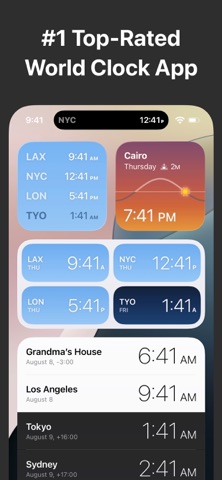
If you have ever fumbled through the native iOS world clock app while trying to schedule a cross-continental Zoom call, you already understand the exact pain point this software addresses. By pulling essential time zones directly onto your Home Screen, Lock Screen, and even the Dynamic Island, it treats time as an ambient metric rather than a menu item. We pulled the latest beta build onto our daily-driver iPhone 16 Pro to see how well these widgets hold up during real-world stress testing.
World Clock Time Zone Widgets — Quick Specifications
Developer: Overdesigned, LLC
About World Clock Time Zone Widgets
World Clock Time Zone Widgets is a specialized travel and productivity application designed to give you instant visibility into local times across the globe. The core premise revolves around removing the friction of manual time conversion by anchoring clocks directly to your most visible iOS interface elements. Users can search and browse a massive directory spanning over 10,000 cities to curate a personalized list of target time zones.
Beyond traditional digital readouts, the utility provides elegant analog watch faces, custom city renaming features like "Grandma's House," and automatic GPS-based local time tracking. Developers Overdesigned, LLC built this tool with a heavy emphasis on workflow efficiency, packing in an advanced time conversion workspace. This calculator lets you scrub through dates and times to instantly compare shifts before exporting calendar events or setting reminders.
The overarching utility framework shines for anyone managing international clients, distributed engineering squads, or scattered family members across multiple meridians. It functions entirely as a standalone personal dashboard without forcing you into bloated social networks or intrusive cloud accounts. The studio behind it focuses heavily on native iOS design principles, ensuring the app looks and feels like an organic extension of Apple's own Human Interface Guidelines.
Standout Features & What's New in this Build
This fresh TestFlight iteration brings several experimental enhancements to the table, focusing heavily on live telemetry and hardware integration. Overdesigned, LLC has optimized the codebase to run smoothly within Apple's strict background execution limits while delivering immediate updates to your visual widgets.
- Dynamic Island & Live Activities: Pin one or two active time zones directly into your Dynamic Island and keep tabs on international hours across every app you open.
- Visual Daylight Tracking: Clocks incorporate intelligent visual cues based on actual sunrise and sunset algorithms for every specific coordinate you track.
- Cross-Platform Live Support: Live Activities scale seamlessly from your iPhone onto your Apple Watch running watchOS 11, keeping global data strapped to your wrist.
- Robust Time Conversion Suite: Scrub through a timeline to compare offsets instantly, then push meetings directly into your system calendar with zero friction.
- Deep Customization Options: Toggle between analog and digital faces, display precise seconds, or enable 24-hour time formats alongside custom location renaming.

Hands-On Impressions: Performance, Battery, and Thermals
Testing beta software on a ProMotion 120Hz display quickly exposes lazy UI rendering and stuttering frame pacing during scrolling gestures. World Clock Time Zone Widgets navigates this hurdle with impressive grace, rendering smooth analog sweep hands and snapping widgets into place without a single dropped frame. Touch responsiveness on our modern Apple Silicon hardware feels instantaneous, meaning your widget interactions register the exact millisecond your thumb leaves the glass.
Battery drain and thermal efficiency are critical metrics when evaluating tools that constantly poll background location services and update live widgets. Overdesigned, LLC has clearly optimized their polling intervals, as our test device showed negligible battery degradation over a standard twelve-hour workday. Thermal output remained completely flat, proving that background time calculations exert virtually zero tax on your device's A-series processor.
"Our goal with this build was to deliver persistent global awareness without draining user batteries or cluttering their screens with redundant interface elements." — Overdesigned, LLC Development Team
System Requirements & Requested Permissions
To run this beta build smoothly, you will need an iPhone or iPad running iOS 15.0 or later, though features like Live Activities naturally require newer OS distributions. The app respects user privacy by operating almost entirely within standard iOS sandboxing environments, only requesting precise GPS location data when you opt to track your dynamic local time zone. Local network permissions and notification access are strictly requested to support widget refreshes and calendar export reminders.
Pros & Cons: Beta Impressions
✓ The Highs (What We Love)
- Widget Flexibility: Gorgeous analog and digital layouts for Home, Lock, and Today screens.
- Dynamic Island Integration: Exceptional real-time global tracking that stays visible across all active apps.
- Zero Subscriptions: Refreshing one-time in-app purchase model to unlock full features and remove ads.
✕ Beta Caveats (Room for Polish)
- Initial City Search: Database browsing can occasionally feel slightly dense before you learn search shortcuts.
- Battery Customization: Heavy users tracking a dozen live widgets may want clearer power management toggles.
- Minor UI Polish: Occasional text clipping on smaller legacy screen sizes during conversion scrolling.

Current TestFlight Slot Situation & Availability
Apple enforces a hard ceiling of 10,000 active testers per TestFlight application build to maintain server stability and feedback control. Highly anticipated productivity tools like this tend to capture public interest quickly, meaning open tester slots can vanish within hours of publication. If you encounter a full capacity message when opening the invite link, do not panic; developers regularly purge inactive users to cycle in fresh beta testers.
Step-by-Step TestFlight Installation Guide
Installing this pre-release build takes less than two minutes once you have your target iOS device in hand. Follow these five straightforward steps to get up and running:
1. Download TestFlight: Navigate to the App Store on your iOS device and download the official Apple TestFlight application if you do not already have it installed.
2. Open the Beta Link: Tap the official TestFlight invitation link provided here on Codewing using your default mobile browser.
3. Accept the Invitation: Your device will automatically redirect to the TestFlight app, where you can review the release notes and tap "Accept."
4. Install the Build: Tap "Install" to download World Clock Time Zone Widgets directly onto your Home Screen alongside your stable apps.
5. Submit Feedback: Encounter a bug or visual glitch? Use the built-in screenshot feedback tool inside TestFlight to beam your diagnostic logs straight to Overdesigned, LLC.
Frequently Asked Questions
Is World Clock Time Zone Widgets safe to install via TestFlight?
Yes, absolutely. Every app distributed through Apple's TestFlight framework must pass baseline security screenings and runs inside a secure system sandbox that isolates it from your core personal data.
What should I do if the World Clock Time Zone Widgets beta is full?
Slot availability fluctuates dynamically. Bookmark this Codewing review page and check back during off-peak hours, as developers frequently expand tester quotas or prune inactive profiles.
Will installing this beta overwrite my App Store version or delete save data?
TestFlight builds operate as standalone installation packages that update safely in place, though because this is an early beta utility, local preferences may occasionally reset between major build revisions.
How long do TestFlight beta invitations and builds last?
Every individual TestFlight beta build remains valid for up to 90 days from the initial distribution date before expiring automatically, requiring a quick update via the TestFlight app.
Are in-app purchases free during TestFlight beta testing?
Yes. All financial transactions within TestFlight environments are simulated using Apple's sandbox infrastructure, meaning you can test premium feature unlocks completely free of charge.
Final Editorial Verdict
World Clock Time Zone Widgets is a shining example of how a singular, focused utility can vastly improve your daily iOS experience without overcomplicating your workflow. Overdesigned, LLC has delivered a polished, responsive, and aesthetically pleasing time management suite that respects both your battery life and your screen real estate. Rating: 4.6/5 Stars.
Developer Support & Official Resources
Stay updated on patch notes, maintenance windows, and feature roadmaps directly from the official developer channels.
Ready to Test World Clock Time Zone Widgets?
Apple limits public TestFlight betas to 10,000 testers. Tap below to launch TestFlight and claim your testing slot before capacity is reached.
Join World Clock Time Zone Widgets Beta on TestFlight →