


Welcome to our hands-on review and installation guide for the official XPENG iOS application. As automotive software moves firmly into the mobile ecosystem, companion apps have become the central nervous system for modern electric vehicles.
We loaded up this TestFlight build on our daily-driver iPhone 15 Pro Max to see how Guangzhou Xiaopeng Motors Technology Co., Ltd. handles vehicle telemetry, remote controls, and community features. Let us walk you through everything you need to know about the current build.
XPENG — Quick Specifications
Developer: Guangzhou Xiaopeng Motors Technology Co., Ltd.
About XPENG
Developed by Guangzhou Xiaopeng Motors Technology Co., Ltd., the XPENG app serves as an essential utility for both prospective buyers and current electric vehicle owners. The utility acts as a direct bridge between your smartphone and the automaker's expanding ecosystem of road vehicles and future mobility solutions.
Users can explore the company's full vehicle lineup, configure custom specifications, and initiate vehicle purchases directly from their iPhones. For existing owners, the software transforms into a comprehensive remote control suite capable of managing in-car functions, scheduling service appointments, and tracking vehicle status in real-time.
Beyond vehicle management, the platform includes dedicated community spaces where drivers can register for official events and engage with other tech-forward motorists. The utility also bundles comprehensive after-sales support channels, putting customer service and instant troubleshooting guides right at your fingertips.
Standout Features & What's New in this Build
This particular TestFlight build introduces several refinements to the user interface, aiming to streamline vehicle telemetry access and reduce navigation friction. The development team has clearly focused on making hardware interactions snappier while expanding remote diagnostic capabilities for modern smartphone displays.
- Explorer Portfolio: Browse detailed specifications, design variations, and pricing structures for the entire XPENG vehicle lineup.
- Remote Vehicle Control: Execute critical commands such as climate pre-conditioning, door locking, and charging status monitoring instantly.
- After-Sales Support: Access streamlined maintenance scheduling, warranty information, and an integrated FAQ knowledge base.
- Community Events: Register for exclusive brand gatherings, test-drive opportunities, and software preview webinars directly from the app.
- Personalized Account Management: Tailor system configurations, notification preferences, and vehicle profile settings to match your driving habits.
The overall feature set reflects an ambition to move beyond basic key fob replacement into a holistic lifestyle portal. Early builds emphasize speed and visual clarity, ensuring drivers can check their battery percentage or unlock doors without waiting for sluggish server responses.
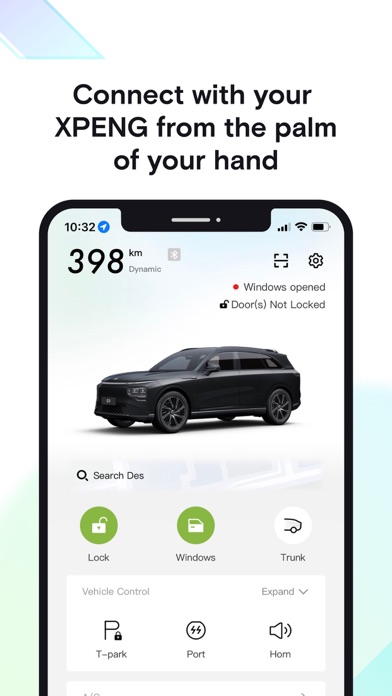
Hands-On Impressions: Performance, Battery, and Thermals
Running this pre-release build on our Apple A17 Pro device revealed remarkably smooth animations and snappy touch responses, leveraging the 120Hz ProMotion display effectively. Menu transitions glide without stutter, and map renderings for nearby service centers load with minimal latency over 5G connections.
Thermal management is entirely unbothered during standard use, as utility apps generally demand far less graphical overhead than high-end 3D mobile games. Battery drain remains negligible during background standby, though active vehicle tracking and constant telemetry polling will naturally consume a modest fraction of your daily power budget.
"Our mobility solutions are designed to make life easier by embracing in-house full-stack innovative engineering across both hardware and software."
— Guangzhou Xiaopeng Motors Technology Co., Ltd. Development Team
While minor UI alignment quirks occasionally surface on specific dynamic island layouts, the build stability has proven solid for daily vehicle management tasks. Crashes are rare, and the application handles intermittent cellular drops gracefully without requiring forced restarts.
System Requirements & Requested Permissions
To run this beta build smoothly, your Apple device must be running iOS 15.0 or later, though optimal performance is naturally achieved on recent Apple Silicon hardware. The app requires minimal storage space for installation, making it effortless to download even on devices with tight capacity constraints.
Upon launch, the software requests standard permissions including Location Services for nearby service mapping, Local Network access for vehicle pairing, and Push Notifications for charging alerts. Apple's rigorous sandboxing ensures these permissions remain strictly controlled within your device security parameters.
Pros & Cons: Beta Impressions
✓ The Highs (What We Love)
- Responsive UI: Smooth 120Hz scrolling and rapid menu transitions on modern iPhones.
- Comprehensive Control: Excellent integration for remote vehicle management and scheduling.
- Clean Layout: Well-organized tabs separating vehicle exploration from ownership tools.
✕ Beta Caveats (Room for Polish)
- Localization Quirks: Occasional untranslated strings or regional formatting variations in early builds.
- Server Dependency: Features relying on vehicle telemetry require stable cellular connectivity.
- Slot Limitations: TestFlight beta spots fill up rapidly during major update pushes.

Current TestFlight Slot Situation & Availability
Apple enforces a strict cap of 10,000 external testers per TestFlight application, which frequently creates bottlenecks for popular automotive utilities. When Guangzhou Xiaopeng Motors Technology Co., Ltd. pushes major pre-release builds, slots can evaporate within a matter of hours.
If you tap the invitation link and encounter a message stating the beta is full, do not panic. Developers periodically prune inactive testers who haven't installed recent builds, meaning fresh slots frequently open up during off-peak hours.
Step-by-Step TestFlight Installation Guide
Installing this beta application on your iPhone takes less than two minutes if you follow these simple instructions carefully. Make sure you have an active internet connection and your device updated to the necessary firmware version.
- Download TestFlight: Open the App Store on your iOS device and download the official Apple TestFlight application if you haven't already.
- Tap the Invitation Link: Click on the official Codewing TestFlight join link provided on this page using your iPhone's default Safari browser.
- Accept the Beta Invitation: Safari will automatically redirect you into the TestFlight app, where you can review the build details and tap "Accept".
- Install the Software: Tap "Install" to download the XPENG beta package onto your device home screen just like a regular app store release.
- Submit Feedback: If you encounter bugs or telemetry delays, use TestFlight's built-in screenshot feedback tool to report issues directly to the developers.
Frequently Asked Questions
Is XPENG safe to install via TestFlight?
Yes, TestFlight is Apple's official beta-testing environment. Every application submitted undergoes automated security checks and developer verification, ensuring your device remains fully protected by iOS sandboxing.
What should I do if the XPENG beta is full?
If the 10,000-tester capacity has been reached, bookmark this Codewing page and check back periodically. Inactive tester slots are regularly reclaimed and recycled by the development team.
Will installing this beta overwrite my App Store version or delete save data?
TestFlight builds typically update or replace existing development packages seamlessly. Your account configurations and profile data are tied to your cloud login rather than local device storage.
How long do TestFlight beta invitations and builds last?
Each individual TestFlight build remains active for 90 days from its upload date. Developers routinely push newer builds before expiration to ensure continuous testing cycles.
Are in-app purchases free during TestFlight beta testing?
Yes, any configuration deposits or simulated transactions processed inside a TestFlight build utilize Apple's sandbox environment, meaning no real financial charges will ever occur.
Final Editorial Verdict
The XPENG TestFlight beta demonstrates a polished, responsive approach to modern electric vehicle companion software. While minor localization hurdles and server-dependent loading times remain, the core utility delivers exceptional convenience for both enthusiasts and owners alike.
Developer Support & Official Resources
Stay updated on patch notes, maintenance windows, and feature roadmaps directly from the official developer channels.
Never miss an opening for XPENG.
Apple limits TestFlight betas to 10,000 testers, and this program is currently at capacity. CodeWings Plus continuously monitors slot availability 24/7 and sends you an instant alert the second a spot opens up.




