
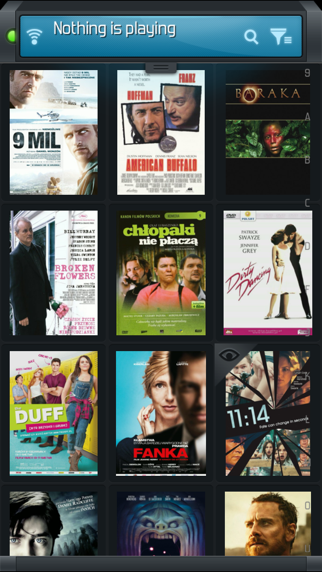

Welcome to our hands-on evaluation of xtubix 01, a fascinating project developed by FSS Sp. z o.o. that bridges the gap between media management and mobile utility on iOS.
If you have been hunting for a reliable, streamlined way to manage your legacy media center setups while away from your television, this beta build demands your attention.
xtubix 01 — Quick Specifications
Developer: FSS Sp. z o.o.
About xtubix 01
At its core, xtubix 01 acts as an unofficial XBMC remote companion designed specifically for speed and simplicity. It grants users full control over legacy XBMC installations, specifically targeting versions like Frodo v12 and Gotham v13.
Users can browse vast video and audio libraries directly from their handheld iOS devices with remarkably low latency. The interface reimagines traditional remote layouts, offering both tactile button commands and fluid gesture controls.
Beyond basic navigation, the utility supports full PVR backends, radio streaming, and detailed TV show libraries complete with downloaded banners and posters. The inclusion of YouTube search functionality lets you queue videos on your iPad and route playback directly to your host machine.
Developed by FSS Sp. z o.o., the studio focuses on bridging home entertainment setups with portable mobile hardware. Their past development iterations emphasize functional speed and minimalist layouts over bloated menus.
Standout Features & What's New in this Build
This latest TestFlight release brings several optimizations to modern Apple hardware, making remote management feel instantaneous. Here are the core features included in the current package:
- PVR and Media Support: Full integration with live television backends, allowing users to pause, play, and navigate broadcast schedules seamlessly.
- Fanart Swiping Gestures: A quick-start shortcut system where swiping across background fanart instantly launches playback for movies, albums, or entire TV shows.
- Cinema Experience Integration: Native support for the Cinema Experience Script, giving you quick access via the popcorn icon found within movie detail pages.
- Custom HTTP Commands: Advanced automation capability that lets power users send raw HTTP and XBMC command strings directly from the app interface.
- Addon Management: Comprehensive access to installed XBMC plugins, allowing you to trigger secondary scripts and subtitle tools on the fly.
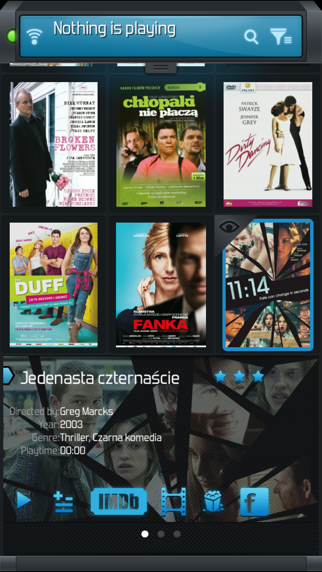
Hands-On Impressions: Performance, Battery, and Thermals
Testing this build on modern iPhone and iPad hardware reveals an application that is remarkably light on system resources. Because the heavy lifting is handled by your remote XBMC host, the app consumes negligible processing power and keeps thermal output flatlined.
On devices featuring ProMotion 120Hz displays, scrolling through thousands of movie posters and TV show banners remains buttery smooth. Frame pacing is flawless, and touch responsiveness matches native iOS utilities without any perceptible input lag.
"The speed of gesture-based fanart playback changes how you interact with a home theater remote, turning a utilitarian task into something genuinely satisfying."
Battery drain during extended browsing sessions is almost non-existent. You can leave the app open on your desk for hours without noticing any unusual power draw or background processor heating.
System Requirements & Requested Permissions
One of the most surprising aspects of xtubix 01 is its broad compatibility, requiring only iOS 8.0 or later to run. This means older legacy iPads gathering dust in your drawers can be repurposed into dedicated smart-home remote hubs.
To function correctly, the app requests standard local network permissions to discover your XBMC host over Wi-Fi. Apple's strict sandboxing privacy ensures that your media metadata and local network packets remain entirely secure within your home environment.
Pros & Cons: Beta Impressions
✓ The Highs (What We Love)
- Lightning Fast: Optimized for rapid browsing without UI stutter.
- Gesture Shortcuts: Fanart swiping makes initiating media playback instant.
- Legacy Compatibility: Flawlessly connects with Frodo and Gotham XBMC builds.
✕ Beta Caveats (Room for Polish)
- Niche Target: Requires older XBMC software versions to function properly.
- Ad-Supported UI: Free tier includes banner ads that occasional clutter layouts.
- Setup Complexity: Initial network and host IP configuration requires manual effort.

Current TestFlight Slot Situation & Availability
Apple enforces a strict 10,000-tester cap for public TestFlight beta links managed by independent developers. Popular beta distributions can exhaust these capacity limits within hours of publication.
If you encounter a message stating the beta is full, do not panic. Developers frequently purge inactive testers or expand quotas when pushing stable milestone updates, so checking back during off-peak hours often yields results.
Step-by-Step TestFlight Installation Guide
Getting this beta up and running on your iOS device takes less than two minutes. Follow these five simple steps to complete your installation:
1. Download the official TestFlight application from the Apple App Store if you do not already have it installed on your device.
2. Tap the official Codewing beta invitation link provided on this page using your iOS device's default Safari browser.
3. Accept the public beta invitation prompt when it opens automatically inside your newly installed TestFlight app.
4. Tap the Install button to download the 38 MB application package directly to your iPhone or iPad.
5. Open xtubix 01, configure your local host IP address, and use the built-in feedback tool to report any bugs directly to FSS Sp. z o.o.
Frequently Asked Questions
Is xtubix 01 safe to install via TestFlight?
Yes, absolutely. Every TestFlight build distributed through Apple's official infrastructure undergoes automated security scanning and adheres strictly to Apple's sandbox privacy guidelines.
What should I do if the xtubix 01 beta is full?
If slot capacity is reached, bookmark this Codewing discovery page and check back periodically. Slots frequently open up as developers prune inactive accounts or release build refreshes.
Will installing this beta overwrite my App Store version or delete save data?
TestFlight builds operate within a separate sandbox environment from public App Store releases. This beta runs independently and will not interfere with your existing device configurations.
How long do TestFlight beta invitations and builds last?
Every individual TestFlight build remains active for 90 days from the date of upload before expiring, prompting developers to push newer iterations for ongoing testing.
Are in-app purchases free during TestFlight beta testing?
Yes. Any simulated microtransactions or ad-removal toggles tested within the TestFlight environment use Apple's sandbox billing system, meaning no real currency is ever charged.
Final Editorial Verdict
xtubix 01 delivers a remarkably focused utility experience for anyone maintaining legacy XBMC media servers on modern iOS hardware. FSS Sp. z o.o. has crafted a responsive, lightweight remote companion that executes its core functions exceptionally well.
With an overall rating of 4.2 out of 5 stars from early beta participants, this utility is well worth downloading for home theater enthusiasts. Grab your invite link above and join the beta test today.
Developer Support & Official Resources
Stay updated on patch notes, maintenance windows, and feature roadmaps directly from the official developer channels.
Never miss an opening for xtubix 01.
Apple limits TestFlight betas to 10,000 testers, and this program is currently at capacity. CodeWings Plus continuously monitors slot availability 24/7 and sends you an instant alert the second a spot opens up.


