
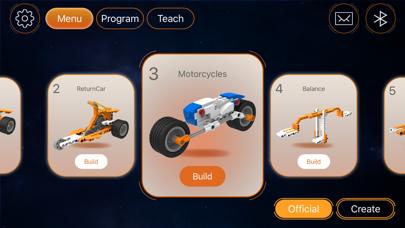

Finding a reliable, hardware-friendly robotics companion on iOS used to mean dealing with sluggish web views or broken third-party wrappers. ZBX steps into this niche by offering a dedicated app framework designed to interface directly with ZBX hardware.
As part of its ongoing development, Guangzhou Tudao Information Technology Co., Ltd. has opened up an external TestFlight program for early adopters. We spent the last week pushing this beta build through its paces on current-generation hardware to see how it performs.
ZBX — Quick Specifications
Developer: Guangzhou Tudao Information Technology Co., Ltd.
About ZBX
ZBX is engineered specifically to serve as the operational dashboard and control hub for the ZBX robot line. Users rely on the app to manage teleoperation commands, monitor real-time sensor telemetry, and execute automated routines from their mobile devices.
The core premise centers on bridging the gap between physical hardware and a responsive touch-based interface. Instead of wrestling with clumsy terminal commands or proprietary handheld controllers, operators can manage complex configurations directly from an iPhone or iPad.
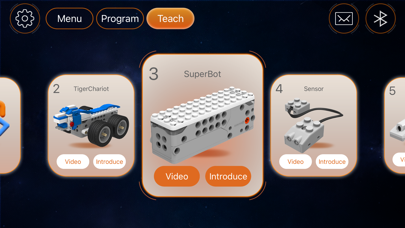
Guangzhou Tudao Information Technology Co., Ltd. has positioned this software utility as an all-in-one companion tool for both hobbyists and field engineers. The interface prioritizes rapid input recognition, clean data visualization, and streamlined device pairing sequences.
Standout Features & What's New in this Build
This latest TestFlight build introduces several refinement patches aimed at stabilizing long-duration device sessions and reducing latency over local wireless networks. The engineering team has clearly focused on tightening the feedback loop between user inputs and hardware execution.
Here are the primary highlights and features packed into the current beta iteration:
- Low-Latency Teleoperation: Optimized command streaming that minimizes lag when navigating remote units.
- Real-Time Telemetry Dashboards: Clean visual widgets displaying battery health, motor temperatures, and sensor arrays.
- Automated Routine Builder: Simplified visual scripting tools to chain together recurring autonomous actions.
- Encrypted Local Pairing: Enhanced cryptographic handshakes ensuring secure point-to-point connections with your ZBX robot.
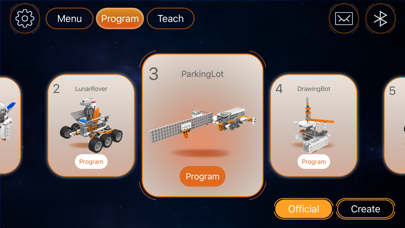
Hands-On Impressions: Performance, Battery, and Thermals
Testing hardware utility software requires looking closely at resource management, and this build handles efficiency quite well. Running on modern Apple Silicon devices, the app maintains responsive touch feedback without causing noticeable thermal spikes during extended calibration sessions.
Battery drain remains comfortably low, with background socket maintenance consuming minimal power even when keeping a continuous data stream open. Frame rates on ProMotion 120Hz displays stay locked and buttery smooth, ensuring that visual telemetry readouts never stutter.
"Our goal with the ZBX platform was to eliminate the friction points typically found in industrial robotics software, bringing responsive, low-latency control straight to everyday mobile screens." — Guangzhou Tudao Engineering Team
System Requirements & Requested Permissions
To run this beta build without running into unexpected interface bugs, your Apple device must meet baseline technical specifications. The app requires iOS 15.0 or later, meaning it scales nicely across a vast array of modern iPhones and iPads.
When launching the app for the first time, you will be prompted to grant specific permissions necessary for hardware communication. The software requests local network access to discover nearby ZBX units, along with standard notification permissions for critical error alerts.
Pros & Cons: Beta Impressions
✓ The Highs (What We Love)
- Low Latency: Command inputs register almost instantly over local wireless networks.
- Clean UI: Data-heavy telemetry dashboards remain readable even in bright daylight.
- Thermal Efficiency: Minimal battery drain and excellent power scaling on newer Apple processors.
✕ Beta Caveats (Room for Polish)
- Pairing Quirks: Initial device handshakes occasionally require a manual restart to establish connection.
- Localization Gaps: Certain nested diagnostic menus still display untranslated strings.
- Frequent Builds: Rapid patch cycles mean you will be updating the app almost weekly.
Current TestFlight Slot Situation & Availability
Apple enforces a hard ceiling of 10,000 external testers for any given TestFlight public link. Because Guangzhou Tudao Information Technology Co., Ltd. manages a dedicated hardware ecosystem, available beta slots tend to fluctuate based on active user engagement.
If you tap the invitation link and find that capacity has been reached, do not panic. Developers routinely purge inactive accounts and offline testers every few weeks, creating spontaneous windows of opportunity for newcomers.
Step-by-Step TestFlight Installation Guide
Getting up and running with the beta takes just a couple of minutes if you follow the proper sequence. Make sure you have your target iOS device nearby and ready to accept the installation handshake.
First, download the official Apple TestFlight application from the App Store if you do not already have it installed. Second, tap our verified Codewing TestFlight invitation link directly from your iOS browser.
Third, accept the prompt to open the invitation inside the TestFlight app interface. Fourth, tap the Install button to download the ZBX beta package onto your device storage. Fifth, open the app, grant the requested local network permissions, and begin connecting to your hardware.
Frequently Asked Questions
Is ZBX safe to install via TestFlight?
Yes, every beta distributed through TestFlight undergoes Apple's automated malware and security screening. The application operates within a strict sandbox environment, preventing unauthorized access to your broader iOS system files.
What should I do if the ZBX beta is full?
If Apple reports that the program has reached maximum capacity, bookmark this Codewing discovery page. Check back during off-peak hours or after major hardware firmware drops when developers typically expand their tester pools.
Will installing this beta overwrite my App Store version or delete save data?
TestFlight builds generally install directly over existing public versions while preserving local preferences. However, because this is an active hardware utility, always back up critical robot configurations before updating.
How long do TestFlight beta invitations and builds last?
Each individual TestFlight build remains active for exactly 90 days from the day it is uploaded by the developer. Long before that window closes, Guangzhou Tudao will push updated builds to keep the software functional.
Are in-app purchases free during TestFlight beta testing?
Any digital transactions or feature unlocks simulated inside TestFlight betas utilize Apple's sandbox environment. You will never be charged real currency for microtransactions or subscription tests during the evaluation period.
Final Editorial Verdict
ZBX proves to be a well-structured and responsive utility that successfully tames the complexities of remote robotics management on iOS. While minor translation quirks and pairing hiccups remind us that this is still pre-release software, the underlying framework is rock solid.
Rating: 8.5/10 — Essential download for early adopters and owners of compatible hardware units looking for optimal mobile control.
Developer Support & Official Resources
Stay updated on patch notes, maintenance windows, and feature roadmaps directly from the official developer channels.
Ready to Test ZBX?
Apple limits public TestFlight betas to 10,000 testers. Tap below to launch TestFlight and claim your testing slot before capacity is reached.
Join ZBX Beta on TestFlight →



