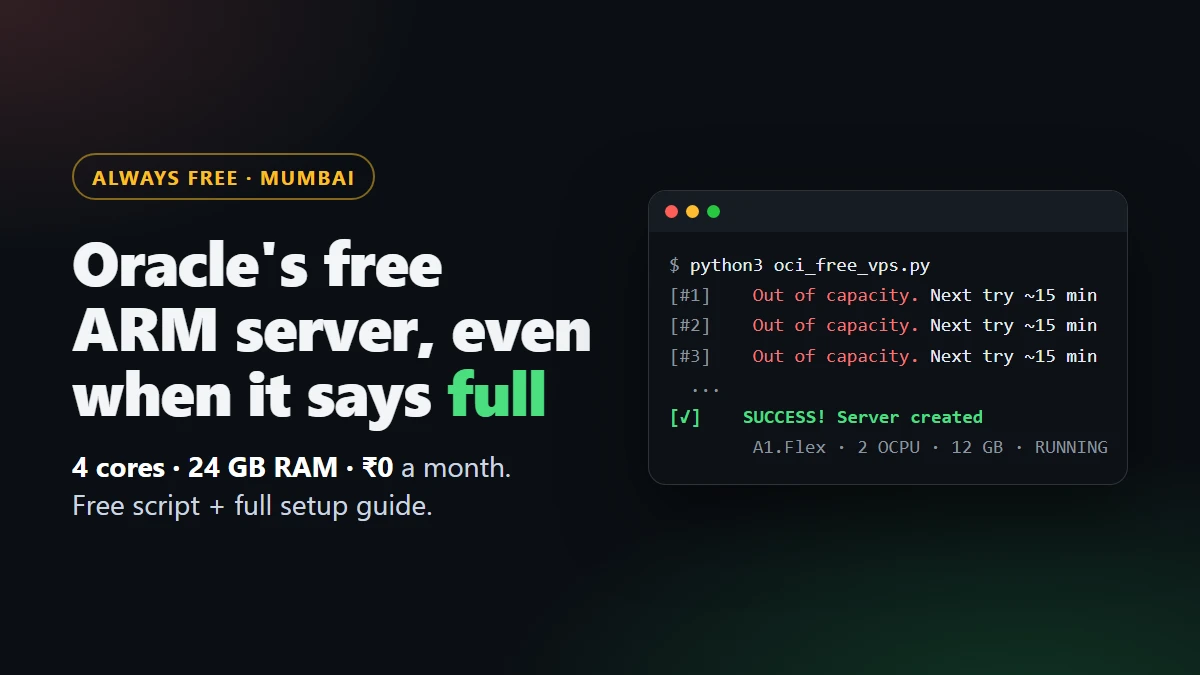
Oracle Cloud gives every account an ARM server with up to 4 cores and 24 GB of RAM, free every month. In Mumbai the console almost always answers "Out of capacity". I got two of these servers anyway (2 cores and 12 GB each) with a small Python script that keeps asking Oracle, politely, until a spot opens. This guide explains why Mumbai says it is full, gives you the script to download, and walks through the whole setup, from making your own Oracle API key to the moment the server is yours.
The short version
- Have an Oracle Cloud account with India West (Mumbai) as its home region.
- Create a network once with the VCN wizard ("Create VCN with Internet Connectivity").
- Create your own API key in the console and save the config file it shows.
- Install Python and the Oracle SDK (
pip install oci), then download the script. - Run
python3 oci_free_vps.py --ocpus 2 --memory 12and leave it running, ideally on Oracle's free small server so your laptop can be off.
Download the script
One Python file, about 550 lines, free to use and change. It contains no keys and nothing from my account: it only reads the API key you create in step 3.
Download oci_free_vps.pyOr from a terminal: curl -O https://www.codewing.app/downloads/oci_free_vps.py
SHA-256: 8791c9d21613d2128f85d9b1a0436419e9a8e9e18ae9d81857ba5760958a0b21
If you came from my reel: this is the full guide I promised in the comments, and the script from part 2.
In this guide
- What Oracle gives you for free
- Why Mumbai always says "Out of capacity"
- What the script does (and what it never does)
- Set it up, step by step (steps 1 to 6)
- The trick: run it on Oracle's free small server, not your laptop
- All the options
- Three rules to keep your free server
- After you get it: log in, open ports, delete your API key
- Should you upgrade to Pay As You Go?
- Troubleshooting
- Frequently asked questions
What Oracle gives you for free
Oracle's Always Free tier is not a trial: it stays free as long as you use it. The part everyone wants is the ARM compute:
| What | Free amount |
|---|---|
Ampere A1 ARM servers (shape VM.Standard.A1.Flex) | 4 OCPUs and 24 GB RAM in total, every month (3,000 OCPU hours and 18,000 GB hours). One OCPU on A1 is one full core. |
Small AMD servers (VM.Standard.E2.1.Micro) | 2 servers, each 1/8 OCPU and 1 GB RAM |
| Disk (block volumes, boot disks included) | 200 GB in total |
| Outbound data | 10 TB a month |
You can split the ARM limit however you like: one server with 4 cores and 24 GB, two with 2 cores and 12 GB each (what I did), or four small ones. That is a real server: CodeWing, the site you are reading, runs on one of these ARM servers in Mumbai.
One catch first: Always Free servers can only be made in your account's home region, the region you picked when you signed up, and it cannot be changed later. If your home region is Mumbai (ap-mumbai-1), Mumbai is where you have to win.
Why Mumbai always says "Out of capacity"
Try to create the server in the console and you get this, day after day:
API Error: Out of capacity for shape VM.Standard.A1.Flex in availability domain AD-1.Mumbai has only one availability domain (AD-1), and thousands of people want the same free ARM servers, so the free pool is full almost all the time. But it is not full forever. Think of a train waiting list: every time someone deletes their server, or Oracle takes back an idle one, a spot opens for a short while, and whoever asks at that moment gets it. In the console you would have to click Create at exactly the right minute. The script simply asks for you, again and again, until it is the one asking at the right moment.
My first server came through at 12:47 am, after the script had been told "no" over a thousand times; the second came the next night at 1:28 am. It can take hours or several days; there is no fixed schedule, and nobody can promise a time.
What the script does (and what it never does)
It uses Oracle's official Python SDK, the same API the console uses, and asks for exactly the server you would ask for by hand. Four things make it safe to leave running for days:
- It asks every 13 to 17 minutes by default, never faster than once a minute. Ask faster and Oracle answers "Too many requests". If it ever gets that answer, it waits (10 minutes, or as long as Oracle asks) before trying again.
- It never goes over the free limit. Before it starts, it adds up the ARM servers you already have and refuses to ask for more than 4 cores and 24 GB in total.
- It never makes a second server by mistake. Before every try it checks whether a server with the same name already exists, and each try carries a one-time retry token, so a dropped connection cannot create a duplicate.
- It tells you what the problem is. "Out of capacity" is normal and it keeps going. A wrong key, a full quota or a missing network is your setup, so it stops and says what to fix instead of retrying forever.
It also finds your public network by itself, picks the latest Ubuntu image for ARM, uses your own SSH key (or makes one if you have none), and writes everything to a log file, oci_vps_hunter.log, next to the script.
What it never does: it does not get around any Oracle limit, it does not touch servers you already have, and it sends nothing anywhere except to Oracle's own API with your own key.
Set it up, step by step
You need an Oracle Cloud account, a computer with Python 3.9 or newer (Windows, macOS or Linux), and about 15 minutes.
Step 1: An Oracle Cloud account with Mumbai as home region
Sign up at oracle.com/cloud/free and choose India West (Mumbai) as the home region (or India South, Hyderabad; this guide works the same there, only the region name changes). Oracle asks for a card to check you are a real person; an Always Free account is not charged. Already have an account? Check your home region at the top right of the console and go to step 2.
Step 2: Create a network once (the VCN wizard)
Your server needs a network with internet access. If you have never created a server before, you probably do not have one yet:
- In the console menu open Networking › Virtual cloud networks.
- Choose Actions › Start VCN Wizard (or the "Start VCN Wizard" button), then Create VCN with Internet Connectivity.
- Give it a name, keep the defaults, and create it.
That makes a public subnet with a route to the internet. The script finds it by itself; you do not need to copy any IDs.
Step 3: Create your own API key
The script talks to Oracle with an API key that you create in your own account. Nobody else's key works for you, and you should never use or share someone else's:
- Click your profile icon at the top right and open My profile (in older consoles: User settings).
- Under Resources (or Tokens and keys), open API keys and click Add API key.
- Keep Generate API key pair, click Download private key (a
.pemfile), then Add. - Oracle now shows a Configuration file preview. Copy it.
Now save it as the config file. Make a folder called .oci in your home folder, move the downloaded .pem into it, rename it oci_api_key.pem, and create a file named config (no extension) next to it with the text you copied. The last line, key_file, must point to your .pem:
[DEFAULT]
user=ocid1.user.oc1..<your user id>
fingerprint=<your key's fingerprint>
tenancy=ocid1.tenancy.oc1..<your tenancy id>
region=ap-mumbai-1
key_file=~/.oci/oci_api_key.pem- Where:
~/.oci/configon macOS and Linux,C:\Users\<you>\.oci\configon Windows. On Windows write the full path inkey_file, for examplekey_file=C:\Users\<you>\.oci\oci_api_key.pem. - On macOS and Linux, lock the key file:
chmod 600 ~/.oci/oci_api_key.pem.
Step 4: Install Python and the Oracle SDK
Check you have Python 3: python3 --version (on Windows: python --version; if it is missing, install it from python.org and tick "Add python.exe to PATH"). Then make a folder for the project with its own virtual environment, so nothing clashes with other Python packages:
macOS / Linux
mkdir -p ~/oci_hunter && cd ~/oci_hunter
python3 -m venv venv
source venv/bin/activate
pip install oci
Windows (PowerShell)
mkdir $HOME\oci_hunter; cd $HOME\oci_hunter
python -m venv venv
.\venv\Scripts\Activate.ps1
pip install oci
On Ubuntu 24.04, pip install outside a virtual environment fails with "externally-managed-environment": that is why the steps use venv. If python3 -m venv itself fails, run sudo apt install -y python3-venv first. If PowerShell refuses to run Activate.ps1, run Set-ExecutionPolicy -Scope CurrentUser RemoteSigned once.
Step 5: Download the script and run it
Put oci_free_vps.py in the oci_hunter folder (or run curl -O https://www.codewing.app/downloads/oci_free_vps.py there). It is plain Python; open it and read it before you run it, as you should with any script that uses your cloud account. Then, with the virtual environment still active:
# one server with 2 cores and 12 GB (what I did, twice)
python3 oci_free_vps.py --ocpus 2 --memory 12 --name oracle-arm-1

# or the whole free limit in one server
python3 oci_free_vps.py --ocpus 4 --memory 24 --name oracle-arm-1
On Windows type python instead of python3. A smaller server usually comes through sooner, because a free spot only has to fit what you ask for. For a second server, run the script again with another name (--name oracle-arm-2) after the first one is created; it will not let the two go over 4 cores and 24 GB together.
Step 6: Check it is working
The first lines confirm your setup, then it settles into its loop. It looks like this (an example: your names and times will differ):
[2026-11-08 00:05:11] Using OCI Config: /home/ubuntu/.oci/config
[2026-11-08 00:05:11] Region: ap-mumbai-1
[2026-11-08 00:05:12] Current ARM A1 Usage: 0.0/4.0 OCPUs, 0.0/24.0 GB RAM
[2026-11-08 00:05:12] Availability Domain : xxxx:AP-MUMBAI-1-AD-1
[2026-11-08 00:05:13] Found public subnet 'public subnet-vcn' in VCN 'vcn'
[2026-11-08 00:05:13] Verified Public Subnet: 'public subnet-vcn'
[2026-11-08 00:05:14] Selected OS Image: Canonical-Ubuntu-24.04-aarch64-...
[2026-11-08 00:05:14] Using SSH public key from: /home/ubuntu/.ssh/authorized_keys
[2026-11-08 00:05:14] Entering safe capacity monitoring loop...
[2026-11-08 00:05:15] [Attempt #1] Polling capacity for VM.Standard.A1.Flex in xxxx:AP-MUMBAI-1-AD-1...
[2026-11-08 00:05:16] Host capacity currently exhausted in xxxx:AP-MUMBAI-1-AD-1. (Normal for Always Free A1)
--> Next availability check in 14.2 mins (at 00:19:28)...
"Host capacity currently exhausted" is the normal answer. Leave it alone. When a spot opens you get this, with your new server's public IP and the SSH command:
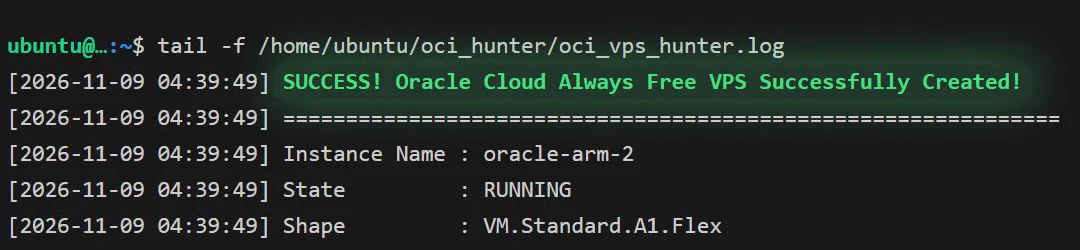
The script stops by itself once the server exists. Stop it earlier any time with Ctrl+C; running it again is safe.
The trick: run it on Oracle's free small server, not your laptop
The script has to keep running, maybe for days. On a laptop that means it stops every time the lid closes. The fix: every account also gets two free small AMD servers (VM.Standard.E2.1.Micro), and those are usually easy to create even in Mumbai. Make one, run the script there, and close your laptop.
- In the console: Compute › Instances › Create instance. Click Change shape, choose Specialty and previous generation › VM.Standard.E2.1.Micro (marked Always Free eligible), keep Ubuntu, pick your network from step 2, and save the SSH key it offers (or paste your own public key). Create it.
- Log in to it:
ssh -i <your-private-key> ubuntu@<micro-server-ip> - On the small server, set up the project as in step 4 (the Linux steps), and download the script into
~/oci_hunter. - Copy your config and key to it, from your computer (
mkdir -p ~/.ocion the server first):
Then on the server:scp -i <your-private-key> ~/.oci/config ~/.oci/oci_api_key.pem ubuntu@<micro-server-ip>:~/.oci/chmod 600 ~/.oci/oci_api_key.pem. If your config has a Windows path inkey_file, change it tokey_file=~/.oci/oci_api_key.pemthere. - Start it in
tmux, so it keeps running after you disconnect:
Press Ctrl+B, then D to leave it running. Come back any time withsudo apt install -y tmux tmux new -s oracle cd ~/oci_hunter && source venv/bin/activate python3 oci_free_vps.py --ocpus 2 --memory 12 --name oracle-arm-1tmux attach -t oracle, or just read the log:tail -f ~/oci_hunter/oci_vps_hunter.log
A bonus: on the small server the script finds the SSH key you already use to log in to it (~/.ssh/authorized_keys), so your new ARM server accepts the same key. Laptop off, script on.
All the options
| Option | What it does |
|---|---|
--ocpus | Cores for the new server. All your ARM servers together: 4 at most. Default: 1. |
--memory | RAM in GB. All your ARM servers together: 24 at most. Default: 6. |
--name | The server's name. The script will not make a second server with the same name. Default: oracle-arm-1. |
--boot-size | Boot disk in GB (47 at least). Keep all your disks within the free 200 GB. Default: 50. |
--interval | Seconds between tries (15 minutes). The lowest allowed is 60. Default: 900. |
--jitter | Random seconds added or removed each time, so the tries do not land on a fixed clock. Default: 120. |
--ssh-key | The SSH public key the server will accept: the key text itself, or the path to a .pub file. With none, the script makes oci_instance_key.pem for you. Default: your ~/.ssh key. |
--config | Where your OCI config file is. Default: ~/.oci/config. |
--subnet-id | Use a specific subnet instead of the first public one. Default: found automatically. |
--image-id | Use a specific OS image. Default: latest Ubuntu. |
--max-attempts | Stop after this many tries. Default: 0 (no limit). |
In part 1 of the reel I said "never ask faster than once a minute": that is the floor, built into the script. Going from 15 minutes down to 1 (--interval 60) asks more often; it also means many more requests, so do not run several copies at once.
Three rules to keep your free server
- Do not ask faster than once a minute. Oracle limits how often an account can call its API. The script enforces this; do not edit it out.
- Do not leave the server idle. Oracle can take back Always Free servers that sit idle: if over 7 days the CPU (95th percentile), network and memory use are all under 20%, the server can be reclaimed (memory counts for A1 servers). Run your real project on it: a website, a bot, a database, your side project. Upgrading to Pay As You Go removes this rule (see below).
- 4 cores and 24 GB is the whole free limit. All your ARM servers together. More than that is not free. The script will not ask for more, and neither should you in the console.
After you get it: log in, open ports, delete your API key
Log in with the command from the log: ssh -i <your-private-key> ubuntu@<new-server-ip>. The user is ubuntu. If the script made a key for you, it is oci_instance_key.pem in the script's folder (on Linux and macOS, chmod 600 it first).
Open ports for a website (80 and 443). Oracle blocks them in two places, and you need both:
- In the console: your VCN › your public subnet › its security list › Add ingress rules: source
0.0.0.0/0, TCP, destination ports80,443. - On the server, Oracle's Ubuntu image has its own firewall rules:
sudo iptables -I INPUT 6 -m state --state NEW -p tcp --dport 80 -j ACCEPT
sudo iptables -I INPUT 6 -m state --state NEW -p tcp --dport 443 -j ACCEPT
sudo netfilter-persistent save
Clean up your API key. Once you have your servers, the script has done its job. Delete the API key in the console (My profile › API keys › Delete), and delete the config and .pem from the small server: rm ~/.oci/config ~/.oci/oci_api_key.pem. Make a new key the next time you need one.
Should you upgrade to Pay As You Go?
In the console's billing section you can upgrade your account to Pay As You Go. Your Always Free servers stay free; you are only billed for what goes beyond the free limits.
- For: idle servers are no longer reclaimed, and many people find ARM capacity much easier to get after upgrading (not guaranteed).
- Against: anything outside the free limits now costs real money: a bigger server, more than 200 GB of disk, a paid service you click by mistake. Oracle checks your card and may hold a small amount to verify it.
- If you upgrade: set a budget alert at once (Billing › Budgets, a small amount such as ₹100) so any charge emails you. The script's free-limit check keeps the ARM servers it makes inside 4 cores and 24 GB.
You do not need it to get a server: both of mine came on a plain Always Free account with the script.
Troubleshooting
- "Could not find your OCI config file". The file must be
~/.oci/config(no.txtat the end; Windows hides extensions, so check), or pass--config <path>. - "FATAL AUTH ERROR" / NotAuthenticated (401). The fingerprint, user, tenancy or
key_fileline does not match the key in the console, or the.pempath is wrong. Copy the configuration preview again (My profile › API keys › ⋮ › View configuration file). A computer clock that is several minutes off also causes this: turn on automatic time. - "No public subnet found". Do step 2 (the VCN wizard), then run the script again.
- "RESOURCE LIMIT ERROR". Your existing ARM servers plus the new one would go over 4 cores or 24 GB. Ask for less (
--ocpus,--memory) or delete a server you do not use. - "FATAL QUOTA ERROR" / LimitExceeded. An account limit is reached, often the 200 GB of disk (boot disks of deleted servers can linger under Storage › Boot volumes). See Governance › Limits, Quotas and Usage.
- "HTTP 429 Rate limit detected". Too many requests from your account. The script waits it out by itself; make sure you are not running several copies or a second tool at the same time.
- "externally-managed-environment" on pip install. Use the virtual environment from step 4.
- "python3 is not recognized" on Windows. Use
pythonorpy. - It has run for days with no luck. That happens in Mumbai. Keep it running on the small server, try a smaller size (2 cores and 12 GB, or 1 core and 6 GB), or consider Pay As You Go.
Frequently asked questions
Is the Oracle ARM server really free?
Yes. Always Free includes Ampere A1 servers up to 4 OCPUs and 24 GB of RAM in total, 200 GB of disk and 10 TB of outbound data a month, for as long as you use them. On a plain Always Free account Oracle does not charge you; on Pay As You Go you pay only for what goes beyond those limits.
Is using a script like this allowed?
The script uses Oracle's official Python SDK and the same API as the console, asks for one free server inside the free limits, and waits at least a minute between tries (15 minutes by default). It does not get around any limit. Read Oracle's terms for your account; Oracle can change how capacity is handed out at any time.
Why does Oracle say "Out of capacity" in Mumbai?
Mumbai has a single availability domain and far more people want free ARM servers than there is free capacity, so the pool is full most of the time. Spots open when someone deletes a server or Oracle reclaims an idle one, and the first request at that moment gets it.
How long does it take?
There is no fixed time. My two came on two nights in a row, at 12:47 am and 1:28 am. It can be a few hours or several days.
Can I move my account to another region to get capacity?
No. Always Free servers can only be created in your home region, which you choose at sign-up and cannot change.
Do I need to keep my laptop on?
Not if you run the script on Oracle's free small AMD server (VM.Standard.E2.1.Micro), as described above. It keeps running when your laptop is off.
Can someone else give me their API key or config?
No, and you should never share yours. An API key controls one Oracle account, so it only creates servers in that account. Create your own in My profile › API keys (step 3), and delete it when you are done.
What is an OCPU?
Oracle's unit of CPU. On the Ampere A1 ARM servers, one OCPU is one full physical core, so the free limit is 4 real cores.
The same idea, waiting politely for a full spot to open, is what CodeWing does for full TestFlight betas: it checks them every few minutes and tells you when a slot opens.