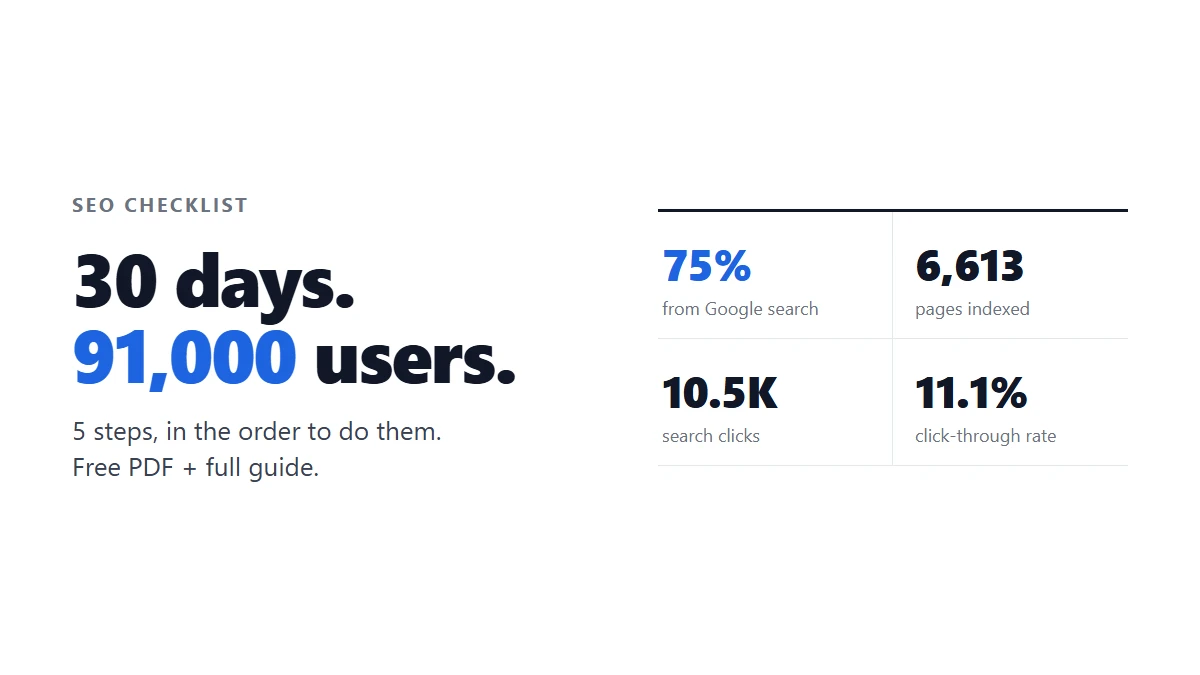
In 30 days CodeWing, the site you are reading, had 91,000 users, and 75% of them came from Google search. No ads, no paid traffic. It came from five things, done in the right order. This is the full checklist from my reel: what to do for each step, how to check it worked, and what it did on my own site, with the real numbers.
All numbers are from my site's Google Analytics 4 and Google Search Console, 30 days in October and November 2026.
Get the checklist as a PDF
The same 5 steps on 8 printable pages, in Hinglish, with a box to tick for each one. Free.
Download the SEO checklist (PDF)If you came from my reel: this is the full checklist I promised in the comments.
In this guide
- Do it in this order
- No. 5: Search Console and a sitemap, from day one
- No. 4: Titles with the words people search
- No. 3: One page for every search
- No. 2: Pages that open in about a second
- No. 1: Organic search, every week
- Bonus: 6 mistakes that hide pages from Google
- Frequently asked questions
Do it in this order
In the reel, No. 1 was the most powerful. But it only works once the other four are in place, so start from No. 5:
| Step | What it means |
|---|---|
| No. 5 Search Console + sitemap | From day one, tell Google where your pages are. |
| No. 4 Titles | Put the words people search into your titles. |
| No. 3 One page per search | One template, and a page for every search. |
| No. 2 Speed | Pages open in about one second. |
| No. 1 Organic search | Every week, see what people search and grow the site from that. |
No. 5: Search Console and a sitemap, from day one
Result on my site: 18,771 pages in the sitemap, status Success.
Without a sitemap, Google finds your pages on its own, one link at a time. A sitemap hands it the full list, and Search Console tells you what Google found and what it did with it.
How to do it
- Open search.google.com/search-console, choose Add property, pick Domain, and verify it with the TXT record it gives you in your DNS. A domain property covers every subdomain and both http and https.
- Make a sitemap. In Next.js (App Router):
// app/sitemap.ts import type { MetadataRoute } from "next"; export default async function sitemap(): Promise<MetadataRoute.Sitemap> { const pages = await getAllPages(); // from your database return pages.map((p) => ({ url: `https://your-site.com/${p.slug}`, lastModified: p.updatedAt, })); } - One sitemap holds at most 50,000 URLs. With more pages, make a sitemap index (in Next.js,
generateSitemaps). - Add this line to
robots.txt:Sitemap: https://your-site.com/sitemap.xml - In Search Console, open Sitemaps and submit your sitemap's URL.
From my site: CodeWing has a page for every TestFlight beta it tracks, so the sitemap is split into several files under one index. A sitemap should only list pages worth indexing: I recently took out duplicate listings (two pages for the same TestFlight link) and dead pages, so Google spends its time on the pages that matter.
No. 4: Titles with the words people search
Result on my site: an average click-through rate of 11.1%: 11 of every 100 people who saw CodeWing in Google clicked.
People decide from the title in the search results. When the title has the words they typed, they click.
How to do it
- Search Console → Performance → Queries. These are the words people really use, not your guesses.
- Put those words at the start of the title:
People search Title pg for students in pune PG for students in Pune: rent, area and contact how to make a next.js sitemap How to make a Next.js sitemap (App Router, step by step) mlbb beta test MLBB Beta Test TestFlight: Full, Get Slot Alerts - Keep the title to about 60 characters. Google cuts longer ones.
- Give every page its own title and meta description. Pages with the same title confuse Google.
// app/[slug]/page.tsx: every page gets its own title
export async function generateMetadata({ params }) {
  const { slug } = await params;
  const page = await getPage(slug);
  return { title: page.title, description: page.description };
}
From my site: the third row above is a real CodeWing title. For "mlbb beta test" the page sits at position 2 to 3 in Google. The title starts with the exact words, then says the one thing a searcher wants to know (is it full right now?) and what to do about it.
No. 3: One page for every search
Result on my site: 6,613 pages indexed and 10.5K clicks from Google Search.
A homepage can only show up for a few searches. When every search has its own page, Google has an answer to show for each of them.
How to do it
- Find the searches in your topic that repeat in a pattern: [thing] + [detail]. For example "[app name] beta", "PG in [city]", "[error message] fix". For ideas, look at Google's autocomplete and "People also ask".
- Build one template, and make a page from each row of your data. This is called programmatic SEO.
- Every page gets its own URL, its own title (No. 4) and an entry in the sitemap (No. 5).
- Every page needs real, useful data. Pages that only swap a name into the same text break Google's spam policy ("scaled content abuse").
- Link pages to each other: related pages and category pages. Google finds new pages faster that way.
Indexing doesn't happen all at once; it comes in steps. If not every page is indexed in the first week, don't panic.
From my site: every TestFlight beta has a page built from one template, filled with live data: whether the beta is open or full right now, when it last opened, how often it opens, similar betas you can join instead. That data is the reason the pages rank. I learned the other side the hard way: a few thousand auto-written review posts, the same text with a different app name, got almost no visitors, so I took them down. Real data per page works; rewording does not.
No. 2: Pages that open in about a second
Result on my site: pages load their main content in about 1 second; Core Web Vitals: Passed.
On a slow page people press back. Google also looks at page experience (Core Web Vitals).
| Metric | What it measures | Google's "good" |
|---|---|---|
| LCP | How long until the main content shows | 2.5 s or less |
| INP | How fast the page reacts after a tap or click | 200 ms or less |
| CLS | How much the page jumps while it loads | 0.1 or less |
How to do it
- Build pages ahead of time: static generation or ISR in Next.js, served from a CDN. Don't build the page from the database on every request.
- Images:
next/image, or WebP / AVIF. Give every image a width and height so the page doesn't jump. Give the main image at the toppriority; lazy-load the ones below. - Ship less JavaScript: drop heavy libraries and third-party scripts you don't need (the chat widget, the third tracker).
- Fonts: use
next/font, orfont-display: swapin CSS.
From my site: beta pages are pre-built and refreshed in the background, so on phones the main content shows in about 0.9 seconds for half of all visits. The slowest pages I have are long blog posts with big images, which is exactly where to look first on your own site too.
No. 1: Organic search, every week
Result on my site: 75% of users came from organic search.
A reel runs for a few days. A page that ranks on Google brings people every day, and it costs nothing. So grow it every week.
The weekly routine
- GA4 → Reports → Acquisition → User acquisition. The "Organic Search" row is your real number.
- Search Console → Performance → turn on the Average position tile. In Queries, find the ones at position 8 to 20: they are close to page 1.
- Make those pages better: the title (No. 4), the content and the speed (No. 2).
- For searches you have no page for, make one (No. 3).
- Keep the pages that bring clicks fresh, and update
lastModifiedin the sitemap (No. 5).
From my site: a real one from my list: "discord testflight" was shown 918 times in a month at position 8.4, and got 4 clicks. That page is close to page 1 and its title doesn't match the search, so it is next on my list. Finding rows like that every week is the whole routine.
Bonus: 6 mistakes that hide pages from Google
If something isn't getting indexed, check these first:
Disallow: /left inrobots.txt, for example copied over from a staging site. The whole site is blocked.noindexleft on:<meta name="robots" content="noindex">, or in Next.jsrobots: { index: false }.- One page with many URLs (
?ref=, with and without a trailing slash, http and https). Set a canonical URL: in Next.jsalternates: { canonical: "/slug" }. - Content that is only built in the browser with JavaScript. Google can render JavaScript, but HTML built on the server (SSR / SSG) is more reliable and faster.
- Redirects, 404s or
noindexpages in the sitemap. Only list real URLs that should be indexed. - The same title and description on every page. See No. 4.
Frequently asked questions
How long does it take Google to index a new site?
There is no fixed time. With a submitted sitemap, the first pages usually show up within days, and a large site is indexed in steps over weeks. Watch Search Console → Pages: what matters is that "Indexed" keeps going up.
Is programmatic SEO spam?
Not when every page has real, useful data that differs from page to page. Google's spam policy targets "scaled content abuse": many pages made only to rank, with the same text and a different name. If a page wouldn't help someone who landed on it, don't publish it.
Do I need a sitemap for a small site?
Google can find a small, well-linked site without one, but a sitemap costs five minutes and shows you in Search Console exactly what was found. Make one anyway.
What is a good click-through rate?
It depends on your position and the kind of search, so compare your own pages with each other. A page with many impressions and a much lower rate than your others usually needs a title that matches the search better.
Does this work with the Next.js Pages Router too?
Yes. The code above is App Router; in the Pages Router a sitemap is an API route or a page that returns XML, and titles go in next/head. CodeWing itself runs on the Pages Router. The steps don't change.
More practical guides like this on Instagram: @buildbya.ditya. The checklist is free; if a friend has a site, send it to them. And if you test iPhone betas: CodeWing tells you the moment a full TestFlight beta opens.